

Conductor
Conductor · Coding
Conductor is a Mac app that runs Claude Code, Codex, Cursor and OpenCode agents side by side in isolated git workspaces, then helps you review, merge and clean up each result.
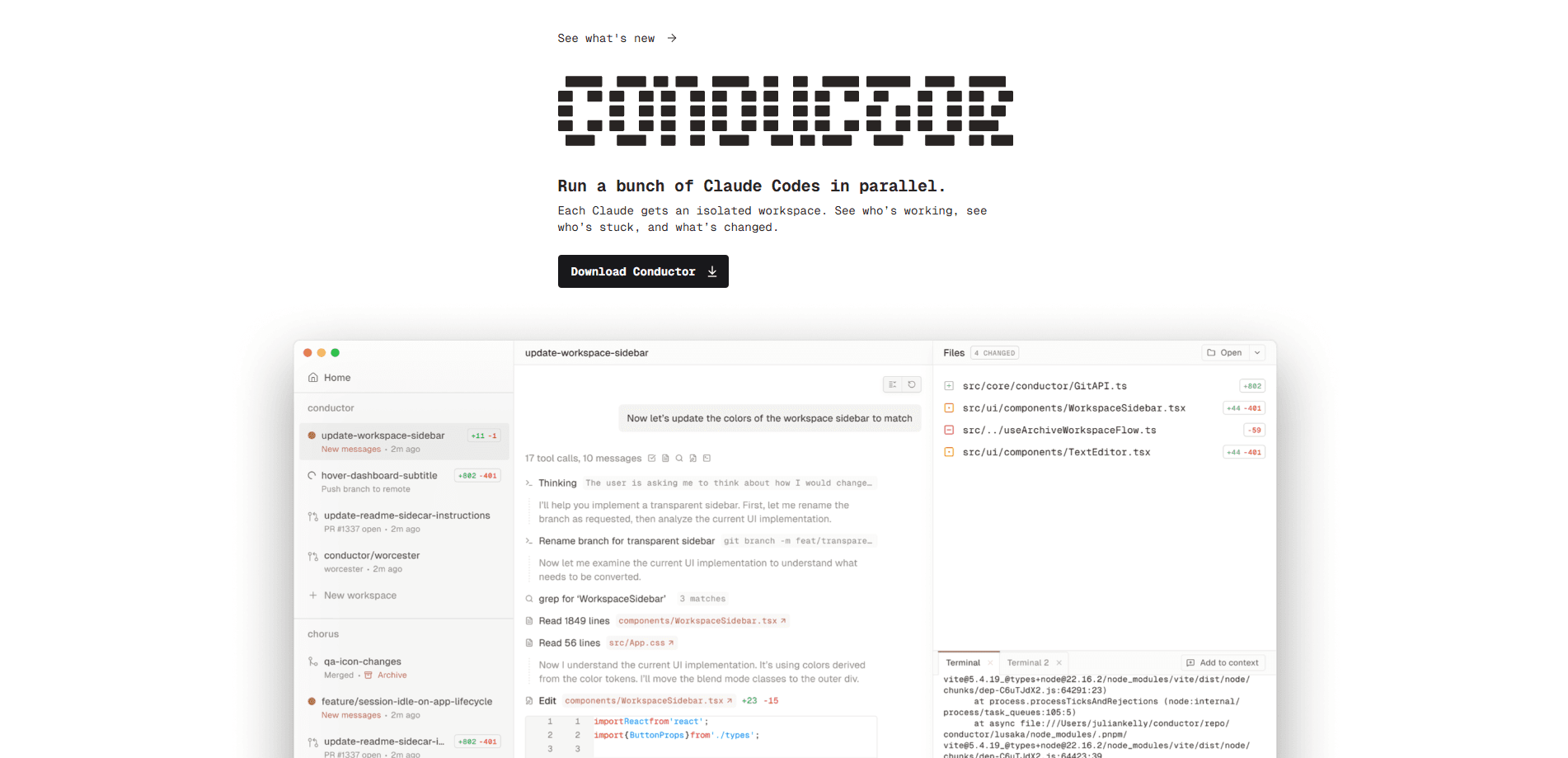
About Conductor
What Is Conductor
Conductor is a desktop app that lets you run several coding agents at the same time instead of waiting on one chat to finish. Each task gets its own workspace: a separate, git-backed copy of your project with its own branch, files, terminal and running environment. You point an agent at a workspace, watch it work, then review the diff before anything lands in your main code.
The problem it targets is familiar to anyone juggling agent sessions. One agent edits files while you're mid-thought on another task, branches collide, and you lose track of which change came from where. Conductor borrows git worktrees to keep each stream of work physically separate, so an agent working on a bug fix can't touch the files an agent is using for a new feature. When a branch is done, you review it, open a pull request and merge on your own schedule.
The limits matter too. Conductor is Mac-only, it runs on your machine with your user permissions, and the free plan keeps everything local. Cloud workspaces, the API and the mobile app sit behind the Pro tier, and cloud sessions store your chat data on Conductor's servers rather than on your device.
Getting Started
- Download Conductor for Mac and add a project from a local folder, a GitHub repo or a quick start
- Create a new workspace and let Conductor branch off your base branch, with its own working tree and environment
- Start a Claude Code, Codex, Cursor or OpenCode session in that workspace and describe the task in plain language
- Review the changes in the diff viewer, run the app and tests, then open a pull request and merge when it looks right
- Archive the workspace so your sidebar stays focused, and restore it later from the History pane if you need it
Product Information
A quick look at Conductor's pricing, supported platforms, and performance.
Best for
The users, tasks, and scenarios where this tool fits best.
Users
- Solo developers
- Professional developers
- Small teams
- Larger organizations
Tasks
- Parallel feature work
- Bug fixes that ship alone
- Multi-agent review
- Issue fanout
- Risky experiments
Scenarios
- A developer shipping several features at once
- Reviewing agent output before merge
- Working off the laptop
- A team collaborating on one branch
- Keeping a long project organized
Key features
Isolated Git-Backed Workspaces
Every task in Conductor gets its own workspace, a separate git-backed copy of your project built with git worktrees. That workspace carries its own branch, files, terminal and running environment, so an agent can edit code and run commands without colliding with your main checkout or with agents working elsewhere. Isolation here is about keeping work separate, not locking it down: agents still run on your Mac with your user permissions.
Parallel Claude Code, Codex, Cursor and OpenCode Sessions
Conductor runs the coding agents you already use, side by side. You can start a Claude Code session in one workspace and a Codex session in another, or run them together in one workspace when the work shares a branch. Cursor sessions support Composer 2.5 and OpenCode uses the models from your configured providers. If an agent can't start, the app points you to the harness settings that need attention.
Diff Viewer and Review Flow
The diff viewer shows what changed in a workspace before it becomes a pull request. You can read changed files, spot accidental edits, and leave inline comments that go straight back to the agent that made the change. GitHub review comments show up in the same place, and the Checks tab collects git status, CI, deployments, comments and todos so you have one last pass before merging.
Pull Request, Merge and Archive
Conductor wraps the common GitHub steps in the app UI. It helps draft the pull request, respond to review comments and fix failing checks, then follows Actions and status checks on the branch. When the PR is approved and the checks are green, you merge. Finished workspaces archive so the sidebar stays focused, and you can restore one later, chat history included, from the History pane.
Plan Mode, Fast Mode and Reasoning Controls
Before an agent edits anything, Plan Mode has it lay out an approach you can approve or send back, which suits refactors, migrations and multi-file changes where the boundary isn't clear yet. Fast Mode trades caution for speed on narrow edits and quick follow-ups. Some models expose thinking and reasoning controls for heavier work like architecture and debugging, so you can dial effort up or down per session.
Conductor Cloud, API and Mobile App
The Pro plan adds Conductor Cloud, which runs a workspace in a Vercel sandbox in the us-east-1 region so agent work continues even after you close the app. Each sandbox has an 8-core CPU and 16GB of RAM with Node.js 24, Python 3, git and GitHub CLI preinstalled. The Conductor API lets you create workspaces and send prompts over HTTP, and routines run a saved prompt whenever a webhook fires. The iOS app rounds it out for checking progress away from the desk.
Pros and cons
Pros
- Isolated git worktrees keep parallel agents from editing the same files, which removes most branch collisions
- Runs Claude Code, Codex, Cursor and OpenCode in one app, so you don't switch tools per agent
- The free plan covers parallel local agents with your own subscriptions and keys
- Cloud workspaces keep running after you close the app, and the Pro API lets you drive them over HTTP
- Holding a SOC 2 Type II attestation gives teams a security signal before adopting it
Cons
- Mac only, so there's no Windows or Linux desktop version to fall back on
- Cloud workspaces store your chat data on Conductor's servers, which is a privacy change from the local model
- Cloud workspaces, the API and the mobile app all sit behind the Pro tier, raising the cost for anyone who wants them
- Isolation is a development convenience, not a security boundary, since agents still run with your user permissions
Frequently asked questions
Conductor is a Mac app for running coding agents in parallel. It gives Claude Code, Codex, Cursor and OpenCode each their own isolated git workspace, with a branch, files and terminal, then helps you review the diff, open a pull request, merge and archive the result.
Related content
Explore related tools, skills, and articles for Conductor.
Conductor Alternatives

Base Code
Base44 (Wix) · Coding · ProductivityBase Code is a shared cloud development environment from Base44. Teammates describe changes to an existing GitHub codebase in chat, preview them live and send them back as pull requests.

Google EmbeddingGemma 2
Google DeepMind · Writing · Image · CodingGoogle EmbeddingGemma 2 is a 740M-parameter open model that turns text, code, images, audio, and video frames into vectors in one 768-dimension space, running on phones and laptops.

GitGlow
GitGlow · Coding · ProductivityGitGlow is a local-first desktop Git client that lets independent developers review their own code and their AI agents' changes in one place before shipping.