

ContentStudio: Social Manager
ContentStudio · Marketing
ContentStudio is an AI social media management platform for agencies, brands, and teams that plan, schedule, publish, and analyze posts across a dozen social networks from one dashboard.
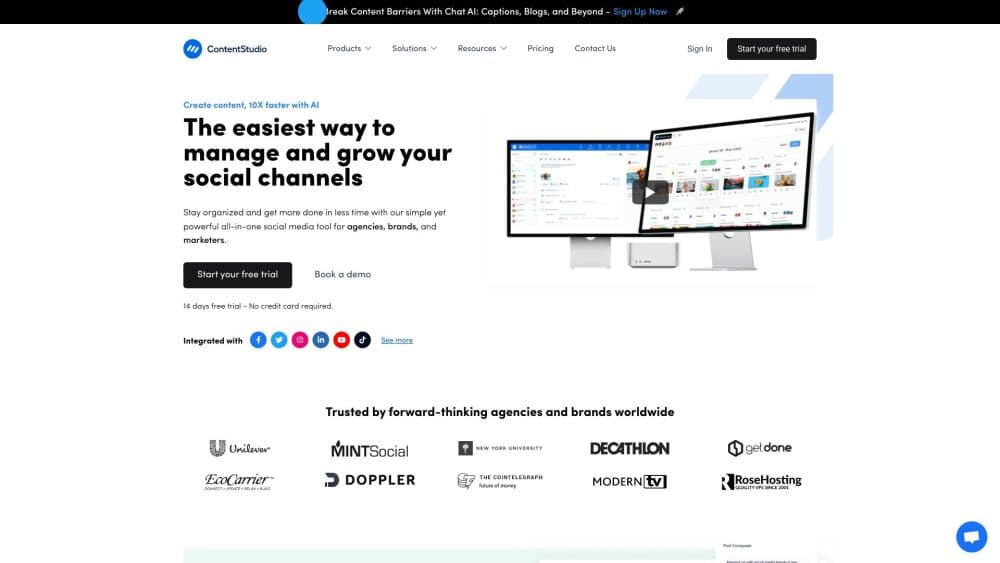
About ContentStudio: Social Manager
What Is ContentStudio
ContentStudio is a social media management platform that handles the work most teams split across several apps. You plan a content calendar, generate captions and images with AI, schedule posts to every connected network, reply to comments from a shared inbox, and pull performance reports. ContentStudio runs one workspace, talks to 12 networks, and includes social listening and client management on higher plans.
The problem it solves is the tool sprawl that hits any team running more than a couple of accounts. Scheduling lives in one tab, the AI writing tool in another, analytics in a third, and comments somewhere a person has to remember to check. ContentStudio folds those into one place built around a calendar and a publishing queue, so the work moves in a straight line instead of a loop between apps.
The tradeoff is that this is a platform, not a specialist. Its AI writing is good enough for captions and hashtags but isn't going to replace a dedicated long-form assistant, and several features people expect, like the social inbox and competitor analytics, sit on the paid Advanced plan rather than the entry tier. Solo creators on the cheapest plan get publishing and AI generation, not engagement or benchmarking.
Getting Started
- Sign up for an account at contentstudio.io and start the 7 day free trial, which needs no credit card.
- Connect your social accounts under workspace settings, then check the plan limit, since every profile or page counts as one account against your cap.
- Open the planner, pick a date, and draft a post in the composer with a live preview of how it will look on each network.
- Use AI Studio to write captions and generate images or video, then attach them to the post and schedule it.
- Watch performance in Analyze, and use the social inbox on paid plans to reply to comments and messages as they come in.
Product Information
A quick look at ContentStudio: Social Manager's pricing, supported platforms, and performance.
Best for
The users, tasks, and scenarios where this tool fits best.
Users
- Agencies managing many clients
- Growing marketing teams
- Solo creators and freelancers
Tasks
- Building a content calendar for multiple networks
- Generating captions and visuals with AI
- Replying to comments and DMs from one inbox
- Reporting on performance
Scenarios
- A small agency onboarding a new client
- A brand running the same campaign across several networks
- A team recycling evergreen content
Key features
AI Studio for Text, Image, and Video
AI Studio generates captions, hashtags, and post ideas, creates images, and turns prompts into short videos, all inside the composer. It routes to a set of image and video models, so you get credits for each type rather than a single bucket. For a team that pays separately for a writing tool and an image generator, this replaces both with one bill.
Multi-Network Scheduling and Publishing
You schedule posts to 12 networks, including Facebook, Instagram, LinkedIn, X, TikTok, YouTube, Pinterest, Threads, Bluesky, Telegram, and Google Business Profile. X threads and LinkedIn carousels are supported natively, and the content planner shows your whole schedule in calendar, grid, or feed view. Publishing can run unlimited, so the plan doesn't cap how often you post.
AI Brand Knowledge and Voice
You train the AI on your brand so its output stays on message instead of sounding generic. It picks up your tone and recurring topics, and the composer applies them to captions and rewrites. The benefit is less editing: drafts land closer to what you would publish, and a small team doesn't need a brand guide taped to the wall.
Social Inbox and Engagement
The social inbox gathers comments and direct messages from every connected account into one place, with assignment, internal notes, and saved replies. It is on the Advanced plan and up, not Standard. For teams that treat replying as part of the job rather than an afterthought, this removes the daily tab-hopping.
Analytics with Competitor Benchmarking
The dashboard tracks engagement, reach, and follower growth across networks, and on higher plans adds competitor analytics, campaign and label reporting, and Meta and Google Ads reporting. You can export reports as PDF or CSV, schedule delivery by email, or pipe the data into Looker Studio. It turns reporting from a chore into something you set and forget.
Approval Workflows and Client Management
Advanced adds team collaboration, shared drafts, and an approval workflow so content can be reviewed before it goes out. Agency Unlimited layers on complete client management, EasyConnect onboarding, live training, priority support, and a white label option. For agencies, this is where the platform earns its keep over a basic social media scheduler.
Developer and Agent Access
ContentStudio ships a public REST API with a dedicated plan starting at $15 a month, plus an MCP server, a CLI, and an agent skill, all included on every plan. Named integrations cover Claude and OpenClaw, and prebuilt connectors exist for Zapier, n8n, Make, and Pabbly. Teams that want to drive publishing from code or an AI agent can do it without upgrading.
Pros and cons
Pros
- One platform covers planning, AI generation, scheduling, engagement, and analytics, so teams drop several subscriptions.
- The API, MCP server, CLI, and agent skill are included on every plan, even Standard, which is rare for a social tool.
- Unlimited posting on all plans means you aren't rationed on how many times you publish.
- Agency tools like client workspaces, approvals, and white labeling are built in rather than bolted on.
Cons
- There is no permanent free tier, only a 7 day trial. After it ends you pay or lose access, and account data is kept for up to 90 days.
- The social inbox, competitor analytics, and approval workflows are locked to the Advanced plan and up, so the $19 Standard plan feels thin on engagement.
- Pricing is per plan, not per seat, but the included users are low on the cheaper tiers, so a growing team leans on add ons that push the real cost up.
- AI image and video generation run on credits, so heavy visual use can exhaust the monthly allowance and require top ups.
Frequently asked questions
ContentStudio is a social media management tool for planning, scheduling, publishing, and analyzing posts across 12 social networks. It adds AI content generation, a shared inbox for comments and messages, analytics, and client management for agencies and teams.
Related content
Explore related tools, skills, and articles for ContentStudio: Social Manager.
ContentStudio: Social Manager Alternatives

ngram 2.0
ngram · Video · Marketingngram 2.0 is an AI video generator for teams. It turns a prompt, a screen recording, or a product URL into a narrated explainer, product demo, or AI avatar video, and every scene stays editable.

shippedit.me
Krawlup · Marketing · Businessshippedit.me now redirects to Krawlup, a web platform that audits SEO, AEO and page speed every week, then hands the fixes to AI coding agents over MCP.

MePersona
MePersona, Inc. · Writing · Productivity · MarketingMePersona is an AI unified inbox for creators. It learns your voice, drafts replies to fan messages from 12 platforms, and sends only what you approve.