

CoreSpeed
CoreSpeed · Coding · Productivity
CoreSpeed is an MCP server that gives AI agents connected apps, shared memory and thousands of built-in tools behind one sign-in, with credits and spend caps on every call.
About CoreSpeed
What Is CoreSpeed
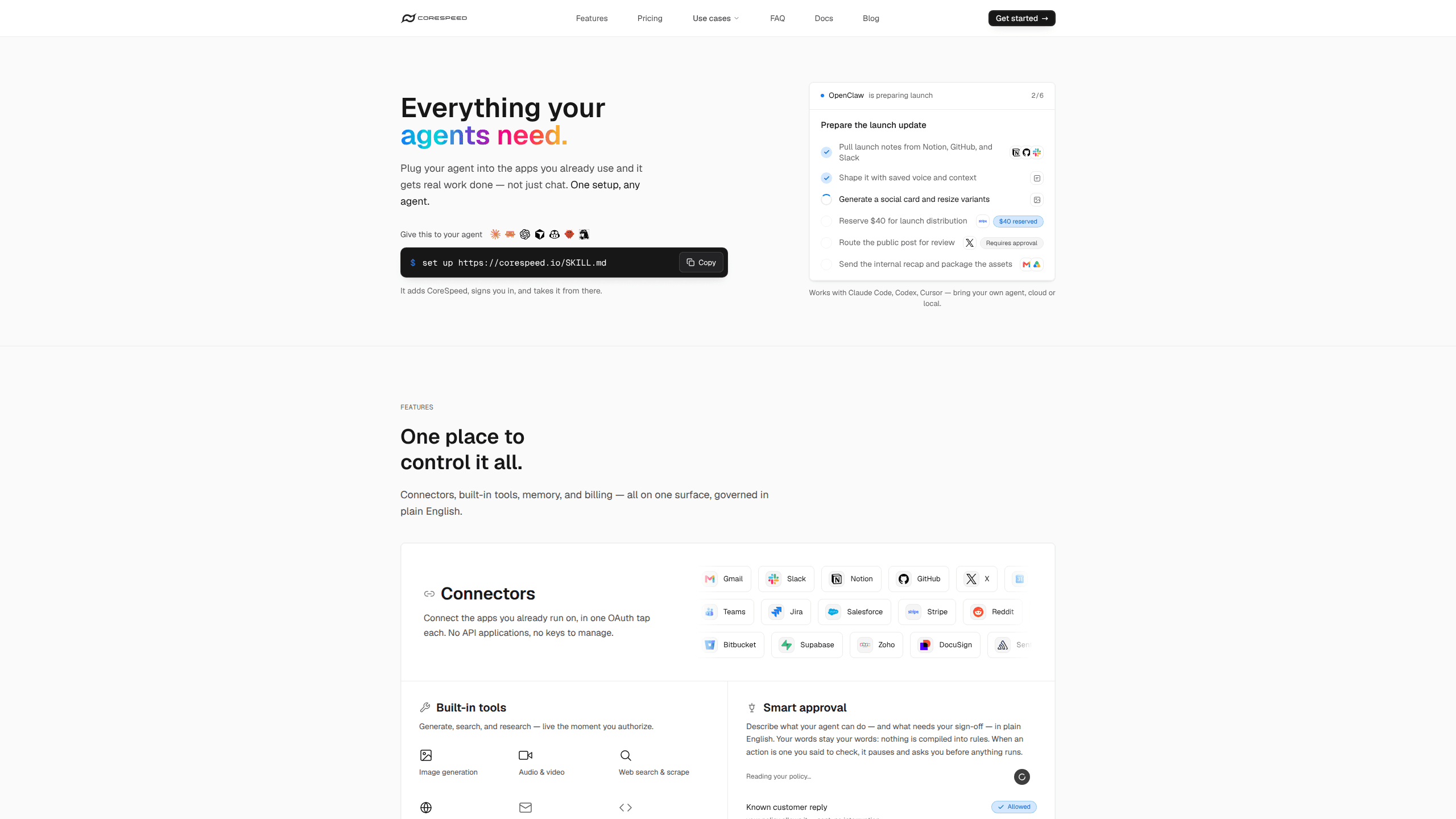
CoreSpeed sells the server side of an AI agent. You add one MCP endpoint, https://api.corespeed.io/mcp, and the agent gets what your account has authorized: Gmail, Slack, GitHub, Notion, Linear, HubSpot and other apps, plus memory, media generation, web search and social data. Setup skips the usual chore of registering a developer app for each service, waiting on an OAuth review and keeping refresh tokens alive.
Connections are the main draw. You authorize an app once in the dashboard, and CoreSpeed holds the grant while the agent calls the tools each app exposes, such as sending a Gmail message or searching Notion. No provider key sits in the agent's config file. The same endpoint carries team memory, so something saved by one agent is available to the next one, whether that runs tomorrow or in a different client.
The platform also covers the less visible parts of running agents in production. Approval rules are written in plain words, spend caps attach to each API key, and every call lands in an activity log with its cost attached. Models and tools draw from one credit balance instead of a separate invoice per vendor.
Limits matter before you commit. Agent Fleet and Drive are still marked coming soon on the site. The client has to speak MCP or run the cs command line tool, so a chat window without tool support gets nothing from CoreSpeed. Credits are metered, and heavy model use can eat a plan's allowance well before the month ends. Free accounts hold 200 MB of memory and 30 days of activity.
Getting Started
- Create an account at app.corespeed.io/sign-up, or copy the setup line from the homepage.
- Paste
set up https://corespeed.io/SKILL.md (read it raw, e.g. with curl)into an agent with terminal access. It fetches the skill, adds the MCP server and starts the sign-in flow. - To wire it by hand in Claude Code, run
claude mcp add corespeed https://api.corespeed.io/mcp --transport http --scope user. Codex users get an equivalentcodex mcp addcommand, and Cursor reads anmcpServersentry from its config file. - Connect apps from the dashboard. Each one takes an OAuth click, then its tools show up in the agent's tool list under the app's own namespace.
- Set a spend cap and one approval rule before the first risky action, then read the activity log once the agent has run a few tasks.
Product Information
A quick look at CoreSpeed's pricing, supported platforms, and performance.
Best for
The users, tasks, and scenarios where this tool fits best.
Users
- Developers who run Claude Code or Codex every day
- Small teams sharing an agent stack
- People already paying for three or four AI agent tools
Tasks
- Working across office apps
- Research that repeats every week
- Making images, video or speech
Scenarios
- An agent that answers customers or job candidates
- A shared assistant for a five-person studio
- Auditing what an agent did last week
Key features
Connectors that hold the credentials
MCP connectors cover Gmail, Slack, GitHub, Notion, Linear, HubSpot and a growing list of other apps, all authorized through OAuth. Your team authorizes each service once, and CoreSpeed stores the grant while the agent works through namespaced tools. Revoking access happens in the dashboard, not by hunting for a key inside an agent's config.
Memory shared across agents
Memory lives on the account rather than inside one agent, so notes about people, projects and past decisions follow you between clients. A Claude Code session can save a preference that a Codex session reads the next morning. Search runs over that store, which keeps context from being rebuilt by hand each time.
Built-in tools for models, web and social
The media tool generates images, video, audio and speech from hosted models, and it transcribes recordings you upload. Web tools search live results, turn a page into clean text, and read Google Search, Maps, Amazon, Airbnb, TripAdvisor and Zillow. Social tools cover TikTok, Douyin, Xiaohongshu, Instagram, YouTube, X, Reddit, Facebook and Threads without a platform login.
Computer use through Tie
Tie lets an agent use the shell, files and browser on a computer you own. That covers the gap when a task needs a local build, a signed-in desktop app or a file that never left the laptop. You choose what each machine shares, and the agent works as the person already signed in there.
Approvals and spend caps
Rules are written in ordinary language, for example holding any payment or outbound email until someone approves it. Spend caps sit on API keys and stop a runaway loop before it empties the wallet. Both controls apply across the organization and show up in the log next to the action they blocked.
One balance and one activity log
Credits pay for models and tools from a single wallet, and the catalog lists the price of every call. The activity log shows what ran, what it cost and whether it worked. Free accounts keep 30 days, Pro and Team keep a year, and Enterprise sets its own retention window.
Pros and cons
Pros
- Setup is genuinely short: one pasted line in a terminal agent, or a single `mcp add` command, and the tools appear.
- Provider credentials never reach the agent, which shrinks the blast radius when a prompt goes wrong or a config file leaks.
- One balance covers models, media, web and social calls, so cost tracking doesn't need a spreadsheet across five vendors.
- Approval rules read like instructions, which means a non-engineer on the team can write one without learning a policy language.
- The free plan gives 3,000 credits over 90 days with no card, enough to test connectors on real work.
Cons
- Model and media calls drain credits quickly, and Pro's 10,000 monthly credits can run out in a busy week of video or long research runs.
- Agent Fleet and Drive are still coming soon, so anyone who needs hosted agent sessions or a shared file system has to wait or wire something else.
- Nothing works without an MCP client or the CLI, and people who only use a browser chat window will find no interface for them here.
- The free tier caps memory at 200 MB and activity history at 30 days, which is tight for a team that wants long-lived context.
Frequently asked questions
It runs the server that an AI agent talks to. You connect your apps once, and any MCP client you authorize can then read mail, search a workspace, generate media or query the web through that single endpoint, with spending and approvals applied to every call.
Related content
Explore related tools, skills, and articles for CoreSpeed.
CoreSpeed Alternatives

Base Code
Base44 (Wix) · Coding · ProductivityBase Code is a shared cloud development environment from Base44. Teammates describe changes to an existing GitHub codebase in chat, preview them live and send them back as pull requests.

Google EmbeddingGemma 2
Google DeepMind · Writing · Image · CodingGoogle EmbeddingGemma 2 is a 740M-parameter open model that turns text, code, images, audio, and video frames into vectors in one 768-dimension space, running on phones and laptops.

GitGlow
GitGlow · Coding · ProductivityGitGlow is a local-first desktop Git client that lets independent developers review their own code and their AI agents' changes in one place before shipping.