

cospec
cospec · Coding · Productivity
cospec is a no-code platform for building MCP servers, so AI agents like Claude and Cursor can reach your team's tools. Connect services, describe each tool, then deploy a secure instance in a click.
About cospec
What Is cospec
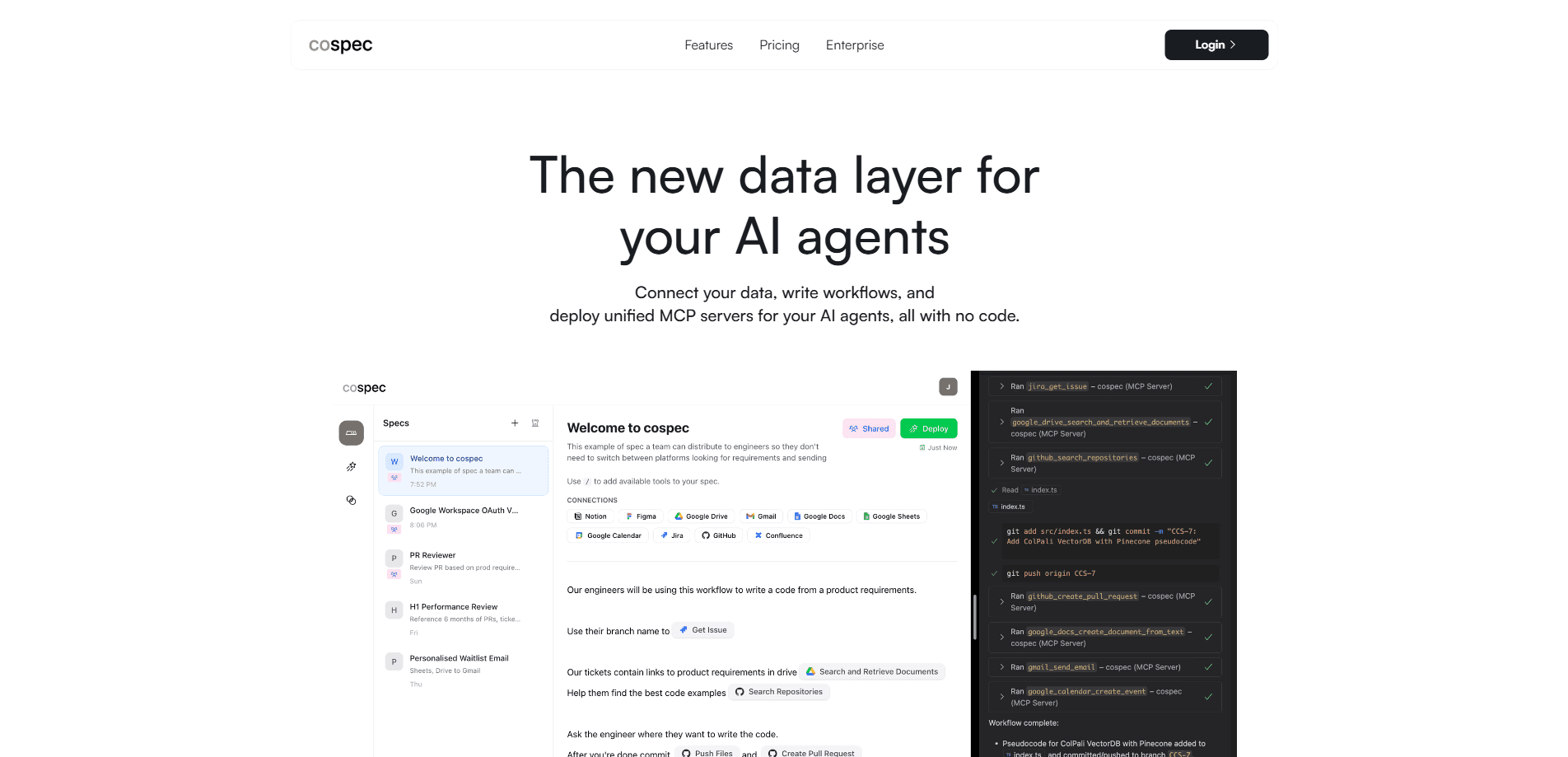
cospec is a web platform that turns scattered team data into tools your AI agents can call. It builds MCP servers, the Model Context Protocol standard that lets assistants like Claude, Cursor, and VS Code read Jira tickets, open GitHub pull requests, and update Google Docs. You write the spec, connect the services, and the platform handles the hosting.
The problem it targets is context sprawl. Your work lives across nine or more apps, and an AI agent usually sees one at a time. cospec lines those sources up behind a single OAuth 2.0 protected endpoint, so the agent pulls what it needs from a workflow you defined instead of guessing.
The main limit is scope. cospec builds the bridge between services, but it doesn't run the agent itself, so the value depends on which third-party tools you already use. Managed hosting is waitlist only, so most teams self-host or run it on their own Cloudflare account, and a workflow only earns its keep once the apps behind it are connected and working.
Getting Started
- Create a cospec account and open the visual editor.
- Connect the services you want, such as GitHub, Google Workspace, Notion, or Jira, through OAuth.
- Write a spec that names the tools and functions your agent should call.
- Deploy the server in one click to get a private OAuth 2.0 instance.
- Plug the endpoint into Claude, Cursor, or another MCP-ready assistant.
Product Information
A quick look at cospec's pricing, supported platforms, and performance.
Best for
The users, tasks, and scenarios where this tool fits best.
Users
- Developers who want to expose internal tools to an agent without writing a server
- Small teams with context spread across many apps
- AI power users running Claude or Cursor daily
Tasks
- Auto-fixing CI failures
- Automated PR reviews
- Code migration
Scenarios
- Standing up a first MCP server
- Connecting a design-to-dev flow
- Giving a hosted agent limited access
Key features
No-Code Spec Editor
cospec replaces hand-written server code with a visual editor where you define tools, functions, and resources. You describe what each capability does and the platform generates the MCP server that exposes it. That shortens the build loop from days of boilerplate to a spec you can review, and anyone on the team can read the spec even if they never touch the code behind it.
One-Click MCP Deployment
Each workflow becomes a reusable MCP instance you deploy with a single click. The server ships to Cloudflare Workers, so it runs on edge locations near wherever the agent calls from. You get a unique URL and stop worrying about host setup or scaling.
OAuth 2.0 Protected Instances
Every deployed server sits behind OAuth 2.0 security, so only you reach it. Tokens are stored encrypted, and connections to third-party apps use the same OAuth flow your team already trusts. That keeps an agent from touching accounts nobody approved, which matters once you grant it access to repositories and internal documents that were never meant to leave the building.
Wide Service Connections
cospec connects to GitHub, Google Workspace, Notion, Airtable, Gmail, Jira, Asana, and more through OAuth. You link the accounts once, and any workflow can draw on them. The catalog covers the tools most teams already run, so you rarely need a custom connector. Link them once and move on.
Shared Team Specs
Specs can be shared across an organization, and admins manage who deploys what. A teammate inherits the same tools instead of rebuilding them from scratch. Nobody starts over. That cuts drift between one person's agent setup and the rest of the team.
Coding Work Memory and Control
Alongside the server builder, cospec ships open tools such as como, a local-first memory engine that indexes pull requests, issues, commits, and AI CLI sessions, and zane, which lets you approve Codex runs from a phone. Both point at the same goal: keep agents grounded and under review.
Pros and cons
Pros
- Builds and hosts an MCP server without coding, so non-engineers can connect tools too.
- OAuth 2.0 and encrypted token storage keep each deployed instance private.
- A free tier covers up to 3 deployments, enough to test a real workflow.
- One-click Cloudflare deployment skips the usual server plumbing.
- Connects a wide catalog of everyday work apps out of the box.
Cons
- Managed hosting is waitlist only, so most teams must self-host on their own Cloudflare account.
- Value depends on the third-party tools you already pay for, and weak integrations cap what an agent can do.
- Complex workflows can take real setup time before they run cleanly.
Frequently asked questions
cospec is a no-code platform for building and deploying MCP servers. You connect your work apps, describe the tools an AI agent should use, and cospec hosts a secure endpoint the agent can call.
Related content
Explore related tools, skills, and articles for cospec.
cospec Alternatives

Base Code
Base44 (Wix) · Coding · ProductivityBase Code is a shared cloud development environment from Base44. Teammates describe changes to an existing GitHub codebase in chat, preview them live and send them back as pull requests.

Google EmbeddingGemma 2
Google DeepMind · Writing · Image · CodingGoogle EmbeddingGemma 2 is a 740M-parameter open model that turns text, code, images, audio, and video frames into vectors in one 768-dimension space, running on phones and laptops.

GitGlow
GitGlow · Coding · ProductivityGitGlow is a local-first desktop Git client that lets independent developers review their own code and their AI agents' changes in one place before shipping.