

CraftMusic AI
CraftMusic AI · Writing · Voice & Language
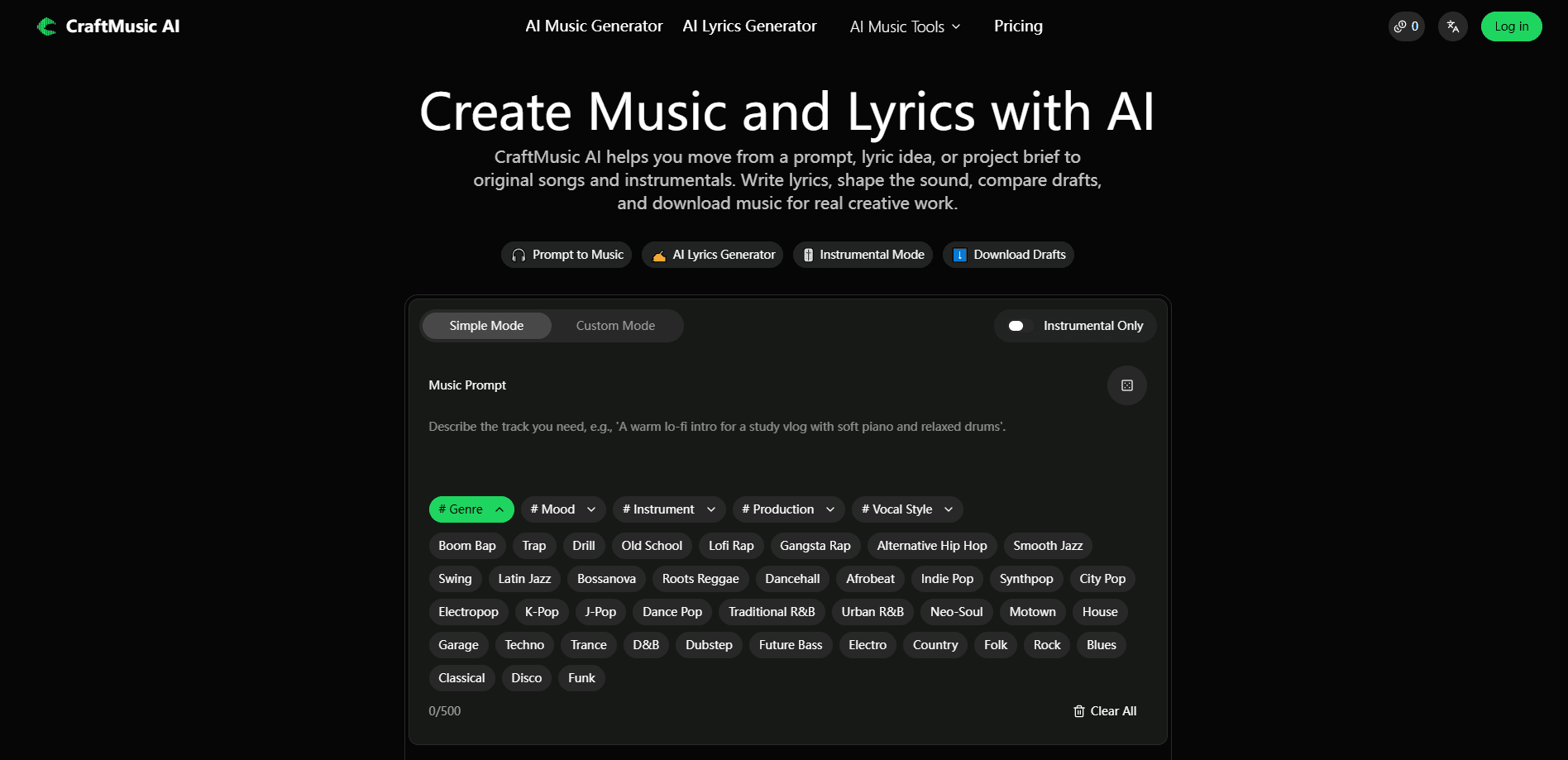
CraftMusic AI is a browser-based AI music generator that turns a written prompt or your own lyrics into a complete song with vocals, or an instrumental track you can drop into a video, podcast, or game. It's text to music in the simplest sense: describe what you want, press generate, and get a draft. It pairs that generation engine with a small suite of finishing tools, so you can write lyrics, compare drafts, convert audio to MIDI, and download the version worth keeping without leaving the workspace.
About CraftMusic AI
What Is CraftMusic AI
CraftMusic AI is an AI music platform built around one main idea: you describe what you want to hear, and the generator returns a finished-sounding draft you can actually use. You can start from a text prompt that names a genre, mood, or scene, or paste lyrics you've already written and let the tool build the melody and arrangement around them. Both routes end in the same place, a track you can preview, compare against other takes, and download.
The product isn't only the generator. It also bundles the smaller jobs that come after a first draft: writing and reshaping lyrics, splitting stems, mastering audio, and converting a recording into editable MIDI. That combination is what separates it from a one-trick generator. Most people making music for a cheap client video don't want to export a file and hunt down four other tools to finish it.
The catch is in the plan. The free tier is personal use only, and commercial rights come with the paid plans. If you're generating background music for a monetized YouTube video or a client campaign, the license matters more than the sound. Dense, noisy source audio also trips up the transcription side. A clean recording converts far better than a full mix.
Getting Started
- Sign up for a free account on the CraftMusic AI website. The free plan gives you 20 credits and one music generation per month to test the workflow.
- Pick a mode. Prompt mode takes a written description, Lyrics mode takes words you paste in, and instrumental mode removes the lead vocal entirely.
- Set the sound by adding genre, mood, instruments, and vocal direction, then press generate.
- Compare your drafts side by side. The generator usually returns a few versions, so listen for the hook and groove that fit before downloading.
- Download the track, or open the finishing tools to split stems, master the audio, or convert a recording to MIDI.
Product Information
A quick look at CraftMusic AI's pricing, supported platforms, and performance.
Best for
The users, tasks, and scenarios where this tool fits best.
Users
- Content creators
- Songwriters and hobbyists
- Producers on a deadline
Tasks
- Turning a prompt into a song
- Writing and shaping lyrics
- Converting a melody to MIDI
Scenarios
- Scoring a short video or product demo
- Building a song idea from a voice memo
- Filling a content calendar
Key features
Prompt to Music Generation
CraftMusic AI's core engine turns a written description into a song or instrumental draft, complete with melody, rhythm, harmony, and arrangement. You name the scene, mood, genre, and instruments, and the AI music generator handles the structure. It's the fastest path from an idea to something you can actually hear, and it works whether you have musical training or not. Think of it as an AI song maker that starts from a sentence, not a blank piano roll.
AI Lyrics Generator
The AI lyrics generator turns a theme, title, or rough story into structured words, with hooks, verses, and choruses you can edit. It's useful when you know the vibe you want but not the exact lines, especially for rap and pop where the hook carries the track. You stay in control of the final pass, so the result sounds like your idea instead of a template.
Vocals or Instrumental Mode
You can generate a vocal-led song when the lyrics need a voice, or switch to instrumental mode for background music, beats, podcast beds, and game ambience. That single toggle covers two very different jobs, which is why the platform works for both songwriters and video editors. Instrumental tracks tend to be the safer pick for commercial use, since there are no lyrics to clear.
Lyrics to Song Workflow
Paste finished lyrics, a chorus, or an unfinished verse, add a genre and vocal direction, and the tool builds a complete draft around your words. It's the reverse of the prompt workflow. Here the lyrics lead instead of the description. Hearing how your words sit against the melody is often the moment a rough idea becomes a real song. That part is genuinely useful.
Audio to MIDI Converter
The audio to MIDI converter analyzes pitch, timing, and note movement in a recording, then writes the performance as editable MIDI data. It accepts MP3, WAV, M4A, OGG, AAC, FLAC, and WMA files, or you can record directly in the browser. It's a starting point, not a perfect transcription. Expect to clean a few notes if your source has reverb, distortion, or background noise.
Finishing Tools
Beyond generation, CraftMusic AI bundles stem splitting, audio mastering, and a browser MIDI editor for note-level cleanup. These are the tasks that usually force you into a separate DAW session, so having them in the same workspace saves a round trip. For a quick turnaround on a client video or a podcast episode, that convenience is the real draw.
Pros and cons
Pros
- Generates both vocal songs and instrumentals from a prompt or your own lyrics, covering two common use cases in one tool.
- Bundles lyrics writing, stem splitting, mastering, and audio to MIDI conversion, so you don't need a separate app for each step.
- Runs entirely in a browser with no plugins to install, and the free plan lets you test the workflow before paying.
- Paid plans include a commercial license and unlimited downloads on the higher tiers, which matters for published work.
Cons
- Commercial use is locked behind paid plans. The free tier is personal use only, so anyone monetizing the output has to subscribe.
- The audio to MIDI converter struggles with dense or noisy mixes, meaning full songs with reverb and distortion need manual cleanup after conversion.
- Credits and generation limits are metered per month, so heavy users can hit the ceiling before the cycle resets.
Frequently asked questions
It's an AI music generator for turning text prompts or your own lyrics into complete songs or instrumentals. It also includes a lyrics generator, an audio to MIDI converter, and a few finishing tools for editing and mastering what you've made.
Related content
Explore related tools, skills, and articles for CraftMusic AI.
CraftMusic AI Alternatives

Google EmbeddingGemma 2
Google DeepMind · Writing · Image · CodingGoogle EmbeddingGemma 2 is a 740M-parameter open model that turns text, code, images, audio, and video frames into vectors in one 768-dimension space, running on phones and laptops.

MePersona
MePersona, Inc. · Writing · Productivity · MarketingMePersona is an AI unified inbox for creators. It learns your voice, drafts replies to fan messages from 12 platforms, and sends only what you approve.

Fluence
Yay Software (Yannick Huchard) · Writing · Voice & Language · ProductivityFluence is an Android app that reads PDFs, EPUBs, Word files and web articles aloud, follows each sentence as it speaks, and answers questions about the text on the phone itself.