

CrayEye
Alexandria Redmon · Other · Prompts
CrayEye is a free, open-source app for iOS and Android that sends camera images and live sensor context to multimodal AI models, so you can build and share vision prompts.
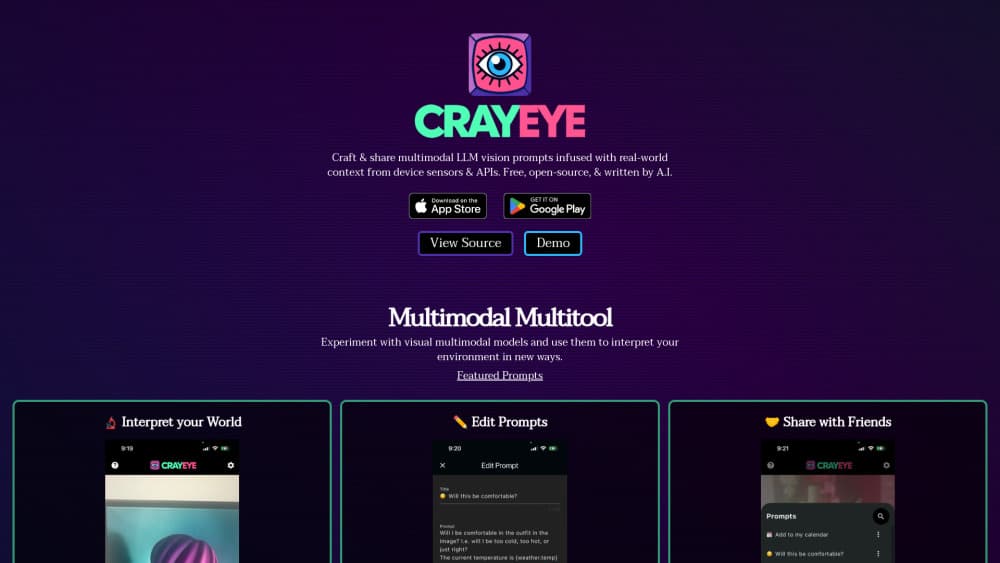
About CrayEye
What Is CrayEye
CrayEye is a multimodal vision app built around one idea: a photo alone rarely gives an AI model enough context. The app attaches details like your latitude, the local forecast and the current time to each request, then sends the image and the prompt to a vision model. Point your phone at a bird, a jacket or a restaurant menu and the model answers with that extra information in hand.
The app ships with a small prompt library and an editor for building your own. You can save favorites, share a prompt through a link, or import one a friend sends you. Because it's an open-source AI app, you can read the code, run your own build or point it at a different model.
The main limits are practical. CrayEye is a thin client. Answer quality depends entirely on the model behind it, and the built-in engine is capped at a small number of free requests per hour. There's no web version and no public API.
Getting Started
- Install CrayEye from the App Store or Google Play, then allow camera and location access when the app asks.
- Pick a prompt from the library, or open the editor and write your own. Insert a variable such as {location.lat} or {weather.temp} where you want live data.
- Point the camera at your subject and tap the prompt button. The app captures a frame and sends it to the selected engine.
- Read the answer in the response panel, save the prompt to favorites, or share it as a link.
Product Information
A quick look at CrayEye's pricing, supported platforms, and performance.
Best for
The users, tasks, and scenarios where this tool fits best.
Users
- Curious phone photographers
- Students and field learners
- Developers testing vision prompts
Tasks
- Identifying plants, birds and materials
- Estimating calories from a plate
- Naming colors and art context
- Extracting keywords from a scene
Scenarios
- A museum visit
- Grocery shopping
- Testing a local model
Key features
Camera-First Prompting
The camera view is the home screen, not a buried tab. That's rare for an AI camera app. You frame the shot, tap a prompt and get an answer in seconds. There's no upload step and no gallery digging, which makes the app feel closer to a magnifying glass than a general image recognition app.
Sensor and API Variables
Prompts can pull in live values with placeholders. {location.lat} and {location.long} add coordinates, {weather.temp} and {weather.forecast} add conditions, and {time.datetime} adds the current date. Sensor-aware prompts are the core idea here. They separate CrayEye from a plain object identification app, since the model can reason about where you are and what the weather is doing.
Prompt Editor and Library
Every prompt is editable text. You can duplicate a built-in prompt, change its wording, add a variable and save it to favorites. The library covers birds, plants, colors, food, art, materials and sound, which gives you a starting point instead of a blank box.
Shareable Prompt Links
Prompts travel as links. Send one to a friend and it opens in their copy of CrayEye, ready to run. This turns the app into a small social tool for prompt ideas, and it's how the featured prompts page distributes new ones.
Custom Engines and Local Models
The default engine calls OpenAI's chat completions endpoint with gpt-4o-mini. You can add another engine by pasting a JSON definition with a URL, headers, a request body and a response path. The README walks through connecting Ollama and Llava on your own machine, so a local setup is possible if you run the model host yourself.
Markdown Answers and Streaming Output
Responses arrive as they're generated and render as markdown. Lists, headings and links stay readable, which matters for prompts that return a calorie table or a set of references. The response view also keeps the result on screen so you can compare it with what the camera sees.
Pros and cons
Pros
- Free with no subscription, and the MIT license lets you inspect or fork the code.
- Sensor context makes prompts more specific than a photo alone, especially for location-dependent questions.
- Custom engine support covers hosted APIs and local models such as Llava through Ollama.
- The prompt library is genuinely useful, with ready-made prompts for food, plants, colors and events.
- Prompt links make sharing an idea a one-tap action.
Cons
- The built-in engine is limited to 15 requests per hour, which runs out fast during a testing session.
- There's no web app and no public API, so the phone is the only way in.
- Last release was in mid 2024, and the iOS build has not seen a feature update since June of that year.
- Privacy details are thin. Photos leave the device for whichever engine you pick, and the project publishes no separate policy.
Frequently asked questions
Yes. The app costs nothing on both stores, and the source code is available under the MIT license. The free built-in engine has an hourly request cap, so heavy use means adding your own engine.
Related content
Explore related tools, skills, and articles for CrayEye.
CrayEye Alternatives

Odyssey 3
Odyssey · OtherOdyssey-3 is Odyssey's foundation world model. It simulates physics in real time, turns a prompt into an interactive environment, and adapts to robots, cars and games.

JarvisCore
Prescott Data · Coding · Productivity · OtherJarvisCore is an open source Python runtime where AI agents work as equal peers on an agent mesh, claim tasks from a shared ledger, and reach external services through a zero-trust broker.
Clef
Cloudflare · Business · OtherClef is Cloudflare's open-source decision model for Workers AI. It returns calibrated probabilities for typed questions, not generated text, so agents can classify, route, and act fast.