

Create Music AI
Create Music AI · Voice & Language
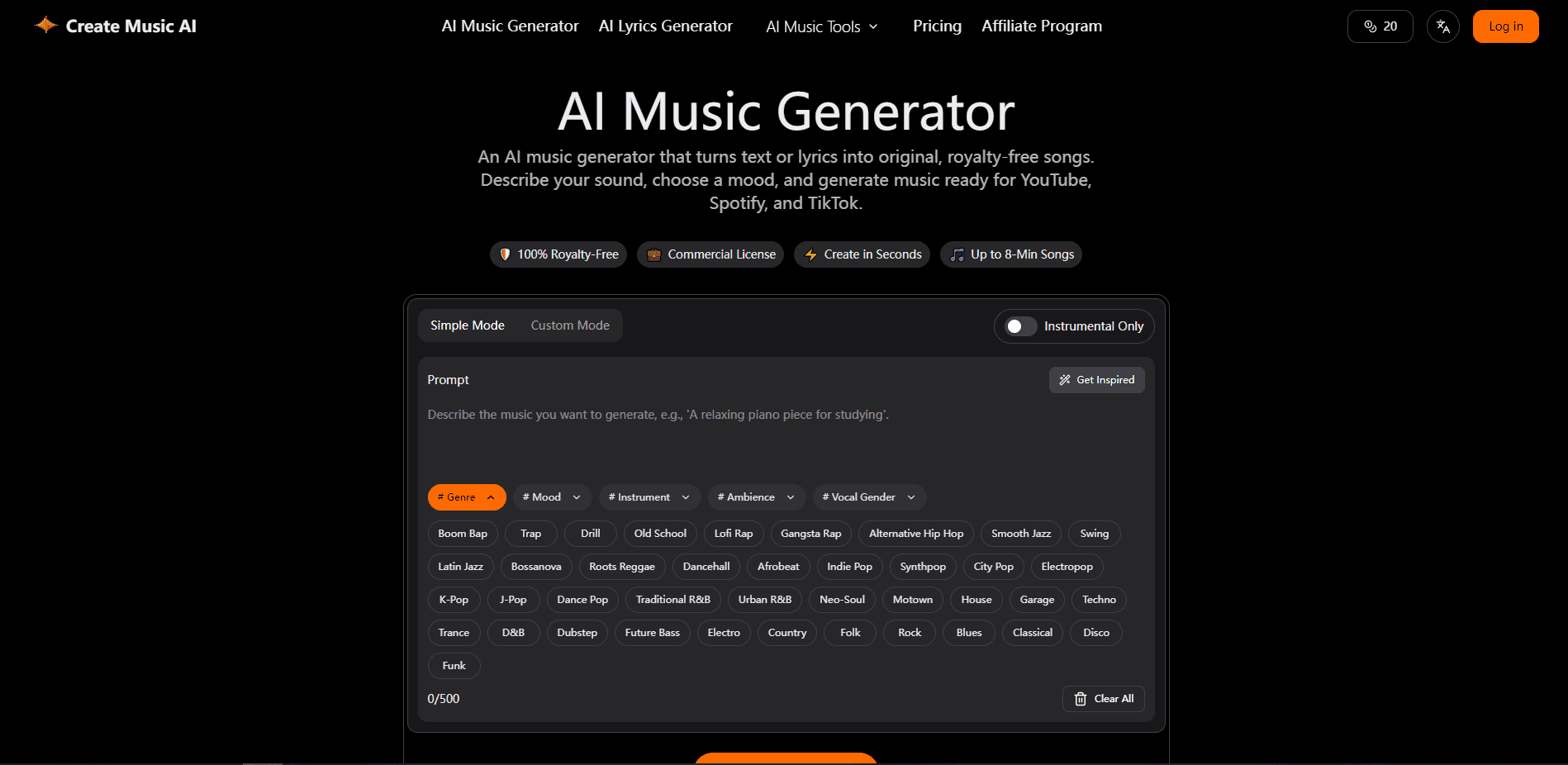
Create Music AI is an AI music generator that turns a written prompt or your own lyrics into a complete vocal or instrumental track. It sits in the browser, so there's nothing to install and no plugin chain to configure before you can hear a result. You describe a mood, genre, and vocal style, and it returns a playable song you can preview in about 30 seconds. A paid plan adds a commercial license, and everything you make stays royalty-free for YouTube, Spotify, and TikTok.
About Create Music AI
What Is Create Music AI
Create Music AI is a web-based music creation platform built around a text-to-music engine. Type a description like "late-night R&B funk with a swung pocket," pick a genre and mood, and the tool writes the melody, structure, vocals, and instrumentation for you. Tracks can run up to 8 minutes, which is longer than most text-to-music generators offer, and long enough to fit a full arrangement instead of a repeated loop. Does that length matter in practice? For full songs, yes.
The pitch is a single connected workflow instead of five different tools. Lyrics writing, song covers, vocal removal, stem splitting, and mastering all live in the same place, which means you can move a track from a rough lyric sheet to a finished, licensed release without ever leaving the browser tab you started in. That matters if you make music for short-form video or client work, because you don't lose time exporting and re-importing between apps.
The main limits are worth knowing up front. This isn't a DAW, so fine control over individual notes is thin compared to something like Ableton or FL Studio. No note-by-note editing here. Commercial rights also apply only to tracks made under an active paid plan, so free-tier output stays personal-use.
Getting Started
- Open the site and start a free generation, no download needed.
- Describe the sound you want, or paste lyrics, then set genre, mood, instruments, and vocal type.
- Hit generate and preview the result; most drafts come back in around 30 seconds.
- Refine with the lyrics tool, vocal remover, or mastering step if you need a cleaner mix.
- Download the track, and on a paid plan grab a license certificate for commercial use.
Product Information
A quick look at Create Music AI's pricing, supported platforms, and performance.
Best for
The users, tasks, and scenarios where this tool fits best.
Users
- Content creators
- Songwriters and hobbyists
- Podcasters and small studios
Tasks
- Turning a text prompt into a finished song
- Writing and setting lyrics
- Making an AI song cover
- Cleaning up audio
Scenarios
- Scoring a short-form video on a deadline
- Building a royalty-free music catalog
- Prototyping a song before studio time
Key features
Text to Music Generation
Type a description of the sound you want, and the generator builds melody, arrangement, and instrumentation around it. You control genre, mood, and instruments rather than accepting a single fixed output. Tracks can stretch to 8 minutes, which suits full songs instead of just clips. Need a two-minute pop hook instead? That works too.
Lyrics to Song
Paste your own lyrics or write them in the built-in lyrics tool. The generator maps verses, choruses, hooks, and bridges into a structured song. This is the feature to lean on if you already have words and need the music to match.
AI Song Cover Generator
Re-record a track with a new vocal interpretation instead of the original singer. You can explore different singing styles and reshape a song's vocal character for demos, covers, or idea testing, which is handy when a melody works but the vocal delivery doesn't fit the mood you're chasing. It's a creative tool, not a cloning service for celebrity voices.
AI Vocal Remover and Stem Splitter
The AI vocal remover strips vocals out of an existing song to get an instrumental, and the stem splitter breaks a track into separate parts. Useful when you want a backing track, a sample, or a cleaner mix to work from. It saves importing the file into a separate editor.
AI Music Mastering
Run a finished track through a mastering step to even out loudness and polish the mix before release. It won't replace a dedicated mastering engineer, but it gets casual releases to a listenable level without extra software. Not studio-grade. Enough for a YouTube upload, all the same.
Music Video Generation
Turn a finished track into a shareable music video for YouTube, TikTok, or Reels. You build the visual alongside the audio, so promo content doesn't require jumping to a separate video editor. Handy for musicians who post constantly. Think of it as a quick path from finished song to something you can actually publish.
Royalty-Free Commercial Licensing
Tracks made under a paid plan come with a commercial license for YouTube, Spotify, TikTok, ads, and client projects. Annual subscribers can also download a license certificate. Generated music carries no ongoing royalty obligation to the platform.
Pros and cons
Pros
- Browser-based with no install, so you can start on any machine.
- Fast previews, with drafts landing in about 30 seconds.
- Paid plans bundle a commercial license, covering monetized videos and client work.
- Up to 8-minute tracks suit full songs, not just loops or clips.
- Lyrics, covers, vocal removal, and mastering share one workflow.
Cons
- No API is documented, so you can't wire it into an automated pipeline.
- Fine note-level editing is limited compared to a full DAW.
- Commercial rights apply only to tracks made during an active paid subscription, so free output can't be monetized.
Frequently asked questions
It's for turning text or lyrics into complete songs without a studio or DAW. People use it to score videos, write demos, and build royalty-free music for social platforms and client work.
Related content
Explore related tools, skills, and articles for Create Music AI.
Create Music AI Alternatives

Foley
Hanamori Labs, LLC · Voice & Language · Productivity · AI AssistantFoley is a voice to-do list that turns a spoken sentence into a filed task, complete with project, date and time, then helps you plan the day around what is already there.

HireKey
HireKey · Voice & Language · Productivity · LeaningHireKey is an AI job search copilot built by a former tech recruiter. It checks role fit, tailors resumes, runs interview practice and tracks every application.

Fluence
Yay Software (Yannick Huchard) · Writing · Voice & Language · ProductivityFluence is an Android app that reads PDFs, EPUBs, Word files and web articles aloud, follows each sentence as it speaks, and answers questions about the text on the phone itself.