

CreatorHat
CreatorHat · Writing · Video · Marketing
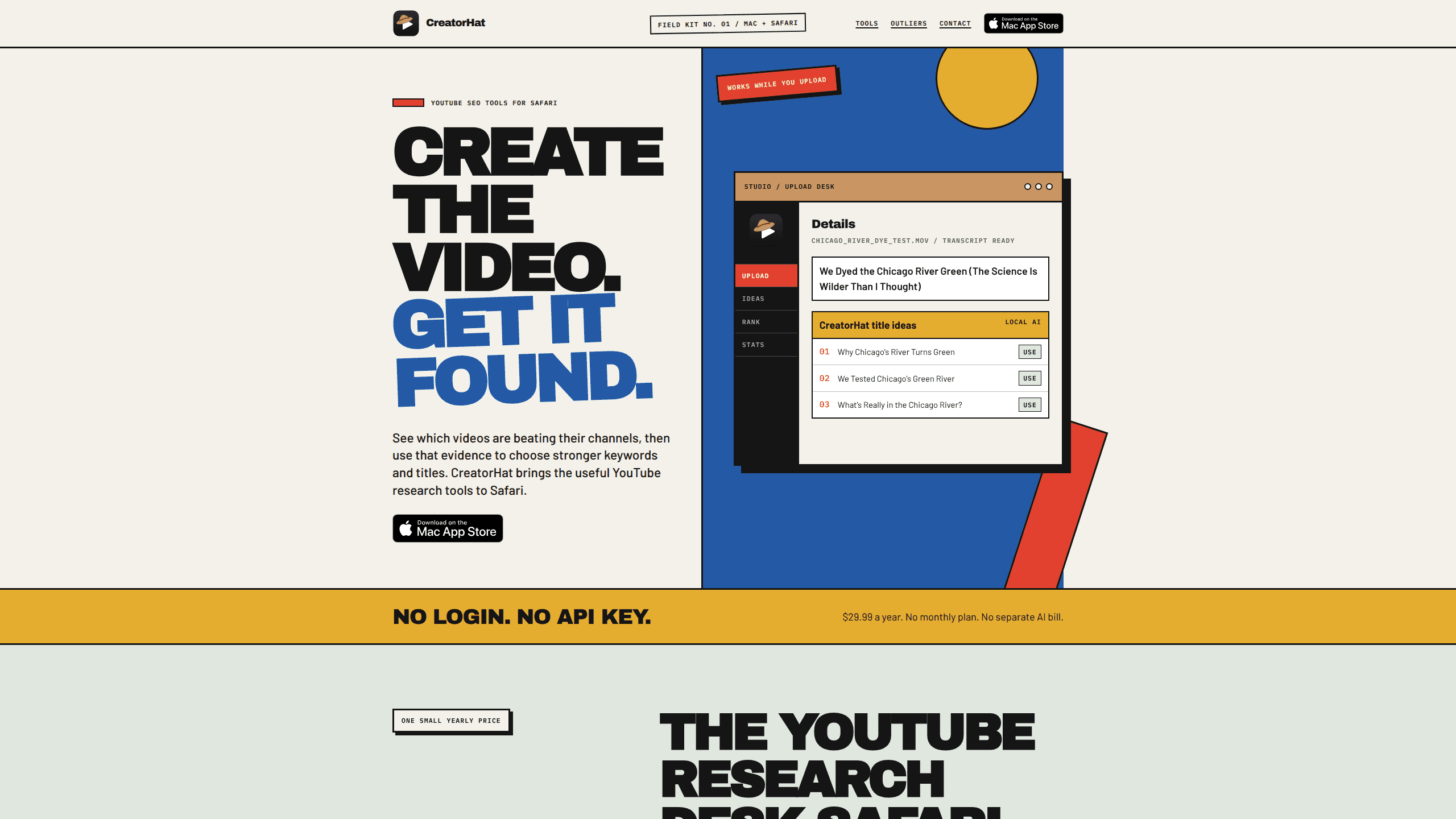
CreatorHat is a YouTube SEO tool built as a Mac app plus Safari extension, so its research panels sit right inside YouTube and YouTube Studio. It helps creators find breakout videos, research the phrases viewers actually type, check where their own uploads rank, and draft titles and descriptions while a video uploads. It even works as a YouTube title generator. It runs on macOS 26 with Apple Intelligence and costs a flat $29.99 a year, with no account and no API key to paste.
About CreatorHat
What Is CreatorHat
CreatorHat is a research desk for YouTube creators who work in Safari on a Mac. Instead of opening a separate dashboard, pasting a YouTube Data API key, or trusting a made-up monthly search-volume number, it reads the YouTube pages you already have open and adds evidence beside them. The core idea is simple. Once you can see which videos are outrunning their own channel, you have something concrete to base a topic or a title on. That matters for video SEO for Mac users who'd otherwise fly blind.
The tool does three main jobs. It finds outliers by comparing a video's views per day against the channel's recent normal, so a small channel having a good week doesn't get buried next to a giant channel's baseline. It runs keyword research that starts with YouTube's own autocomplete and then checks current competition and the median views per day of the videos already ranking. And it assists the upload itself, transcribing a local video on your Mac while YouTube is still processing it and preparing title choices and a description draft.
The biggest limits are worth stating up front. It only works on Safari for macOS 26 and newer, and the on-device writing and transcription need Apple Intelligence, so Windows, Chrome, and older Macs are out. It won't send your video or transcript to an AI server, but that privacy comes with a trade-off: everything runs locally and nothing syncs across devices. It also can't promise more views. Its own site is upfront about that. So who's it for? Creators who already work on a recent Mac in Safari and want research without a pile of tabs.
Getting Started
- Buy CreatorHat from its site or the App Store, then install the Mac app and enable the Safari extension.
- Grant the app access to your export folders (Movies, Downloads, or a folder you pick) so it can read the local video file.
- Open YouTube or YouTube Studio in Safari. For upload assist, start an upload whose filename matches a local file the app can read.
- Read the suggestions beside the title field once transcription finishes, apply one, and edit it in place if needed.
- Use the keyword and outlier panels on any YouTube page to check competition and video pace before you commit to a topic.
Product Information
A quick look at CreatorHat's pricing, supported platforms, and performance.
Best for
The users, tasks, and scenarios where this tool fits best.
Users
- Solo YouTube creators
- Small-channel creators
- Mac and Safari users
Tasks
- Finding breakout topics
- YouTube keyword research
- Writing titles and a description during upload
- Tracking your own rankings
Scenarios
- You're uploading a video and YouTube is still processing, so you use the idle time to pick a title and description.
- You want a topic idea grounded in real demand, so you check which videos are earning views per day right now rather than guessing.
- You're deciding whether a phrase is worth a video, so you look at the current search results before committing.
- You keep your video and transcript off third-party AI servers and prefer everything to run locally.
Key features
YouTube Outlier Finder
Raw view counts favor large channels, which makes a genuine breakout hard to see. CreatorHat compares a video's views per day against that channel's recent normal, so a video running several times above its channel's average stands out on its own terms. Small channel, real signal. The tool shows page data live as you browse, which means less time tabbing between a spreadsheet and YouTube.
YouTube Keyword Research
Keyword research here starts with phrases YouTube itself suggests, not a black-box volume estimate. CreatorHat checks the current competition and the median views per day of the videos already ranking for a phrase, then rolls those signals into an opportunity score. That score summarizes real evidence instead of pretending to know an exact monthly search count. Honest, but still useful. It beats the round numbers many tools hand out.
Upload Assist and Local Transcription
While YouTube processes an upload, CreatorHat transcribes the video on your Mac and prepares five title ideas plus a description, right beside the Studio fields. You can ask for another set of titles and apply one without publishing, then edit it in the title field itself. Because transcription runs locally through Apple Intelligence, the video and transcript don't get sent to a third-party AI server. Nothing leaves your machine here.
Rank Tracking
You can test where your own video ranks for a given phrase and store each result on your Mac, so changes become visible over time. It's a local history, not a cloud dashboard. That keeps your data on your machine, but it also means it won't follow you to another Mac.
Channel Audits
The extension can look at a channel's recent results to show what's working and what isn't. That gives you a read on a competitor's pace before you decide whether their topic is worth chasing. Fast check, no guesswork.
Tag Analysis
CreatorHat can show the tags used by top-ranking videos and tally the phrases that repeat across them. It treats tags as a research clue rather than a ranking lever, which lines up with YouTube's own guidance that titles, thumbnails, and descriptions carry more weight for discovery.
No Account, No API Key
There's no CreatorHat account system and no YouTube API key to paste. The Safari extension for YouTube talks to the site from the pages you already have open, so setup is a purchase and an extension toggle rather than a developer-console chore. For a lightweight Safari extension for YouTube, that's about as painless as setup gets.
Pros and cons
Pros
- Flat $29.99 a year with a 7-day trial and no separate AI bill or monthly plan.
- Views-per-day and channel-relative signals give a clearer read on breakouts than lifetime view counts.
- Keyword research leans on real ranking videos and their median views per day instead of invented search volumes.
- Runs entirely on your Mac, so video files and transcripts stay off third-party AI servers.
- No account or API key needed, which cuts setup to almost nothing.
Cons
- macOS 26 with Apple Intelligence and Safari only, so Windows, Chrome, and older Macs can't use it at all.
- Local-only design means nothing syncs, so rank history and work don't carry across devices.
- No monthly option, so you pay the full year even if you only need it for one project.
- It improves your evidence but can't guarantee more views, and it won't package a video for you.
Frequently asked questions
It adds views-per-day and channel-relative breakout signals, keyword research, rank checks, channel audits, and writing help inside YouTube and YouTube Studio in Safari. Everything shows up beside the page you're already on, so you research without leaving the site.
Related content
Explore related tools, skills, and articles for CreatorHat.
CreatorHat Alternatives

Google EmbeddingGemma 2
Google DeepMind · Writing · Image · CodingGoogle EmbeddingGemma 2 is a 740M-parameter open model that turns text, code, images, audio, and video frames into vectors in one 768-dimension space, running on phones and laptops.

MePersona
MePersona, Inc. · Writing · Productivity · MarketingMePersona is an AI unified inbox for creators. It learns your voice, drafts replies to fan messages from 12 platforms, and sends only what you approve.

Fluence
Yay Software (Yannick Huchard) · Writing · Voice & Language · ProductivityFluence is an Android app that reads PDFs, EPUBs, Word files and web articles aloud, follows each sentence as it speaks, and answers questions about the text on the phone itself.