

CtrlAI
Cirtus · Other
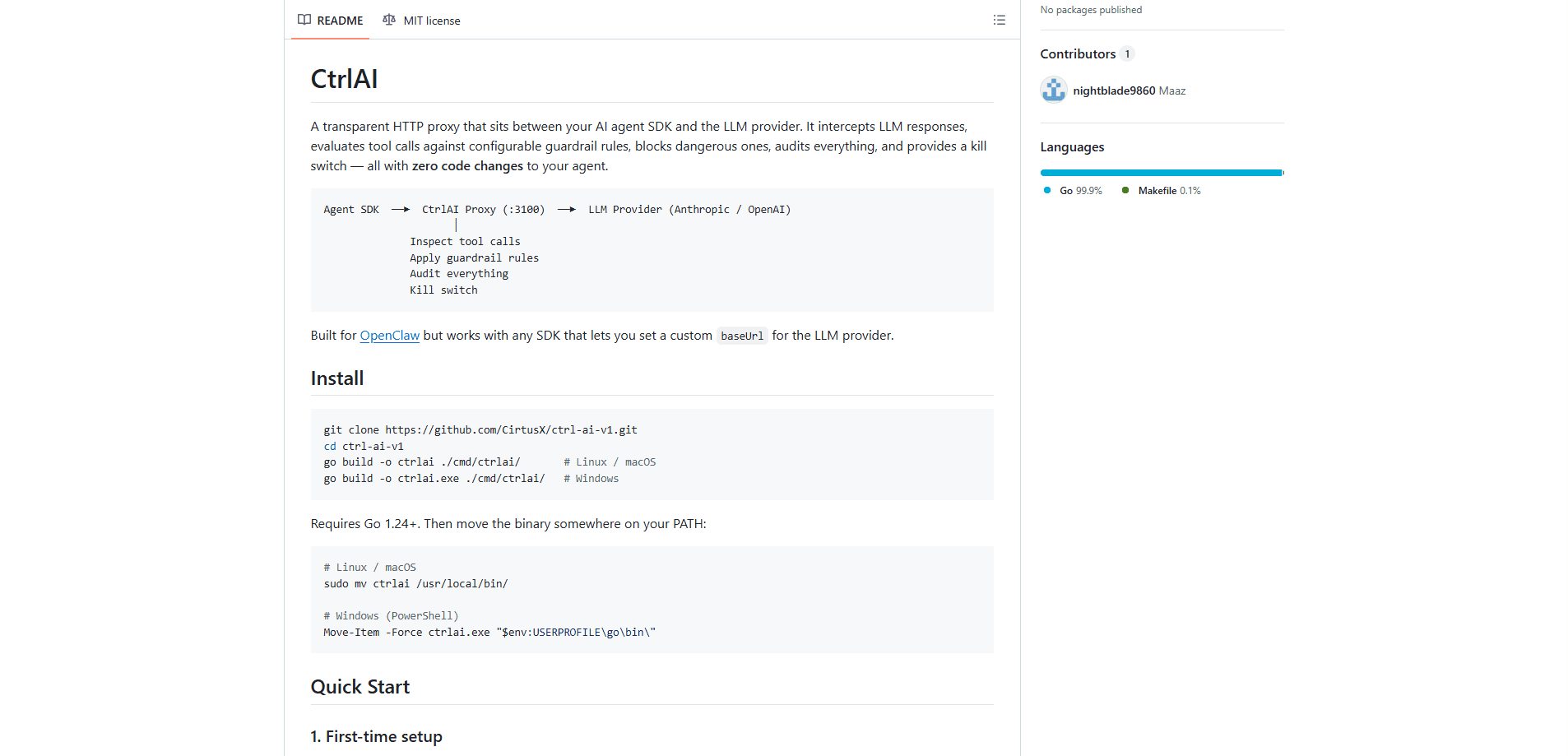
CtrlAI is an AI agent guardrail proxy: an open-source HTTP layer that sits between your agent SDK and the LLM provider, then inspects every tool call the model tries to make. It blocks the dangerous ones. It records the rest. A tamper-evident audit log and a kill switch round out the package. You drop it in front of your existing setup by changing one URL, so your agent code never touches this security layer. No rebuild. No wrapper.
About CtrlAI
What Is CtrlAI
CtrlAI is a self-hosted proxy for teams running AI agents that can actually do things, like read files, run shell commands, control browsers, and send messages on real platforms. Those capabilities are exactly what makes agents useful, and exactly what makes them risky. CtrlAI inserts a checkpoint right in the middle of the request path so that you, not the model, get to decide what an agent is allowed to do before it ever does it.
The main problem it solves is control without surgery. Most guardrail tools ask you to wrap your SDK, edit your agent, or rebuild your workflow around their API. Who wants that? CtrlAI instead hides behind the provider's base URL. Your agent still thinks it's talking straight to Anthropic or OpenAI. In between, CtrlAI reads the tool calls, checks them against rules, and either lets them through or swaps the response for a block notice.
The biggest limitation is the environment. CtrlAI is a Go binary you build and run yourself, so it suits people comfortable with a terminal and a config file. Its dashboard has no login. Anyone who can reach port 3100 can see activity and kill agents on your machine. If that port is exposed beyond localhost, you're trusting the network. For local development this is fine. For anything shared, put it behind its own access control.
Getting Started
- Clone the repo from GitHub and build the binary with Go 1.24 or newer, then move it onto your PATH.
- Run
ctrlaiwith no arguments to trigger first-time setup, which writes a default config, rules file, and audit directory. - Start the proxy with
ctrlai start(add-dto run it in the background). - Point your agent at the proxy by setting the provider
baseUrltohttp://127.0.0.1:3100/provider/anthropicin your agent config. - Open the dashboard at
http://127.0.0.1:3100/dashboardto watch tool calls and tune your rules.
Product Information
A quick look at CtrlAI's pricing, supported platforms, and performance.
Best for
The users, tasks, and scenarios where this tool fits best.
Users
- Developers building AI agents
- Small teams shipping agent products
- Security and compliance-minded operators
Tasks
- Blocking risky tool calls
- Keeping an audit trail
- Emergency shutdown
Scenarios
- Local agent development
- Multi-agent setups
- Compliance review
Key features
Transparent Proxy With Zero Code Changes
CtrlAI slots between your agent SDK and the LLM provider without touching your agent. You change one base URL, and the proxy forwards requests upstream, inspects the response, and returns it as if nothing happened. The SDK never knows. No rewrite, no wrapper, no new API to learn.
Configurable Guardrail Rules
Rules live in a YAML file and match on tool name, agent ID, file path globs, command regex, URL regex, or any substring in the arguments. You can block a specific tool entirely, block it for one agent only, or block dangerous shell patterns like an rm -rf on the root. Multiple conditions in a rule are ANDed. Lists within a field are ORed. The first match wins.
19 Built-in Security Rules
Out of the box, CtrlAI ships with built-in rules covering SSH private keys, env files, credential files, shell config writes, destructive commands, data exfiltration, camera access, screen recording, location, and remote code execution. They're on by default. They're toggleable. You get baseline protection before you write a single custom rule.
Kill Switch
You can terminate any agent instantly with ctrlai kill main --reason "suspicious activity", or stop everything with ctrlai kill --all. The proxy returns a fake end-of-turn response so the agent's loop stops cleanly. Kill state is written to a file and watched for hot reload. It takes effect within seconds even while the proxy runs.
Tamper-Evident Audit Log
Every tool call is recorded with a sequence number, timestamp, agent ID, tool name, arguments, decision, and the rule that matched. Each entry carries a SHA-256 hash linked to the previous one. Alter any entry, and the chain breaks from that point on. You can tail it live, query by agent or decision, verify integrity, and export to CSV or JSON.
Live Dashboard and REST API
A web dashboard on the same port shows agents, request and block counts, the full rule list, and a real-time feed of tool call decisions over WebSocket. Everything the dashboard shows is also reachable through a REST API, so you can script rule changes, kills, and audit pulls from your own tooling.
All-or-Nothing Response Blocking
When one response contains several tool calls, CtrlAI evaluates each one but strips the entire response if any single call is blocked. The reasoning is that models plan calls as a group, so letting the "safe" half run could cause unpredictable behavior. It's the cautious default, with a partial-blocking mode noted as a future option.
Multi-Agent Isolation
Agent identity comes from the URL path, so /provider/anthropic/agent/work/... and /provider/anthropic/agent/main/... are treated as entirely separate agents, each with its own rules, audit history, and kill state. You can lock down one agent's permissions without changing what the others are allowed to do.
Pros and cons
Pros
- Works with any SDK that lets you set a custom base URL, so integration is a one-line config change rather than a rewrite.
- Ships with 19 security rules enabled by default, giving useful protection before any setup work.
- Audit log uses a SHA-256 hash chain, so tampering is detectable rather than just discouraged.
- Covers Anthropic Messages and OpenAI Chat Completions with full inspection, plus pass-through for other paths.
- MIT licensed and self-hosted, so there's no subscription and no data leaving your machine.
Cons
- Requires Go 1.24+ to build and a comfort level with config files and a CLI, which rules out non-technical users.
- The dashboard has no authentication, so exposing port 3100 beyond localhost lets anyone on the network kill agents and read activity.
- All-or-nothing blocking means one bad call in a batch blocks the whole batch, so you'll sometimes resend a harmless request separately.
Frequently asked questions
It's a proxy that sits between your AI agent and the LLM provider. It reads the tool calls the model returns, checks them against your rules, blocks the dangerous ones, and logs everything. Your agent keeps running as if it were talking directly to Anthropic or OpenAI.
Related content
Explore related tools, skills, and articles for CtrlAI.
CtrlAI Alternatives
BinkBink
BinkBink · OtherBinkBink is a free online game platform and AI game maker that lets anyone turn a short text description into a playable browser game. You can jump into hundreds of community-made games. Or describe your own idea and play it in seconds, then share it with friends. Want to create your own game? You don't need to code. No engine setup, no download, no hassle.

Audiogen
Audiogen Inc. · OtherAudiogen is an AI music generator built by Audiogen Inc., a small research team that spent about 2.5 years training its own generative music model and designing a web interface around it. Instead of a plain text box, this AI music tool turns the timeline into a beginner-friendly Generative Audio Workstation, or GAW, where inpainting, extending, remixing and stem editing work more like painting on a canvas. The product is still in beta, so access runs through a waitlist or an invite. Paid plans aren't published yet.

Aiml API
AIMLAPI OÜ · OtherAiml API is a unified AI model API that puts more than 1000 models from OpenAI, Google, Anthropic, and others behind one endpoint and one bill. You write code against a single OpenAI-compatible schema, then switch between chat, image, video, and audio models by changing a model string. It suits developers and small teams who want multi-model access without juggling a dozen separate provider accounts, and it removes the usual billing headache that comes with testing several vendors. One key covers it all.