

Data Cleaner
Data Cleaner · Coding
Data Cleaner is an AI data cleaning tool that turns messy text into clean, structured spreadsheets for analysts, sellers, and ops teams.
About Data Cleaner
What Is Data Cleaner
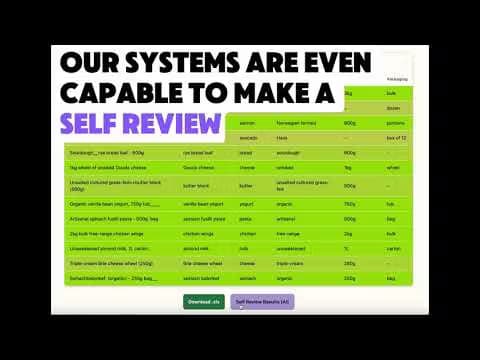
Data Cleaner is an online tool that takes messy, inconsistent text, like a pasted list of product records or customer entries, and reshapes it into neat rows and columns you can actually work with. You paste your raw data, let the AI figure out the format, and get back a structured table in seconds. No formulas, no manual reformatting.
The problem it targets is boring but expensive: someone spends hours fixing inconsistent spacing, mixed naming, and broken columns before any real analysis can start. Data Cleaner cuts that step. Its site claims a 95% accuracy rate and processing speeds over 1,000 records per second. Those numbers come from the vendor, not an independent test. If your team runs on tight reporting deadlines, the minutes saved at this stage compound across every dataset you touch.
It isn't a full data platform. There's no database hosting, no complex joins, no advanced modeling. It cleans and structures what you give it, then hands the result back as Excel, CSV, or through an API. Heavy transformation logic still needs something else. Data standardization is the whole job here, and nothing more. It's a data standardization tool, not a data warehouse. If you came looking for something that also stores your records, runs scheduled jobs, and joins tables across sources, this isn't that product.
Why reach for a data cleaning online service instead of a formula sheet? Because pasting a mess and reading a clean table beats debugging nested formulas any day. Simple as that. If you've ever stared at a column of product names that should all match and somehow don't, you already know why a dedicated cleaning step saves more time than it costs.
Getting Started
- Open the site and paste your messy data into the input box, or upload a file. The trial works without signing up.
- Optionally define the output columns you want, so the AI knows the shape of the result.
- Run the cleaning step and let the tool detect patterns and build the structured table.
- Review the output, then sign up for an account if you want to save work or keep going past the free character limit.
- Export the finished data to Excel, CSV, or pull it via the API.
Product Information
A quick look at Data Cleaner's pricing, supported platforms, and performance.
Best for
The users, tasks, and scenarios where this tool fits best.
Users
- Business analysts
- Data scientists
- Small sellers and retail operators
- Operations teams
Tasks
- Cleaning product catalogs
- Fixing customer lists
- Structuring pasted raw text
- Prepping inventory data
Scenarios
- A weekly report deadline where your source export is a mess and you have an hour to fix it.
- A one-off cleanup of a spreadsheet that's been growing inconsistently for months.
- Migrating data between tools and needing one clean, standard format first.
- Running the same cleanup every month on a recurring CSV dump.
Key features
Instant Data Transformation
Paste messy text. Get structured columns in seconds, instead of an afternoon of find-and-replace. The output is designed to be consistent across every record, so a field that says "256GB" in one row and "256 GB" in another comes out the same way. That consistency matters most when you're preparing data for analysis or reporting, where a single mismatched value can break a pivot table you spent an hour building.
AI Pattern Recognition
The AI detects patterns in your input and works out the shape of the data on its own, so you don't have to hand-configure column rules for common cases. Smart column recognition handles most standard records. You can still define output columns yourself when you want tighter control. Big difference. This is the gap between a blank regex playground and data cleaning software a non-technical user can actually run.
Custom Column Configuration
You can name the exact output columns you need before running a clean, which tells the tool how to lay out the result. This helps with structured formats like product databases, where fields should always appear in the same order. It keeps you from getting a table that's clean but shaped wrong. Think of it as a structured spreadsheet tool you steer, not one that guesses and runs. If you've spent time reordering columns by hand after an automated tool shuffled everything, you know how much difference a small bit of upfront configuration can make to your daily workflow.
Flexible Export Options
Cleaned data comes back as Excel, CSV, or through an API, so it can slot into whatever you already use. Analysts can drop a CSV into their reporting stack. Developers can wire the API into an existing workflow. When you export clean data straight into the tool you already trust, the cleanup step stops being a dead end.
Enterprise-Grade Security
Processing runs on Microsoft Azure infrastructure, and the vendor says sensitive information isn't permanently stored. For teams nervous about pasting real customer or catalog data into a web tool, that's the claim worth checking against your own policy before you commit. Security posture here is a vendor statement, not a certification you can inspect on the site. Read it as a starting point, not a guarantee. If your data is regulated, ask them directly.
Free Trial Without Signup
You can paste data and run a clean before creating an account, which lowers the barrier to testing whether the output actually fits your data. The free tier covers 30,000 characters per month, enough for small datasets and a few trial runs. You only pay once your volume grows past that. No card, no setup call.
Pros and cons
Pros
- Works directly in the browser, so there's nothing to install and the trial needs no signup.
- Handles the repetitive formatting work that eats hours of manual cleanup time.
- Exports to Excel, CSV, and an API, fitting both analysts and developers.
- Free tier with a real 30,000-character monthly allowance for small jobs.
- Runs on Azure with a stated no-permanent-storage policy for sensitive data.
- The interface asks for almost nothing. Paste, run, review.
Cons
- The 30,000-character free limit is tight. A 200-item database is roughly 7,000 characters, so a few runs exhaust it fast.
- Accuracy is advertised at 95% by the vendor, which means roughly one in twenty records may still need a manual check. That's a real cost when your data has to be exact.
- It's a cleanup tool, not a data platform. No database hosting, joins, or advanced transformation logic.
- Refunds after the first week are proportional to usage, so a heavy first week can leave you with little back.
Frequently asked questions
It takes messy, inconsistently formatted text and turns it into clean, structured columns you can export. You paste raw data, it detects the patterns, and you get back a tidy table in seconds.
Related content
Explore related tools, skills, and articles for Data Cleaner.
Data Cleaner Alternatives

Base Code
Base44 (Wix) · Coding · ProductivityBase Code is a shared cloud development environment from Base44. Teammates describe changes to an existing GitHub codebase in chat, preview them live and send them back as pull requests.

Google EmbeddingGemma 2
Google DeepMind · Writing · Image · CodingGoogle EmbeddingGemma 2 is a 740M-parameter open model that turns text, code, images, audio, and video frames into vectors in one 768-dimension space, running on phones and laptops.

GitGlow
GitGlow · Coding · ProductivityGitGlow is a local-first desktop Git client that lets independent developers review their own code and their AI agents' changes in one place before shipping.