

Databench by Alkera
Alkera (Alkera AI, Inc.) · Coding · Productivity · Business
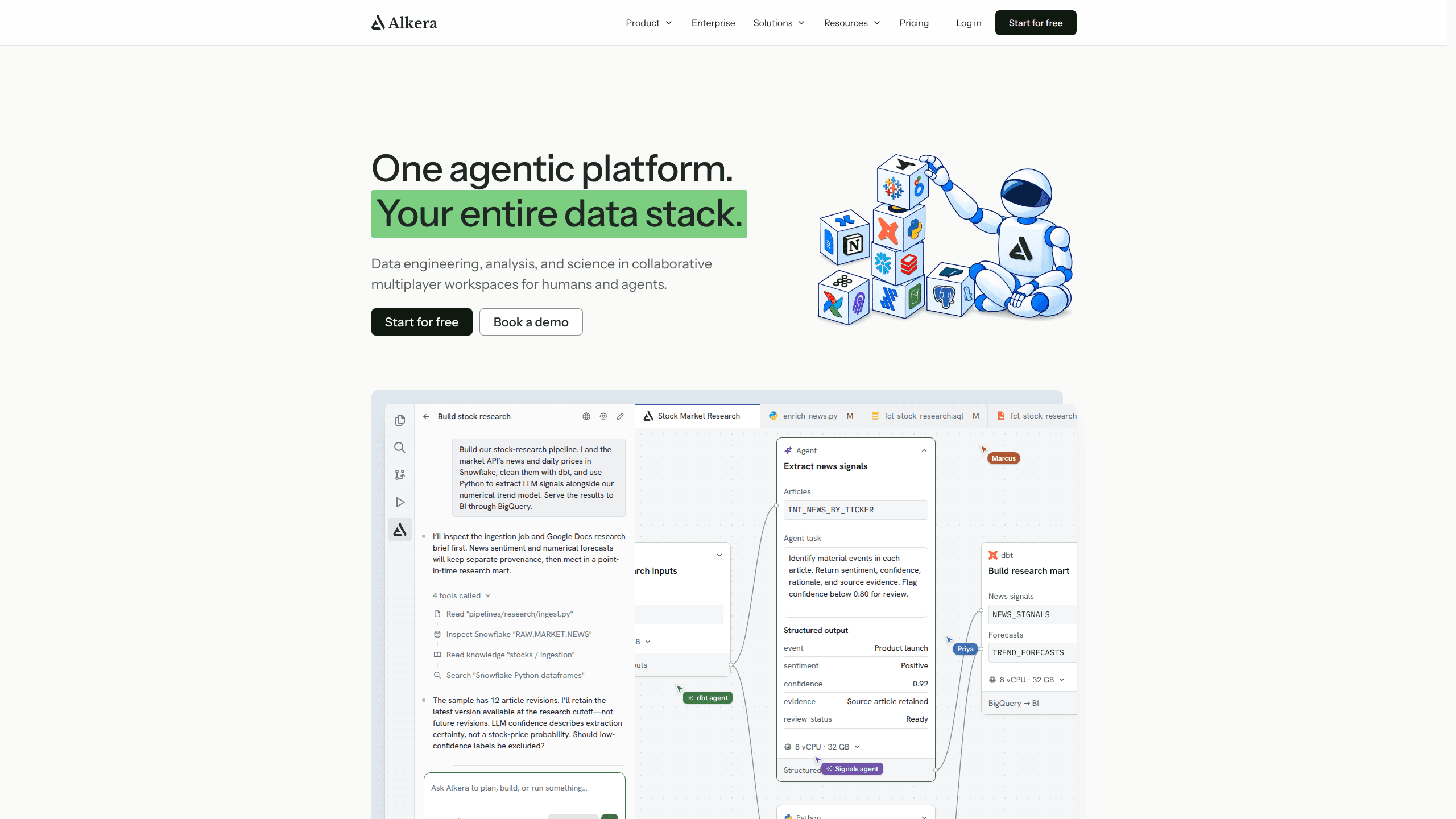
Databench by Alkera is an open-source, self-hostable workspace where data teams and AI agents share notebooks, files, chat, and compute on servers you control.
About Databench by Alkera
What Is Databench by Alkera
Databench by Alkera is a browser-based workspace for data work, published as open source under Apache-2.0. A team gets shared notebooks, files, agent chats, and the machines those chats run on, all inside one deployment the team hosts itself. Alkera, the company behind it, also sells a hosted version at alkera.ai with managed connectors and a free tier.
The problem it targets is familiar to anyone who has pointed a coding agent at a warehouse. A query can run without errors and still be wrong, because the join, the sample, or the source table was wrong. Databench keeps the agent inside the same notebook a person is editing, so its SQL and Python edits appear cell by cell while they happen.
This is not a managed BI product. Interactive dashboards, packaged connectors, and SSO belong to the commercial Alkera platform. The open build gives you a collaborative notebook, shared files, agent chats, and compute you add yourself, which is the trade for keeping data on hardware you already pay for.
Anyone comparing it with a hosted notebook is really asking whether a self-hosted data workspace is worth the operational work. The answer depends on how much of your data can leave the building. Where it cannot, an AI agent for data analysis that runs on your own machines is the only version of the tool you can approve.
Getting Started
- Install Docker with Compose v2, clone the repository, copy
.env.exampleto.env, and add an Anthropic or OpenAI key. - Run
docker compose up --build, openhttp://localhost:8080, and sign in as the default admin to confirm the stack works. - For a deployment other people reach, use the production compose file with real secrets and a public base URL, then bootstrap the first admin account.
- Add a Linux server over SSH under Organisation then Machines, wait for its node to register, and move a workspace onto it so chats and notebooks run there.
Product Information
A quick look at Databench by Alkera's pricing, supported platforms, and performance.
Best for
The users, tasks, and scenarios where this tool fits best.
Users
- Data engineers
- Analytics engineers
- Data scientists
Tasks
- Warehouse analysis in SQL
- Model training and post-training on rented capacity
- Reviewing agent output
- Handing work to a colleague
Scenarios
- Teams that must keep data in-house
- Small data teams without a platform group
- Starting an unfamiliar dataset
Key features
Notebooks that mix SQL, Python, and agents
One notebook holds SQL and Python cells side by side. A SQL cell queries any configured connection and hands the result to Python as a dataframe, and tables and charts render inline. Files stay plain Python, compatible with marimo, so they open in an editor and diff in git like any other source file. That matters when a team wants review history rather than a screenshot of a result.
Live edits from an agent working beside you
An agent reads, writes, and runs cells in the notebook you have open, and its changes appear as it makes them. Several people can join the same chat, which turns a solo analysis into a shared session. You can stop a run, edit a cell, and send the agent back with a correction instead of restating the whole request.
Compute you add yourself
An organisation admin adds any Linux server reachable over SSH, and Databench installs a node on it. Machines are shared per team, so a GPU box can serve the people who need it without a separate cluster account. Each chat runs in its own sandbox with gVisor and nftables rules that leave other services on the host alone.
Model gateway with bring your own model keys
Chats reach Anthropic, OpenAI, or Bedrock through a gateway that uses keys you supply. Nothing is resold and no shared quota sits between you and the provider. Swapping a key or a provider is a configuration change on your side, not a support ticket.
Organisations, teams, and a permission record
Password sign-in covers organisations, nested teams, invitations, and roles. One authorization policy layer classifies every action and records the decision, which gives a reviewer a trail when an agent proposes something destructive. This is the part that makes the open-source data workspace usable with contractors and auditors.
Shared files and a CLI
Each organisation gets a shared drive with live editing, sharing, and trash, so a CSV a teammate drops in is available to every notebook in the workspace. The alkera CLI runs a local daemon and talks JSON-RPC to the web app, which lets a developer work from a terminal without losing the shared session.
Pros and cons
Pros
- Apache-2.0 licence with no per-seat cost, so a team can run it for the price of the servers and model tokens.
- Data stays on infrastructure you register, including a laptop Docker box for early testing.
- Agent edits are visible in the notebook while they happen, which makes review part of the workflow.
- Bring your own model keys means provider choice and billing stay under your control.
- Notebooks are plain Python files, so version control and marimo tooling keep working.
Cons
- Self-hosting needs Docker, TLS, secrets management, and SSH access to Linux servers, which is more setup than a hosted notebook tool asks for.
- The Claude Agent SDK harness is still in progress, so opencode is the only harness that works today.
- Servers behind ufw or firewalld drop forwarded traffic by default, and the node does not add rules for either, so you have to open ports yourself.
- No mobile app and no Windows server support. Windows works only for the CLI and its daemon.
Frequently asked questions
The open-source data workspace is free to self-host under Apache-2.0, and you pay only for servers and model tokens. Alkera's hosted platform adds a free tier with 10 GB of storage, then Plus at $50 per month and Pro at $200 per month.
Related content
Explore related tools, skills, and articles for Databench by Alkera.
Databench by Alkera Alternatives

Base Code
Base44 (Wix) · Coding · ProductivityBase Code is a shared cloud development environment from Base44. Teammates describe changes to an existing GitHub codebase in chat, preview them live and send them back as pull requests.

Google EmbeddingGemma 2
Google DeepMind · Writing · Image · CodingGoogle EmbeddingGemma 2 is a 740M-parameter open model that turns text, code, images, audio, and video frames into vectors in one 768-dimension space, running on phones and laptops.

GitGlow
GitGlow · Coding · ProductivityGitGlow is a local-first desktop Git client that lets independent developers review their own code and their AI agents' changes in one place before shipping.