

DB Pilot
DB Pilot · Marketing
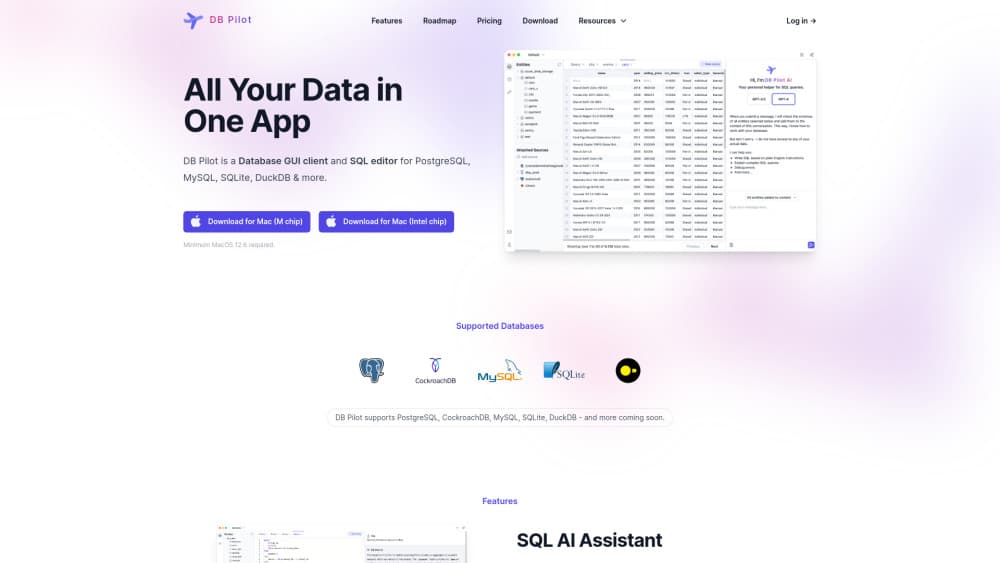
DB Pilot is an AI database GUI for Mac that pairs a smart SQL editor with SQL and Python notebooks and an AI assistant. It connects PostgreSQL, MySQL, SQLite, DuckDB, and CockroachDB.
About DB Pilot
What Is DB Pilot
DB Pilot is a desktop database tool built for Mac. It gives you the usual workbench pieces, a SQL editor, a table browser, and a results grid, then adds two things most workbenches leave out: notebooks that mix SQL and Python, and an AI assistant that writes and explains queries from plain English.
The problem it targets is the gap between asking a question and getting an answer. Analysts often write a query, export a CSV, then open a notebook to clean and chart the result. DB Pilot keeps that loop in one window, so a query feeds straight into a Python block and a chart without leaving the app.
The catch is hardware and reach. It runs on macOS only, needs macOS 15 or later, and works best on Apple Silicon, so Windows and Linux users are still waiting. The free plan also caps AI use until you buy a license.
Getting Started
- Download DB Pilot from dbpilot.io and open it on a Mac running macOS 15 or newer.
- Add a connection: pick PostgreSQL, MySQL, SQLite, DuckDB, CockroachDB, or a local file, then enter the host, port, and credentials.
- Explore your schema in the table viewer, and run a first query in the SQL editor with autocomplete on.
- Open a notebook and mix SQL blocks with Python blocks to transform and chart the data.
- Add your own AI provider key in settings, then ask the assistant to draft or explain a query.
Product Information
A quick look at DB Pilot's pricing, supported platforms, and performance.
Best for
The users, tasks, and scenarios where this tool fits best.
Users
- Data analysts who live in SQL and Python
- Product and business owners who run their own database
- Developers who want an AI database tool without a subscription
- Students and hobbyists on a budget
Tasks
- Turning a plain English question into a working query, then refining it in the editor instead of starting from scratch.
- Exploring a new database by browsing tables and columns before writing anything.
- Joining data from several sources, since a notebook can pull from multiple databases, files, and APIs at once.
- Building a small dashboard with input fields, date filters, charts, and tables to share a repeatable analysis.
Scenarios
- Weekly reporting
- Debugging a query that fails
- Comparing periods
- Onboarding to an unfamiliar schema
Key features
AI Assistant Across Every Block
The AI assistant sits inside the SQL editor, the table viewer, the Python blocks, and even the chart builder. You can ask it to generate a query, explain one you didn't write, or fix an error, and it uses context from the databases and tables you choose. It is a natural language to SQL shortcut for people who know roughly what they want but not the exact syntax. It supports the latest models from OpenAI, Anthropic, Google, and xAI, plus custom models from any provider once you add your own key.
SQL and Python Notebooks
Notebooks are the part that sets DB Pilot apart from a plain SQL client. Each block holds SQL, Python, text, or a chart, and they run in order like a Jupyter notebook. Query results are available in later Python blocks, and Pandas or Polars dataframes are available in later SQL blocks, so you can move between the two languages without copy and paste. You can parameterize blocks with Jinja and store secrets as environment variables.
Interactive Dashboards
You can turn a notebook into a small dashboard with input fields, date filters, tables, and charts. That means the same file serves as both your scratch pad and the report you hand to someone else. It's lighter than a BI tool on purpose, aimed at a repeatable analysis rather than a company wide dashboard.
Spreadsheet Style Table Editor
The table viewer lets you browse records and change them the way you would in a spreadsheet. You can insert, update, and delete rows, and filter or sort tables without writing SQL. For anyone who owns a small database, that removes the fear of a mistyped DELETE.
Smart SQL Editor
The editor offers context aware autocomplete for tables, columns, keywords, and functions, so you spend less time recalling exact names. Paired with the assistant, the pane works as an AI SQL editor: describe the result you want, and the query appears for review. It also formats your SQL to keep it consistent, keeps a query history you can re-run, and lets you save favorites for the statements you run often.
Local First and Private
All app data and connection credentials stay on your machine, with passwords stored in the system keychain. Database connections happen directly between your computer and the server. The AI assistant can see which tables and columns exist so it can help, but it doesn't read the actual rows in your database.
Export and Chart Builder
You can export results or copy them to the clipboard as CSV, JSON, NDJSON, or Markdown, which covers most handoffs to colleagues. The chart builder lets you build visuals without code and compare values across time periods from inside the results grid.
Pros and cons
Pros
- The AI assistant works across SQL, Python, tables, and charts, so you aren't bouncing to a separate chatbot.
- Notebooks mix SQL and Python with shared results between blocks, which cuts the usual export and reimport step.
- Local first design keeps your data and credentials on your own machine, and the AI never reads your rows.
- You choose your own AI provider and key, so you control model and cost instead of a bundled markup.
- A one time $79 license with a working free tier is a low risk way to try it.
Cons
- macOS only for now, and it needs macOS 15 or newer, so Windows and Linux users can't use it.
- The free plan limits AI messages to 20, so heavy AI use means paying or adding your own key.
- The dashboard and chart features are lighter than a dedicated BI tool, so enterprise reporting stays elsewhere.
- No public API, which means teams that need to script the tool itself have no path in.
Frequently asked questions
It's a database GUI and notebook app for exploring, querying, and editing data on a Mac. You connect a database, write SQL or Python, and use the AI assistant to generate and explain queries.
Related content
Explore related tools, skills, and articles for DB Pilot.
DB Pilot Alternatives

ngram 2.0
ngram · Video · Marketingngram 2.0 is an AI video generator for teams. It turns a prompt, a screen recording, or a product URL into a narrated explainer, product demo, or AI avatar video, and every scene stays editable.

shippedit.me
Krawlup · Marketing · Businessshippedit.me now redirects to Krawlup, a web platform that audits SEO, AEO and page speed every week, then hands the fixes to AI coding agents over MCP.

MePersona
MePersona, Inc. · Writing · Productivity · MarketingMePersona is an AI unified inbox for creators. It learns your voice, drafts replies to fan messages from 12 platforms, and sends only what you approve.