

DCP
DCP · Coding
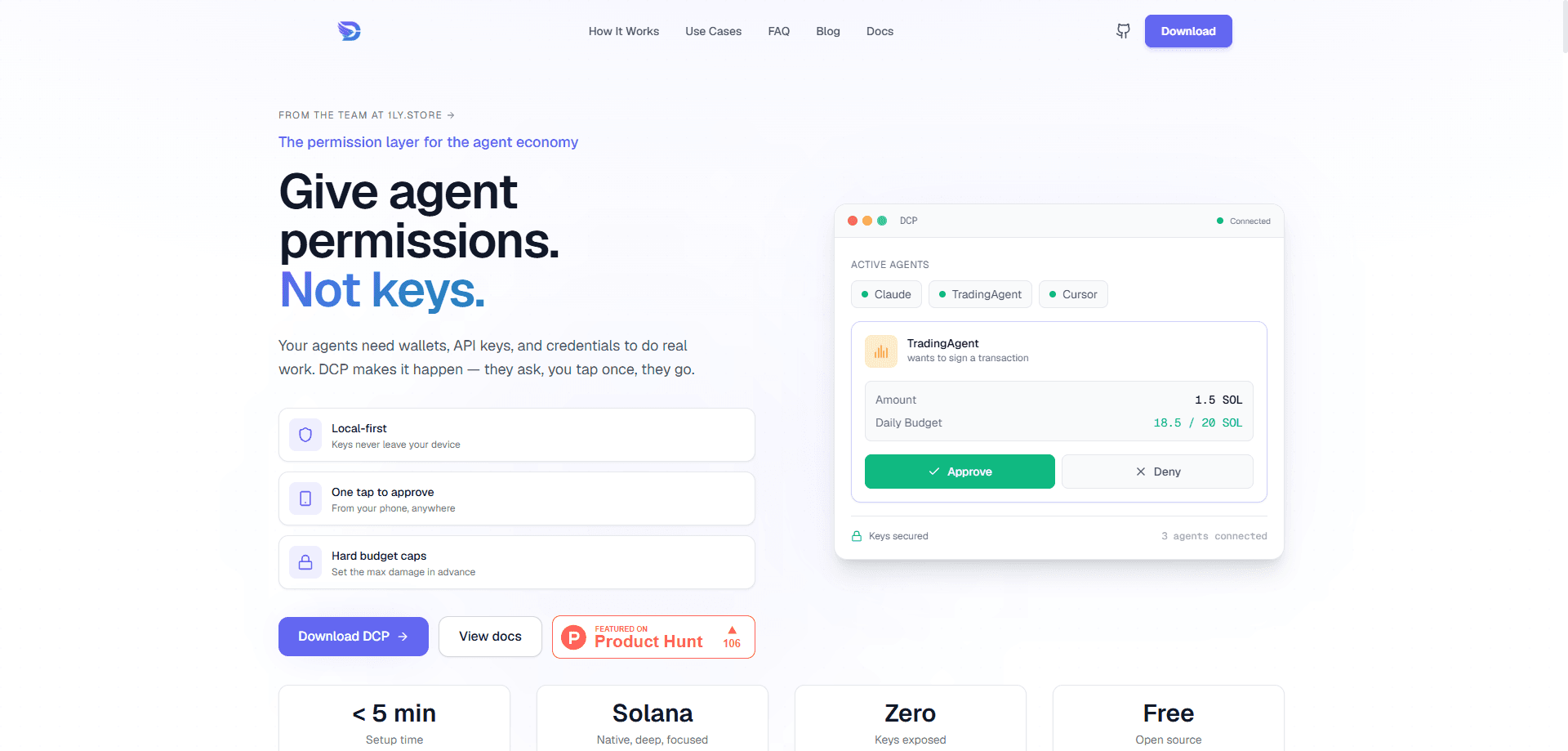
DCP is a permission layer that sits between AI agents and the sensitive things they want to touch. It runs on your own computer, holds your wallet keys and stored details in a local vault, and hands agents only the result of an action, never the secret behind it. Think of it as practical AI agent security you can run yourself rather than rent. Connect an agent in one line, give it its own spending limits and access rules, and approve anything unusual from your phone. It works with Claude Desktop, ChatGPT, Cursor, VS Code, OpenClaw, and any MCP-compatible client.
About DCP
What Is DCP
Most useful agents eventually need something you'd rather not hand over. They sign transactions, pay for API calls, log into accounts with your details, and read private context. Right now you pick between locking them out entirely or handing them your keys and hoping nothing goes wrong. DCP offers a third path: scoped access with rules you set once.
The whole system is non-custodial and built as an AI agent permission layer first, a wallet second. Your keys stay on your device. Signing happens locally, so nothing sensitive gets uploaded. Agents ask DCP for a capability, DCP checks your rules, allowed actions run on their own, and anything over the line waits for your approval. The technology underneath is built around Solana wallets. The same vault also stores things like your email, shipping address, or API keys.
Two things are worth knowing before you commit. The app runs on macOS and Windows only, so Linux users are out for now unless they build from source. And because it's a young product, some pieces, like browser agents through the hosted relay, are still settling in.
Getting Started
- Download DCP Desktop from dcpagent.com for Mac (Apple Silicon or Intel) or Windows.
- Open the app and choose Create vault, then set a password. Write down your recovery phrase, since there's no way to reset it later.
- Create a Solana wallet inside the vault. This is the wallet your agent can spend from, within your limits.
- Optionally store details an assistant might need, like your name, email, shipping address, or an API key.
- Set a per-transaction and daily spending cap in settings, then connect an agent with a single line from the docs.
Product Information
A quick look at DCP's pricing, supported platforms, and performance.
Best for
The users, tasks, and scenarios where this tool fits best.
Users
- Developers running agents on a VPS or remote server
- Crypto users who want automation without handing over a seed phrase
- Anyone paying for APIs, datasets, or inference
Tasks
- Recurring API top-ups
- Form filling and sign-ups
- Token swaps within limits
Scenarios
- Running a coding or trading agent overnight
- Traveling while an agent needs a yes
- Cleaning up after a bad agent
Key features
Local vault with non-custodial signing
Your keys never leave the device. DCP signs locally and uploads nothing, which matters if you don't want a provider holding the thing that controls your money. The vault can also store non-wallet data like identity fields and API credentials, each private until you approve a request for it.
Per-agent rules and scopes
Every agent you connect gets its own permissions. One might read a single credential. Another might hold a small wallet budget, and a research agent might only read approved notes. You decide what each one can use, spend, and read, and the dashboard keeps all of it in one place.
Spending caps with automatic and manual paths
Set a per-transaction and daily cap, and DCP splits actions into two lanes. Anything inside your rules runs automatically; anything over the limit or out of the ordinary asks for approval. An agent can't drain the wallet because the cap holds regardless of what it tries.
Phone approvals through Telegram
Connect Telegram and sensitive requests reach you anywhere. You get a message like "your assistant wants to send $50," then tap Approve or Deny. Not ideal for every purchase. Each approval is tied to the specific amount and destination you see, so it can't be quietly swapped for something else.
One-line agent connection over MCP
Connecting an agent takes a single line, and it shows up in your dashboard with its own rules about a minute later. The docs cover stdio setup for Claude Desktop, Cursor, and VS Code, plus a streamable HTTP mode for remote or URL-based clients. No plugins and no keys handed to the agent.
Full action log and instant revoke
Every request, check, and result is logged, so you can see what an agent did and when. If one starts behaving oddly, one click cuts off its access while the rest keep working. That's the part most people don't think about until something goes wrong.
Solana-native wallet actions
DCP is built around Solana, so a Solana agent wallet here means an agent that can check balances, read transaction history, transfer SOL or SPL tokens, swap through Jupiter, sign transactions, and sign x402 payment payloads. Wallet reads need no approval; anything that moves value goes through budget and approval first.
Pros and cons
Pros
- Keeps private keys on your own device instead of a remote service, which removes the biggest single point of failure.
- Per-agent scopes mean you don't have to give every assistant the same power just to get work done.
- Daily caps make autonomous spending safe enough to actually leave running.
- One-line MCP setup works across Claude Desktop, ChatGPT, Cursor, VS Code, OpenClaw, and other MCP clients.
- Open source, so you can inspect what runs before trusting it with a wallet.
Cons
- Desktop app runs on macOS and Windows only, so Linux users have to build from source or skip it.
- There's no way to recover a forgotten vault password, and losing the recovery phrase means losing access permanently.
- Solana is the only chain the wallet side supports, so Ethereum or Bitcoin users get no help here.
- Being early, some flows around remote and browser agents are less polished than the core desktop setup.
Frequently asked questions
DCP is a permission layer for AI agents. It lets them use your wallet, credentials, and private data while keeping the actual secrets on your device. What does that mean in practice? The agent gets the outcome of an action without ever holding the key or password behind it.
Related content
Explore related tools, skills, and articles for DCP.
DCP Alternatives
Forefront
Forefront · CodingForefront is a web platform for building with open-source AI. It lets you fine-tune leading open-source language models on your own data, evaluate how they perform, and run them through an API or export them to host yourself. Developers who want the convenience of a closed-source platform but insist on owning their models and data are the target audience here.

Startkit
StartKit.AI · CodingStartkit is a boilerplate for building AI SaaS and AI wrapper products. Think of it as an AI startup boilerplate with the boring parts already wired up: authentication, Stripe and Lemon Squeezy payments, usage limits, transactional email, and an AI API starter that talks to OpenAI, Anthropic, Groq, or Llama. You clone the repo, set your price, and start on the part of your product that people actually pay for. It's Next.js under React and Tailwind, so most of the boilerplate code already feels familiar.
Testim
Tricentis · CodingTestim is an AI-powered test automation platform for building and running end-to-end tests across web, mobile, and Salesforce applications. It leans on machine learning to keep tests stable when an interface changes, so teams spend less time fixing broken selectors. Not bad for an automated testing tool you can start using today. You create tests by recording actions in a browser, then optionally add JavaScript when you need more control. It's a solid pick for busy QA teams.