

DeepShare
Yorick · Other
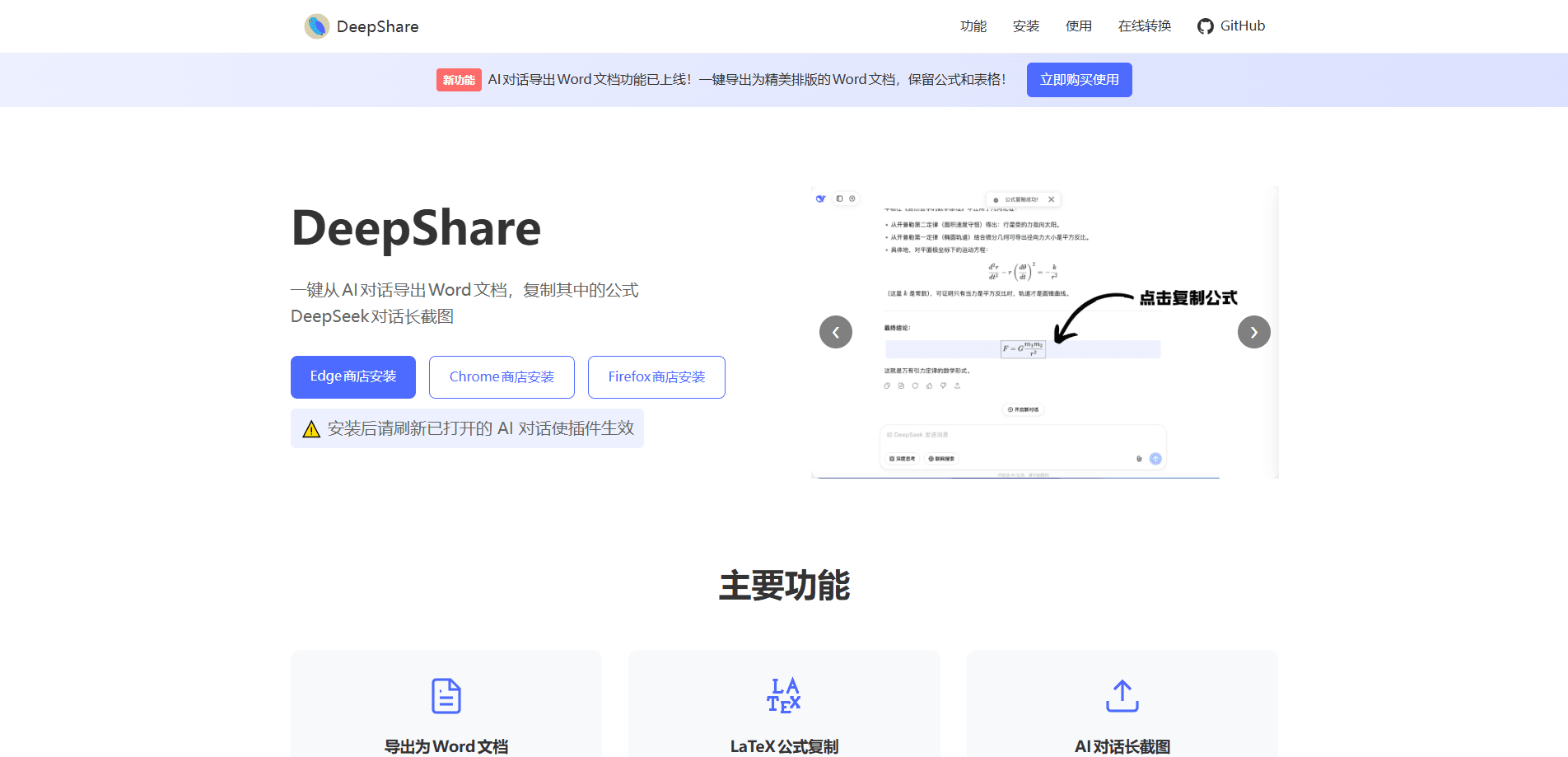
DeepShare is a lightweight browser extension that turns AI chat answers into clean, formatted Word documents. This browser extension for AI chats works on DeepSeek, ChatGPT, Gemini, and a long list of other platforms, keeps headings, tables, and math formulas intact, and adds two extras that most export tools skip: one-click formula copying and full-length DeepSeek screenshots. If you regularly pull AI answers into papers, class notes, or reports, it saves the re-formatting work that normally eats up your afternoon.
About DeepShare
What Is DeepShare
DeepShare is an AI chat export extension for Chrome, Edge, Firefox, and Quark. It solves a small but stubborn problem: copying an AI answer into Word usually breaks the formatting. Headings flatten, tables fall apart, and math formulas turn into unreadable strings of symbols. DeepShare takes the answer straight from the page and rebuilds it as a structured document.
The extension covers more than one platform. DeepSeek, ChatGPT, and Gemini get one-click export to Word, while platforms like Doubao, Kimi, Grok, Qwen, iFlytek Spark, and Poe are supported through a manual paste flow, where you copy the AI answer's Markdown text into the extension and it converts that to a document. It also handles Gemini DeepResearch output.
The biggest limit is scope. This isn't a full workspace or a note-taking app. It exports what's on the page and does little else, by design. The team says it deliberately keeps a light touch so it doesn't take over the original page style. Formula copying and DeepSeek screenshots are free, while Word export runs on a paid quota.
Getting Started
- Install DeepShare from the Chrome Web Store, Edge Add-ons store, Firefox Add-ons, or the Quark extension center.
- Refresh any AI chat pages that were already open, since the extension needs a fresh page to attach.
- Open a conversation on a supported platform like DeepSeek, ChatGPT, or Gemini.
- Use the extension to export the answer to Word, copy a formula, or capture a long screenshot.
- Paste the result into Word, WPS, your paper, or a slide deck and check the layout.
Product Information
A quick look at DeepShare's pricing, supported platforms, and performance.
Best for
The users, tasks, and scenarios where this tool fits best.
Users
- Students
- Researchers
- Teachers
Tasks
- Exporting AI chat to Word
- Copying formulas from ChatGPT
- Archiving a long DeepSeek chat as an image
Scenarios
- Late-night study sessions where you need the AI's derivation in your notes before the material fades
- Building a report from several AI answers and needing consistent formatting across all of them
- Sharing a whole DeepSeek conversation with a teammate who won't open a chat link
Key features
Export Answers to Word
This is the core of the extension. It converts an AI answer into a Word document and keeps the structure that matters: headings, lists, code blocks, tables, and math formulas. The output adds a sidebar table of contents on its own, which is handy when an answer runs long. You skip the usual round of fixing fonts and re-aligning tables after a messy copy-paste.
Formula Copying
Click any formula in a supported AI chat and DeepShare copies it as LaTeX or MathML. That's the format Word, WPS, papers, and slide decks can actually read, so the formula reappears as a real equation instead of a jumble of characters. For anyone in math or science, this alone justifies keeping the extension installed.
DeepSeek Long Screenshots
DeepShare captures a complete DeepSeek conversation as a single image. You can pick one message or several, and add a custom watermark. It's built for sharing and archiving, the kind of thing you'd otherwise stitch together from a dozen screenshots by hand.
Gemini DeepResearch Export
Answers from Gemini's DeepResearch mode can be exported to Markdown or Word. Research summaries that would normally be trapped in the browser become files you can edit and cite.
Wide Platform Coverage
Which AI platforms does it cover? DeepSeek, ChatGPT, and Gemini get full one-click export. A longer list, including Doubao, Kimi, Grok, Qwen, iFlytek Spark, Zhipu Qingyan, OpenRouter, Poe, and Monica, works through manual paste of Markdown text. Coverage is broad, but the depth of support varies by platform.
Manual Paste Conversion
Not every platform exposes its answer in a way the extension can read directly. For those, you copy the answer's Markdown and paste it into DeepShare, which then builds the Word document. It's an extra step, but it keeps the formula and table handling consistent.
Pros and cons
Pros
- Keeps headings, tables, code blocks, and math formulas intact through export
- Formula copying outputs LaTeX or MathML, which pastes cleanly into Word and WPS
- Free tier covers formula copying and DeepSeek long screenshots, no payment needed
- Front-end code is open source, so you can check what it actually does
- Runs on Chrome, Edge, Firefox, and Quark, with no ads in the interface
Cons
- Word export runs on a daily quota, so heavy users will hit the ceiling on lower tiers
- Only DeepSeek, ChatGPT, and Gemini get true one-click export; the rest need manual paste
- Long screenshots are DeepSeek-only, which leaves other platforms out
- The interface and pricing are aimed at a Chinese-speaking audience, which may put off some users
Frequently asked questions
It's a browser extension that exports AI chat answers into Word documents and copies the math formulas inside them. It also saves full DeepSeek conversations as long screenshots. Think of it as a bridge from an AI chat window to a file you can edit.
Related content
Explore related tools, skills, and articles for DeepShare.
DeepShare Alternatives
BinkBink
BinkBink · OtherBinkBink is a free online game platform and AI game maker that lets anyone turn a short text description into a playable browser game. You can jump into hundreds of community-made games. Or describe your own idea and play it in seconds, then share it with friends. Want to create your own game? You don't need to code. No engine setup, no download, no hassle.

Audiogen
Audiogen Inc. · OtherAudiogen is an AI music generator built by Audiogen Inc., a small research team that spent about 2.5 years training its own generative music model and designing a web interface around it. Instead of a plain text box, this AI music tool turns the timeline into a beginner-friendly Generative Audio Workstation, or GAW, where inpainting, extending, remixing and stem editing work more like painting on a canvas. The product is still in beta, so access runs through a waitlist or an invite. Paid plans aren't published yet.

Aiml API
AIMLAPI OÜ · OtherAiml API is a unified AI model API that puts more than 1000 models from OpenAI, Google, Anthropic, and others behind one endpoint and one bill. You write code against a single OpenAI-compatible schema, then switch between chat, image, video, and audio models by changing a model string. It suits developers and small teams who want multi-model access without juggling a dozen separate provider accounts, and it removes the usual billing headache that comes with testing several vendors. One key covers it all.