
Deeptranslate 全页 双语页面翻译器
DeepTranslate · Voice & Language · Productivity
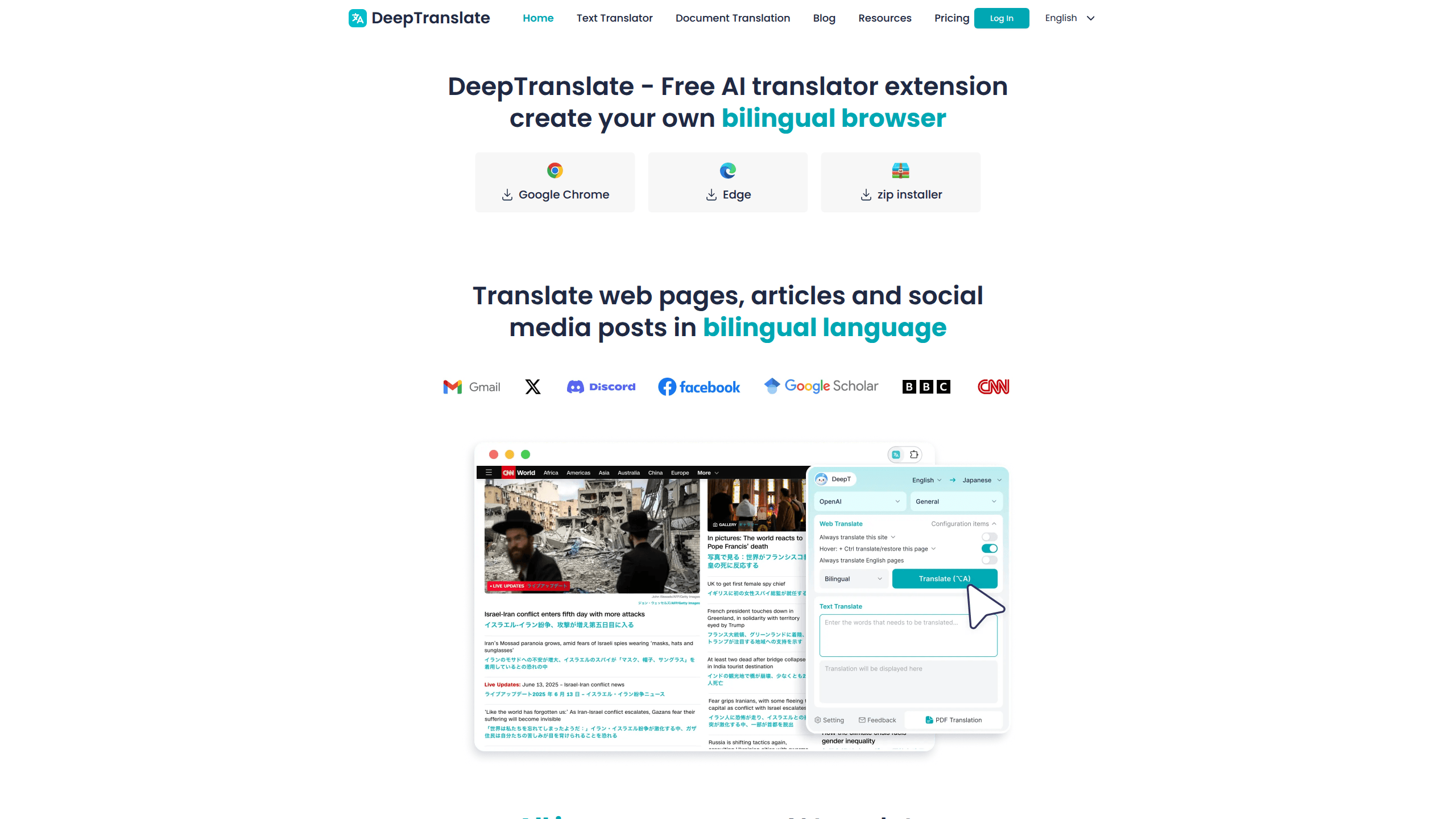
DeepTranslate is a free AI translation extension that translates whole web pages and shows the original text and the translation side by side. It covers 140+ languages, and instead of forcing you to copy text into a separate box, it rewrites the page in place so you keep reading where you already are. During setup you pick a translation engine, Google Translate, OpenAI, Microsoft Translate, Claude or Gemini, and switch between bilingual and full immersive modes whenever you want.
About Deeptranslate 全页 双语页面翻译器
What Is DeepTranslate
DeepTranslate is a web translation extension built by an independent development team. You install it in Chrome, open any foreign page, and it turns that page into a readable version in your own language. No copy and paste. The selling point is the bilingual layout. Rather than replacing the original words, it can stack the translation under each paragraph. That's genuinely useful if you're learning a language. It also helps when you want to check whether a machine got a term right.
The bigger draw is that the AI engines are free to use here. Most web page translator tools either lock AI models behind a subscription or make you bring your own API key. DeepTranslate bundles Google Translate, OpenAI, Microsoft Translate, Claude and Gemini into one interface. The OpenAI option just asks you to sign in with a Google account. Why does that matter? Because the good engines are usually the paid ones.
There are limits worth knowing up front. The document translation feature currently handles PDF files only; other formats are still listed as in progress. Because the translations run through third party engines, whatever you translate passes through those services. So don't run confidential documents through it. Bulk, professional grade translation work still needs a paid tool with glossary and format support.
Getting Started
- Install the extension from the Chrome Web Store or download the install package from the DeepTranslate site.
- Click the DeepTranslate icon in your browser and choose your target language.
- Pick the translation engine and the display mode, bilingual or full immersive.
- Hit Translate and read the page in the layout you prefer.
Product Information
A quick look at Deeptranslate 全页 双语页面翻译器's pricing, supported platforms, and performance.
Best for
The users, tasks, and scenarios where this tool fits best.
Users
- Language learners
- Students reading foreign papers
- Everyday readers who hit foreign sites
Tasks
- Reading foreign news
- Checking terminology
- Translating a PDF
Scenarios
- Browsing around the web during lunch
- Studying for a course in another language
- Comparing a product spec across regions
Key features
Bilingual page translation
This is the feature that sets DeepTranslate apart from basic page translators. Instead of wiping out the original text, it shows the translation alongside it, so you can read the version you understand and still see the source. Bilingual web translation matters when precision counts. You can spot a mistranslated name or a term the engine got wrong and correct your reading on the spot.
Multiple AI translation engines
DeepTranslate pulls several engines into one menu: Google Translate, OpenAI, Microsoft Translate, Claude and Gemini. You choose the engine per page, which means you can run the same paragraph through OpenAI when the Google result feels stiff. The OpenAI option works by signing in with a Google account, so you don't have to manage an API key yourself.
Full immersive translation
When you just want to read, switch to immersive mode and the original text is replaced entirely with the translation. It's cleaner on long articles where seeing two versions of every paragraph gets distracting. You can flip between bilingual and immersive modes on the same page, so the choice is yours rather than fixed at install time.
PDF document translation
The extension can translate whole PDF documents, not just live web pages, and it works to keep the original layout intact. That means tables stay tables and headings stay headings, which matters for reports and academic papers where structure carries meaning. Support for other file types is still listed as in progress, so PDF is the one to rely on today.
Custom translation style
You can set how the translated text looks, including font, color and size, so it fits the page instead of clashing with it. Small thing, but it makes a long reading session easier on the eyes. There's also an option to steer the translation style with built in prompts, useful when you want a more formal or more casual tone than the default.
Pros and cons
Pros
- Free to use. That includes the AI engine options other tools charge for.
- Bilingual view lets you compare the original and the translation without switching tabs.
- 140+ languages covered, so rare language pairs are usually supported.
- One click switching between Google, OpenAI, Microsoft, Claude and Gemini engines.
- Chrome and Edge support with a straightforward install.
Cons
- Document translation only handles PDF right now; other formats aren't ready yet.
- Text you translate is sent to third party engines, so it's a poor fit for confidential material.
- No API, so you can't wire it into your own workflow or app.
- The bilingual layout can clutter pages that are heavy with short lines and buttons.
Frequently asked questions
Yes. The extension is free to use, and that includes the AI engine options. The OpenAI engine requires a Google account sign in, but there's no subscription or per page charge.
Related content
Explore related tools, skills, and articles for Deeptranslate 全页 双语页面翻译器.
Deeptranslate 全页 双语页面翻译器 Alternatives

Foley
Hanamori Labs, LLC · Voice & Language · Productivity · AI AssistantFoley is a voice to-do list that turns a spoken sentence into a filed task, complete with project, date and time, then helps you plan the day around what is already there.

HireKey
HireKey · Voice & Language · Productivity · LeaningHireKey is an AI job search copilot built by a former tech recruiter. It checks role fit, tailors resumes, runs interview practice and tracks every application.

Fluence
Yay Software (Yannick Huchard) · Writing · Voice & Language · ProductivityFluence is an Android app that reads PDFs, EPUBs, Word files and web articles aloud, follows each sentence as it speaks, and answers questions about the text on the phone itself.