

Detecting-AI.com
Detecting AI · AI Detection
Detecting-AI.com is a free AI content detector that scores whether text came from ChatGPT, Claude, or Gemini and highlights the AI-like passages in the original draft.
About Detecting-AI.com
What Is Detecting-AI.com
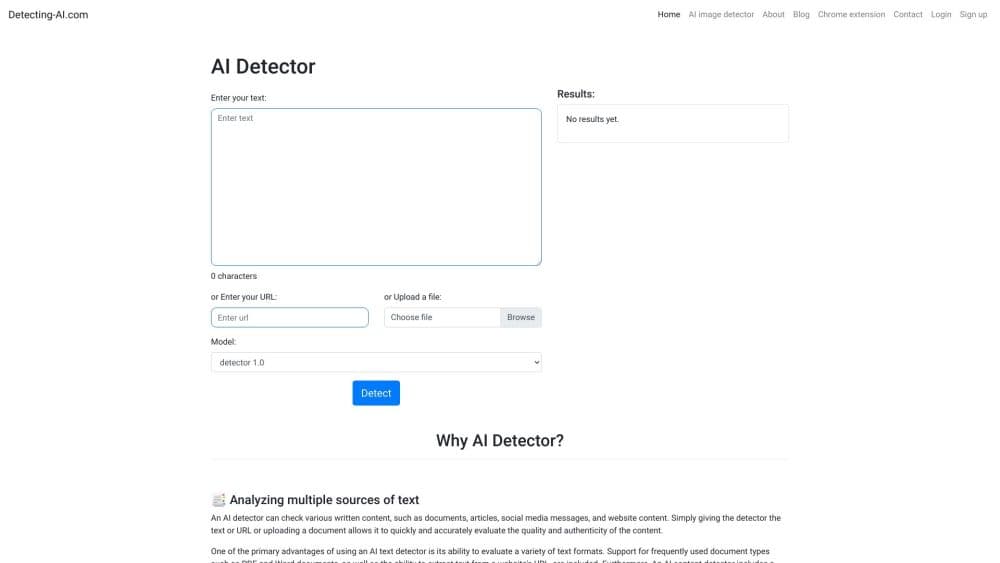
Detecting-AI.com is a browser-based AI detector for anyone who needs to judge writing they did not watch being written. Paste text or upload a TXT, PDF, or DOCX file, and it returns an overall AI score plus the specific passages flagged for closer review. You don't need an account for a free scan.
The tool leans on context analysis rather than a single dramatic percentage. It labels passages as human, AI, or mixed, and it names the model families it is built to review: OpenAI's GPT line, Anthropic's Claude, and Google's Gemini. As a free AI checker, the site is careful to call its output a signal, not proof, which is the honest way to frame any detector.
The limits are real and worth stating up front. Short, translated, or heavily edited writing is harder to classify, and scores shift as the text changes. A model score can't establish authorship or intent, so the site tells users to weigh it alongside drafts and sources. On the free plan, checks are capped at 15,000 characters and 300 per day.
Getting Started
- Go to detecting-ai.com and paste your text or upload a TXT, PDF, or DOCX file. The free tier needs no signup.
- Choose Scan for AI to start the analysis. Your text is not sent to the server while you type.
- Read the results. You get an overall AI score and AI-like passages highlighted inside the full document.
- Create a free account if you want longer checks or more scans per day.
- Developers can call the detector through the API or connect the MCP server to check text from inside an agent.
Product Information
A quick look at Detecting-AI.com's pricing, supported platforms, and performance.
Best for
The users, tasks, and scenarios where this tool fits best.
Users
- Teachers and professors
- Students checking their own work
- Editors and publishers
- Content teams and marketers
Tasks
- Scanning a full document
- Checking mixed drafts
- Humanizing flagged text
- Wiring detection into a pipeline
Scenarios
- Grading a stack of papers over the weekend
- Vetting a freelancer's article
- Publishing a blog post you paid for
- Building a review step into a product
Key features
AI Detection With In-Context Highlights
Detecting-AI.com returns an overall AI score and then marks the AI-like passages inside your original text, so you see where the signal came from instead of trusting one number. The full document stays readable while flagged lines are highlighted in place. That placement is what makes the result something you can actually check.
Model Coverage Across GPT, Claude, and Gemini
The detector is designed to review text from OpenAI's ChatGPT line, Anthropic's Claude family, and Google's Gemini models, plus mixed drafts blended from human and AI writing. The site is upfront that model names describe the text families it reviews, not a guaranteed source match.
Free Tier With No Signup
The free plan covers up to 300 AI detections a day and 15,000 characters per check, with no account needed to start. That is enough to test the detector on your own writing before you pay for anything. Free accounts also get basic AI Humanizer words each month.
AI Humanizer
When a flagged draft needs work, the AI Humanizer rewrites the passages the detector marks and shows each edit so you can accept or reject it. Paid plans bundle a monthly word allowance, and Pro and Scholar add an Autopilot mode that rewrites and re-checks each section automatically.
Plagiarism Checker and Fact Checker
Paid plans pair the AI detector with a plagiarism checker and a Fact Checker. The plagiarism tool traces text back to published sources and runs on credits, while the Fact Checker reviews the claims in a passage. Both sit beside detection so a review covers originality and accuracy together.
API and MCP Server for Developers
Everything the web workbench does is available programmatically. You can score documents from your own pipeline through the AI detector API, or connect the MCP server so an agent checks text for AI patterns mid-conversation. That makes detection a step inside a workflow rather than a separate tab.
Pros and cons
Pros
- Free scans need no account, and the free tier allows up to 300 checks a day.
- In-context highlights show which passages triggered the score, so the result is easy to explain.
- It covers the GPT, Claude, and Gemini families and blends them into one verdict for mixed drafts.
- The API and MCP server let teams fold detection into their own tools instead of a manual copy-paste step.
- Paid plans add a plagiarism checker and a Fact Checker, so one review covers detection, originality, and accuracy.
Cons
- Detection is never proof, so a flagged score can't be used on its own to accuse anyone.
- The free plan caps a check at 15,000 characters, which is tight for long papers or reports.
- Accuracy drops on short, translated, or heavily edited passages, so a single paragraph is a shaky signal.
- The useful extras, like the plagiarism checker and Humanizer Autopilot, sit behind the paid plans.
Frequently asked questions
Detecting-AI.com is an AI content detector that estimates whether text was written by a human or a model like ChatGPT, Claude, or Gemini. It returns an overall AI score, highlights the AI-like passages in your original text, and runs in the browser, over an API, or through an MCP server.
Related content
Explore related tools, skills, and articles for Detecting-AI.com.
Detecting-AI.com Alternatives
Isgen AI
Isgen · AI DetectionIsgen AI is a web-based AI detector that scores text for machine authorship and shows you which sentences and phrases push the number up. It's built for teachers, editors, students, and writers. Their question is simple: did this draft come from ChatGPT, GPT-5, Claude, Gemini, DeepSeek, or another model? You paste or upload content, run a scan, and get a Human, AI, and Mixed breakdown in seconds. There's also a companion editor that scores text while you write it.
Humanizeai Tools
Humanizeai Tools · Writing · AI DetectionHumanizeai Tools is a web-based AI humanizer that rewrites machine-generated text so it sounds like a person wrote it, which is the whole point of the category it belongs to. Paste a draft from ChatGPT, Claude, or Gemini, run it through the tool, and it swaps out the phrases and sentence patterns that AI detectors flag. If your goal is to make AI text sound human before you publish it, this is the kind of tool built for exactly that. It suits students, bloggers, and marketers who need copy that reads naturally and clears tools like GPTZero, Copyleaks, and Winston AI after a single pass.

Hidemyai
Hidemyai · Writing · AI DetectionHidemyai is an AI content humanizer. It rewrites text from ChatGPT, Jasper, and similar tools so the result reads like a person wrote it. You paste your draft, pick a document type and tone, and the service returns a version meant to bypass AI detectors such as Originality.ai, Turnitin, and ZeroGPT. It targets writers, marketers, and students who lean on AI drafts but can't ship copy that sounds robotic. The promise is simple: make AI content undetectable.