

Devin Voice
Cognition AI · Voice & Language · Coding
Devin Voice is the voice mode built into Devin, the AI software engineer from Cognition. It lets you hold a spoken conversation with Devin to explore ideas, pressure-test an approach, and hand off coding tasks while you're away from your keyboard. Instead of typing every prompt, you click the call button, allow microphone access, and talk.
About Devin Voice
What Is Devin Voice
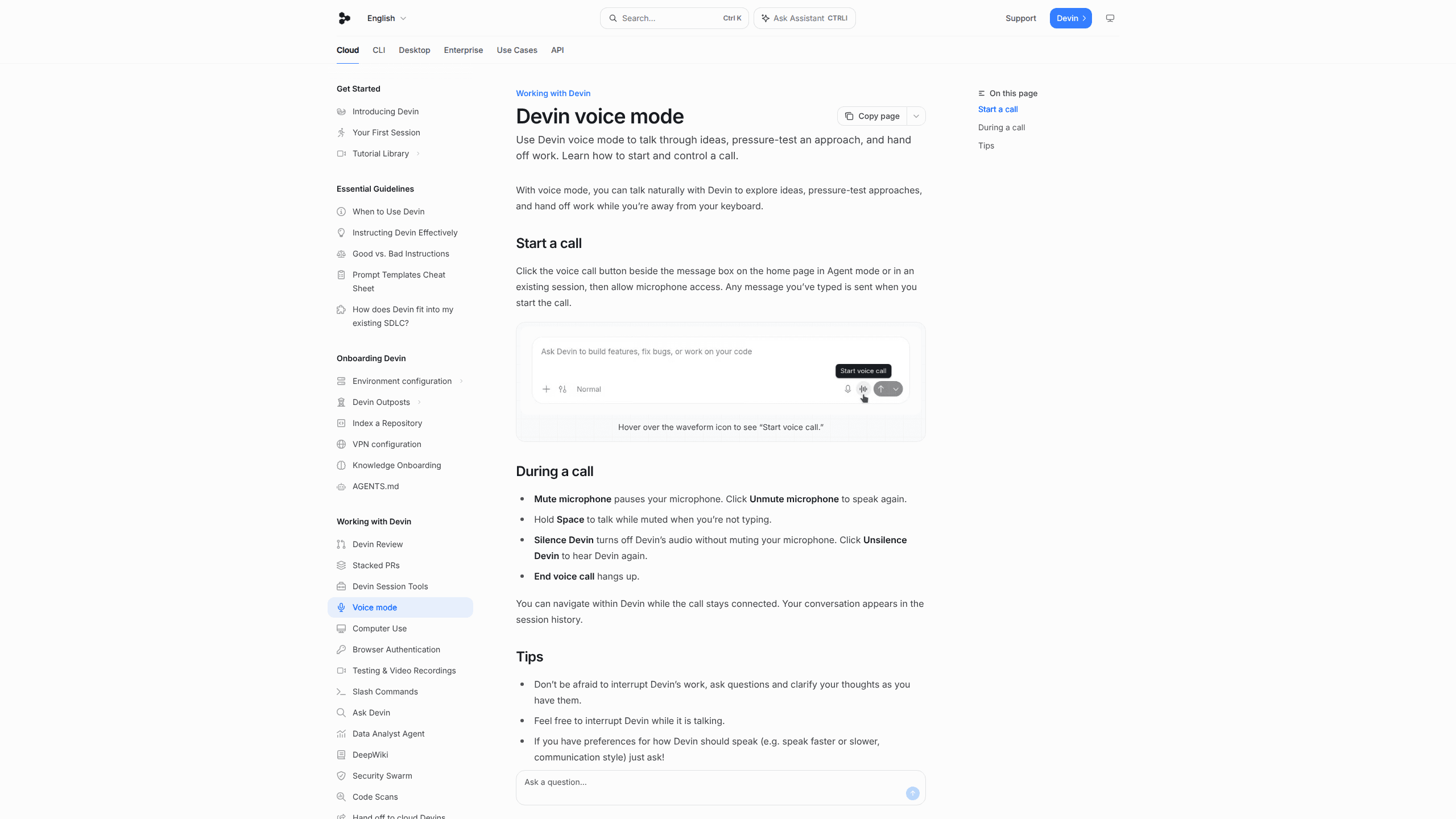
Devin Voice works as a voice coding assistant layered on top of Devin, an autonomous AI software engineer that can write, run, and test code. Rather than a standalone product, it's a calling feature that turns your messages into a live spoken conversation with the agent, so the same Devin session that was moving along by text can simply start listening to you instead. You tap the voice call button next to the message box, grant microphone access, and Devin starts listening. The text you've already typed gets sent the moment the call begins, so you don't lose what you were working on.
The point is convenience. Pacing around a room? The answer can still be at hand. When you're walking to get coffee, or just tired of typing, you can talk through a design decision out loud and have Devin respond. This matters for the messy early stage of a task, when you're still figuring out what you want and no clean written prompt exists yet. Talking is faster than typing when your thoughts aren't fully formed yet. That's the whole pitch.
The biggest limitation is scope. Voice mode is a way to talk to Devin, not a separate coding engine, and the underlying agent still works best on tasks with clear completion criteria. Long, ambiguous spoken instructions can be harder for the agent to act on than a well-structured written prompt that lays out the files, steps, and success criteria in one place. So voice is great for thinking and handing off, less so for precise multi-step specs.
Getting Started
- Open Devin in Agent mode on the home page, or jump into an existing session.
- Type anything you want to send first. Any message in the box is sent when the call starts.
- Click the voice call button next to the message box and allow microphone access.
- Talk with Devin. Mute your mic, hold Space to speak while muted, silence Devin, or end the call as needed.
- Keep navigating inside Devin while the call stays connected. Your spoken conversation is saved in the session history.
Product Information
A quick look at Devin Voice's pricing, supported platforms, and performance.
Best for
The users, tasks, and scenarios where this tool fits best.
Users
- Software engineers who think better out loud and want a coding assistant for hands-free work, assuming they're on a paid plan for agent access.
- Team leads who step away from the desk and still want to keep a Devin session moving by talking through next steps.
Tasks
- Pressure-testing a technical approach
- Handing off work mid-task
- Quick bug triage
Scenarios
- Stepping away from the keyboard for a few minutes while a long agent task runs and you want to redirect it.
- Early project scoping, where the goal isn't clear yet and you'd rather reason aloud than type.
- Reviewing a plan on the go and asking Devin questions as they come to you.
Key features
Talk to Devin by Voice
The core feature is a real-time voice call with Devin. You start a call from the message box in Agent mode or an existing session, grant mic access, and speak naturally. Devin talks back, so you can explore an idea conversationally rather than drafting each message by hand. It's built for the moments when typing feels like friction, not for replacing written prompts entirely. No keyboard required.
Hands-Free Call Controls
Voice mode gives you fine control without ending the conversation. Need a moment? Mute the microphone to pause yourself, then unmute to speak again. Hold Space to talk while muted when you're not typing. Silence Devin to shut off its audio without muting your own mic, and unsilence it when you want to hear it again. End the call with one button.
Send-On-Call Start
Anything you've already typed gets sent the moment the call begins. You don't lose a message you were working on, and you don't have to retype it into speech. Small touch. It removes a real annoyance when you switch from typing to talking mid-thought.
Stay in the App During a Call
You can navigate within Devin while the call stays connected. Open a session, check a diff, or move around the interface, and the voice line holds. This keeps voice as a companion to your normal workflow instead of a separate mode you have to sit still for. You aren't locked in place.
Session History Capture
Your spoken conversation shows up in the session history, so the context from a call isn't lost. When you come back later, the thread of what you discussed is there alongside the rest of the session. That continuity is what makes voice usable for real work rather than a throwaway chat.
Interrupt-Friendly Conversation
The docs actively encourage interrupting Devin, both while it's working and while it's talking. You can jump in with questions or clarifications as they occur to you. Can you change how Devin speaks? Yes. You can even ask it to talk faster or slower or adjust its communication style.
Pros and cons
Pros
- Lets you work with Devin without typing, which is handy when you're away from a keyboard.
- Fine-grained call controls (mute, silence, hold-to-talk) keep the conversation flexible.
- Spoken sessions are saved to session history, so nothing important is dropped.
- You can keep using the rest of the app while a call is live.
- Built into Devin, so no separate account or tool to learn.
Cons
- Requires a Devin plan with agent access, plus a working microphone and browser permission.
- Voice suits loose, exploratory talk more than precise multi-step specs, which the agent handles better in writing.
- Long or vague spoken instructions can be harder for Devin to turn into reliable actions.
- It's a feature of Devin, not a standalone voice product, so its value depends on whether you already use the agent.
Frequently asked questions
Devin Voice is the voice mode inside Devin, Cognition's AI software engineer. It lets you start a live voice call with Devin to talk through ideas and hand off coding work while you're away from your keyboard.
Related content
Explore related tools, skills, and articles for Devin Voice.
Devin Voice Alternatives

Prosp
Prosp · Writing · Voice & Language · MarketingProsp is an AI LinkedIn outreach tool built for agencies and sales teams, and it writes the message and the voice note in your own voice for each prospect so they actually reply. You connect your accounts, find leads, and let the AI draft and send personalized messages at scale, all from one inbox. It's built for people running outbound at volume. That's the whole pitch. Every touchpoint still has to feel human.

Wordly AI Translation
Wordly · Voice & Language · ProductivityWordly AI Translation is a real-time AI translation and captioning platform built for meetings, conferences, and events. It delivers live translation, captions, transcripts, and summaries in more than 60 languages, and attendees join by scanning a QR code or opening a link instead of using dedicated headsets. The platform works with Zoom, Microsoft Teams, Google Meet, and Webex, and it's designed for organizations that want multilingual access without hiring human interpreters for every session. Simple as that.
Musicful
Musicful AI · Voice & Language · VideoMusicful is an AI music generator and AI music video maker that turns text to music in minutes. Give it a text prompt, a set of lyrics, or a hummed melody and it returns a finished track with vocals and instruments. It also doubles as an AI song generator, produces music videos from the songs you create, and offers an AI cover tool plus a developer API. The platform runs in a web browser and through an Android app, so you can start a song on desktop and pick it up on your phone.