

devpit
devpit · Coding · Productivity
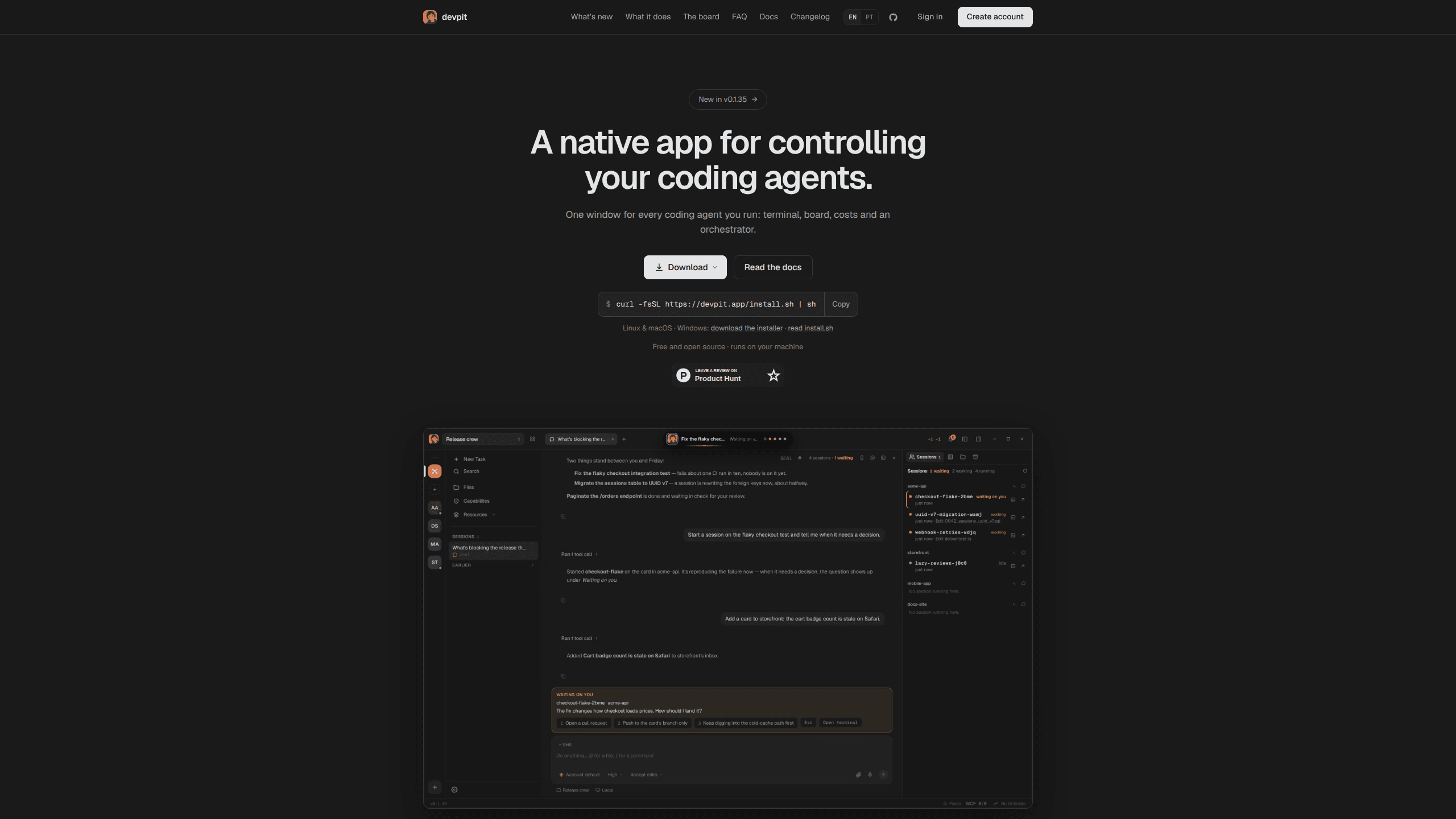
devpit is a desktop app that keeps your Claude Code agents in one window: a terminal per project, a board that starts real work, a cost figure on every call, and an orchestrator across projects.
About devpit
What Is devpit
devpit is a coding agent control room for developers who run several Claude Code sessions at the same time. Instead of six terminal tabs and a vague sense that something is burning tokens, you get one attached terminal per project, a board that shows where each piece of work stands, and a running cost on every agent call.
The app is built in Rust with Tauri, so terminals are real ptys behind tmux rather than a browser pretending to be a shell. On Windows the same job goes to psmux. Projects, boards, conversations and terminal history live in ~/.devpit on your machine, and a repository stays untouched. An account is optional, and today it only signs you in.
The limits are worth knowing before you install. Full agent driving works with Claude Code, since that is the CLI devpit knows how to run. Other tools can report status through a hook, but the board steps still call Claude Code. Sync between machines is not built yet, and the Plus tier that covers remote access is planned rather than shipped.
Getting Started
- Install devpit with the one line installer from the site or the GitHub releases page. On Linux you get a .deb or an AppImage, on macOS a universal .app, on Windows a per-user installer.
- Open the app. Your existing
claudeCLI on the PATH is what it drives, so no new API key is needed and your Claude Code plan keeps paying for usage. - Create a project and point it at a folder. Each project gets its own terminal, board, and workspace in
~/.devpit. - Give a column a step: pick an agent, a model, the slice of the card context it receives, and a spending cap.
- Move a card into that column. The step runs in the terminal you already have open and writes its output, exit code and real cost back on the card.
Product Information
A quick look at devpit's pricing, supported platforms, and performance.
Best for
The users, tasks, and scenarios where this tool fits best.
Users
- Developers running two or more Claude Code sessions a day
- Solo builders shipping side projects
- Small teams that share a repo
Tasks
- Moving work through review and verification stages
- Running tests, builds and lints next to an agent
- Checking what an agent changed
- Watching several projects at once
Scenarios
- You come back after lunch and cannot tell which of five terminals is still working
- A long refactor needs its own checkout
Key features
One target terminal per project
Each project has a single terminal that receives attention. Switch to another project and the previous session keeps running in the background, out of sight but not stopped. You stop juggling tabs and start watching one thing at a time.
Sessions that outlive the window
Terminals are tmux panes, or psmux panes on Windows. Close devpit, reopen it later, and the processes are still there with their scrollback. The same applies during an update, so a running agent does not die because the app restarted.
A board that runs real work
Every project gets a Kanban board with columns you name, reorder and extend. A column either does nothing or holds one step of three kinds: an agent call, a session that takes over the target terminal, or a shell command. Moving a card resolves the step into one invocation with a fixed agent, model, context slice and expected answer shape.
A spending cap on every agent call
Each step carries its own ceiling in dollars, and the card shows the real cost when the step finishes. That combination makes an agent workflow auditable: you know what was allowed before it ran and what it actually cost afterwards.
Files, diffs and a browser beside the terminal
A file tree and diff view sit next to the terminal, so reviewing an agent's change does not mean switching apps. A browser pane opens the project's localhost server, keeps sessions separate per pane, and can pull a signed-in session from Chrome, Firefox or Safari for a specific domain.
Agents as files on your machine
Agent definitions are markdown files with frontmatter in ~/.devpit/agents/, plus whatever your tooling already installed. devpit references them instead of copying them, so the catalogue stays where it belongs. Nothing needs recompiling or registering.
An orchestrator across projects
The orchestrator is a chat you drive. It reads every board you link, lists the sessions running on your Claude Code account, and can start a new session on a card in that card's own worktree. It never moves a card into a lane that runs a step, never acts on a timer, and cannot approve anything in another session.
Pros and cons
Pros
- Cost per agent call is visible on the card, which turns token spending into something you can budget instead of guess.
- The board is optional, so a plain terminal session works exactly as it did before you installed anything.
- Local-first storage in `~/.devpit` keeps repositories clean and avoids a gitignore entry.
- The spending cap and the context slice per column cut the usual waste of loading every agent and every document into each call.
- Sessions survive window closes and app updates because tmux holds the processes.
Cons
- Full board automation assumes Claude Code. If your team runs Codex, Cursor or Gemini CLI as the main driver, the agent steps are not for you yet.
- The macOS build is not signed or notarised, so Gatekeeper refuses the first launch until you open it from the context menu or clear the quarantine flag yourself.
- Setup takes real thought. A new project starts with empty lanes, and every column needs an agent, model and cap before it does anything useful.
- Machines do not sync. An account signs you in and nothing more, so two computers mean two separate workspaces.
Frequently asked questions
Not for board steps. Agent and session steps go through the claude CLI on your PATH. Other tools can report status to the board through the devpit-agent hook, and Gemini CLI does that with no configuration, but the work itself still runs on Claude Code.
Related content
Explore related tools, skills, and articles for devpit.
devpit Alternatives

Base Code
Base44 (Wix) · Coding · ProductivityBase Code is a shared cloud development environment from Base44. Teammates describe changes to an existing GitHub codebase in chat, preview them live and send them back as pull requests.

Google EmbeddingGemma 2
Google DeepMind · Writing · Image · CodingGoogle EmbeddingGemma 2 is a 740M-parameter open model that turns text, code, images, audio, and video frames into vectors in one 768-dimension space, running on phones and laptops.

GitGlow
GitGlow · Coding · ProductivityGitGlow is a local-first desktop Git client that lets independent developers review their own code and their AI agents' changes in one place before shipping.