
Dictanote
Dictanote · Voice & Language · Productivity
Dictanote is a notes app with built-in speech to text, so you can dictate notes by voice in more than 50 languages and keep them synced across your devices.
About Dictanote
What Is Dictanote
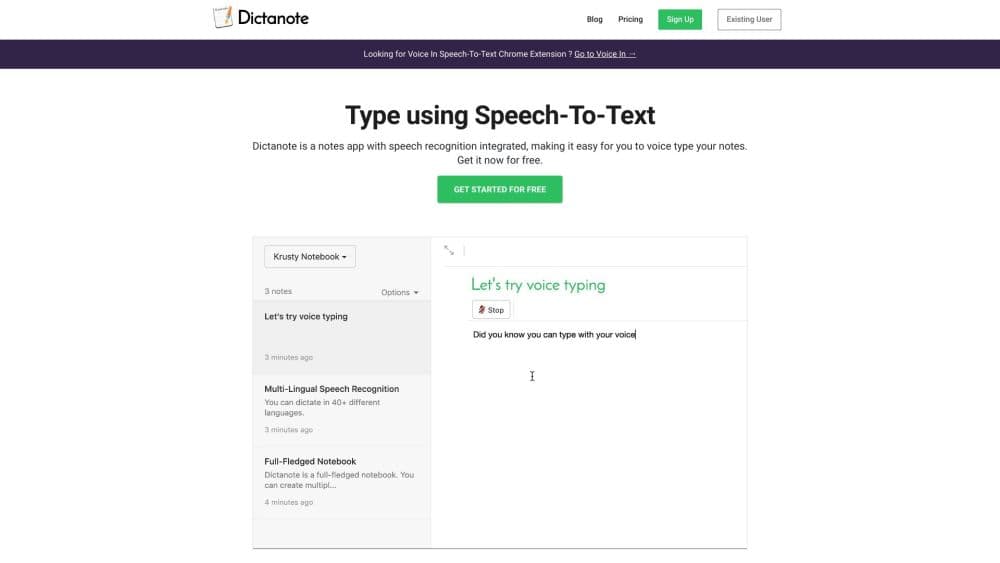
Dictanote is a note taking by voice app and a voice dictation notes app that blends a normal note editor with speech to text, so you can type when you want and talk when talking is faster. It runs in the browser rather than as a separate program, which means there is nothing to download before your first note. The same account works on desktop and mobile, and your notes sync to the cloud so they follow you between devices.
The product's pitch is aimed at people who think out loud. Writers talk through a chapter, then tidy it with the keyboard. Students dictate class notes into a notebook per subject. Professionals capture decisions during a meeting and share the note before the room clears out. Just about anyone who finds speech easier than typing fits the same mold.
The main catch is how dictation works. Dictanote uses your browser's own speech recognition, so it never receives or stores your audio. That is good for privacy, but it also means dictation needs a live internet connection and only runs in the browsers that support the web speech API: Chrome and Edge on desktop, Chrome on Android, and Safari 26 or newer on Apple hardware. Firefox and Brave users are out of luck.
Getting Started
- Open dictanote.co in a supported browser and create a free account with Google or an email address.
- Create your first notebook and give the note a title, since every note lives inside a notebook.
- Click the microphone in the toolbar or press the keyboard shortcut to start dictating, and speak at a normal pace.
- Use voice commands to add punctuation like "period" or "new line", or keep typing by hand whenever that is quicker.
- Upgrade to Pro if you need unlimited notes, hands-free dictation that keeps listening in the background, or password-protected notes.
Product Information
A quick look at Dictanote's pricing, supported platforms, and performance.
Best for
The users, tasks, and scenarios where this tool fits best.
Users
- Students
- Writers and journalists
- Professionals in meetings
- People who find typing hard
Tasks
- Dictating class or meeting notes
- Drafting long text by voice
- Organizing notes by project
- Working offline
Scenarios
- A student sitting through back to back lectures
- A freelancer juggling several clients
- Anyone drafting on the move
- Keeping private notes private
Key features
Speech to Text in 50+ Languages
Dictanote handles more than 50 languages and 80 dialects, and you can switch between them with a keyboard shortcut. It doubles as a dictation app for students, who can dictate lecture notes in their own language and switch dialects when a course is taught in another. Built-in voice commands such as "period" and "new line" work in about 30 of those languages, so you are not limited to English if you dictate in Spanish, Hindi or Japanese.
Voice Commands for Formatting
Instead of reaching for the keyboard mid sentence, you say the punctuation you want. The app turns spoken words into full stops, question marks, new lines and even smileys, which keeps your hands off the keys while you think out loud.
Hands-Free Dictation
On the free plan the microphone shuts off after 20 seconds of silence. Pro keeps listening in the background, even when you switch tabs or pause to gather your thoughts, so you can dictate a whole lecture or meeting without restarting the recording.
Edit by Voice
Pro lets you fix mistakes as they happen. Say "undo", "delete last 3 words" or "backspace 5" and carry on talking rather than stopping to correct by hand. For long dictation sessions, that alone saves a lot of back and forth.
Notebooks and Sharing
Notes are grouped into notebooks, with favourites, pinning and search. On Pro you can share a note or an entire notebook with up to 10 people as viewers or editors, or publish it as a web link, and the people you invite do not need Pro to open it.
Offline Access and Cloud Sync
Notes auto-save and sync across devices, and you can read and edit them offline, with changes syncing once you reconnect. The catch is that dictation itself needs a live connection, so the offline mode covers reading and typing rather than voice input.
Custom Voice Commands
Pro turns a short spoken phrase into text you type all the time. Set "insert email" to fire off your address, or a phrase that drops in a meeting link or a sign-off, and skip retyping the same strings day after day.
Export Anywhere
Any note downloads as a PDF, HTML or plain text file on any plan, including the free one. Dictanote pricing stays simple because the free tier is permanent rather than a trial, and Dictanote Pro is the only paid tier, so there are no surprise extras to budget for. That makes it easy to move a draft into another editor or hand a clean copy to someone who does not use Dictanote.
Pros and cons
Pros
- Voice typing is built into the note app itself, so you do not juggle a separate dictation tool and a separate editor.
- The free plan is genuinely usable, with 50 notes, an hour of dictation a day and export to PDF, HTML and text.
- Audio is transcribed by the browser, and the company says it never stores your recordings, which is a real privacy draw.
- Pro pricing is low at $5 a month billed yearly, and the yearly plan saves roughly a third.
- Notes sync across devices and stay editable offline, so a draft started on a laptop carries on to your phone.
Cons
- Dictation only works in Chrome, Edge and Safari 26 or later, so Firefox and Brave users cannot use the core feature at all.
- Voice input needs a live internet connection, which undercuts the offline mode for anyone dictating away from a network.
- The free plan caps you at 50 notes in a single notebook, which fills up fast if you take notes daily.
- Sharing, images in notes and password locks are Pro only, so the free tier is a solo note taker rather than a team tool.
- There is no public API, which rules it out if you wanted to wire dictation into your own workflow.
Frequently asked questions
Dictanote is a notes app for writing by voice. You dictate your notes with speech to text, fix them with the keyboard, and keep everything organized in notebooks that sync across your devices.
Related content
Explore related tools, skills, and articles for Dictanote.
Dictanote Alternatives

Foley
Hanamori Labs, LLC · Voice & Language · Productivity · AI AssistantFoley is a voice to-do list that turns a spoken sentence into a filed task, complete with project, date and time, then helps you plan the day around what is already there.

HireKey
HireKey · Voice & Language · Productivity · LeaningHireKey is an AI job search copilot built by a former tech recruiter. It checks role fit, tailors resumes, runs interview practice and tracks every application.

Fluence
Yay Software (Yannick Huchard) · Writing · Voice & Language · ProductivityFluence is an Android app that reads PDFs, EPUBs, Word files and web articles aloud, follows each sentence as it speaks, and answers questions about the text on the phone itself.