

Dicte: AI Meeting Assistant
Dicte · Writing · Productivity
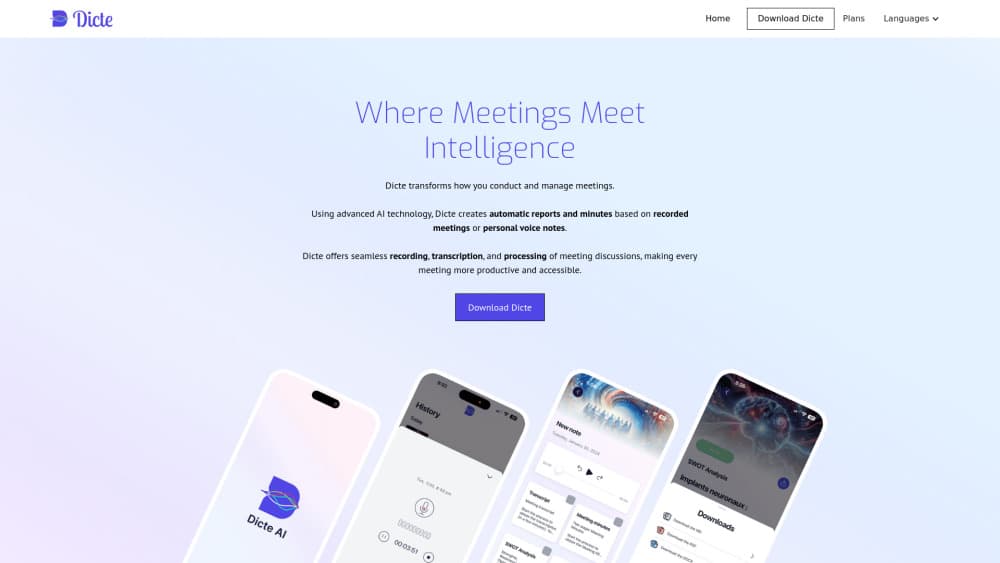
Dicte is an AI meeting assistant that records, transcribes, and turns talks into minutes.
About Dicte: AI Meeting Assistant
What Is Dicte
Dicte is an AI meeting assistant built for recorded conversations rather than scheduled video calls. You tap once, the app captures the room, and it returns a transcript with speaker labels plus a set of generated documents. So it doubles as an AI note taker and a report writer. The pitch is simple. Someone still has to write the report after every meeting, and Dicte wants that job.
It runs on dedicated servers in Paris, with pseudonymization on by default and post-quantum encryption for stored data. That positioning matters if your meetings touch client names, legal details, or anything you'd rather not pipe through a generic US cloud. The mobile-first design also sets it apart from desktop notetakers that assume everyone's on a laptop. Dicte assumes you're walking a site, sitting in a car, or standing in a warehouse.
So what's the catch? Dicte isn't a bot that joins your Zoom link, and that single design choice decides who should download it. It records what happens around your phone, so it fits in-person and hybrid sessions far better than fully remote ones. The interactive AI agents that let you question a transcript are listed as coming soon, so for now the output is documents, not a chat.
Getting Started
- Download Dicte from Google Play and create an account.
- Grant microphone and storage permissions so the app can record and save audio.
- Set your preferred transcription language before the meeting starts.
- Tap the record button when the conversation begins and leave the phone on the table.
- Stop the recording, then pick an AI skill like two-pager minutes or a SWOT analysis to generate the document.
Product Information
A quick look at Dicte: AI Meeting Assistant's pricing, supported platforms, and performance.
Best for
The users, tasks, and scenarios where this tool fits best.
Users
- Consultants and field teams who meet clients in person and still owe a written summary afterwards.
- Managers who run recurring internal sessions and want the same format every time.
- Anyone working across languages who needs a transcript in more than one tongue.
Tasks
- Turning a one-hour talk into a two-page brief you can send the same afternoon.
- Producing a SWOT analysis from a strategy discussion without rebuilding it in a spreadsheet.
- Capturing personal voice notes during a commute and converting them into structured text later.
Scenarios
- On-site client visits where nobody wants to be the one taking notes.
- Hybrid workshops with a mix of people in the room and colleagues dialing in.
- Interviews and fieldwork where you can't type while you talk.
Key features
One-Tap Meeting Recording
Dicte records with a single tap and keeps running while you focus on the conversation. There's no bot to invite and no calendar link to wire up. Simpler is better. The fewer steps between "start talking" and "start recording," the less likely you're going to forget, and the more likely the recording actually happens when it needs to.
Speaker Identification in Transcripts
The transcription engine labels who said what, so a long transcript reads like a script rather than one wall of text. When three or four people keep talking over each other for an hour, that speaker labeling is the single feature that decides whether the final transcript is actually usable. Easy to skim. You can scan for one person's points instead of rereading the whole thing.
AI Skills That Build Documents
Once a recording is done, Dicte runs it through skills that produce finished documents. Two-pager minutes give you a short brief. Detailed minutes give you the full version. A SWOT analysis pulls strengths, weaknesses, opportunities, and threats out of the discussion, and the project management report flags signals and recommendations. You choose the output after the meeting, not before, which means one recording can feed several documents.
Multilingual Transcription
Dicte handles recordings in multiple languages, which helps teams spread across countries keep one shared record. You don't have to standardize on a single working language before the meeting starts. Set the language. Record. Read the result. That flexibility saves real time when colleagues switch between tongues mid-session.
Privacy-First Infrastructure
Data sits on dedicated servers in Paris, pseudonymization is on by default, and stored audio and text use post-quantum encryption. If your organization asks where meeting data lives, that answer is easier to give than with a service that spreads processing across regions. For regulated work, that's a real edge. No hand-waving required.
Mobile-First Design
Dicte is built around a phone, not a desktop browser. That makes it a natural fit for fieldwork, site visits, and any setting where a laptop would be awkward. Voice notes and short recordings live in the same place as full meeting captures, so personal memos and formal minutes share one workspace.
Pros and cons
Pros
- Records with one tap, so there is no setup before a meeting.
- Speaker-labeled transcripts make long conversations searchable.
- Multiple AI skills produce different documents from the same recording.
- Multilingual support suits international teams.
- Paris-based servers and default pseudonymization help with data concerns.
Cons
- It records around your phone rather than joining video calls, so fully remote meetings need a workaround.
- Interactive AI agents that let you question a transcript aren't available yet.
- Pricing details aren't published clearly on the site, so you have to check in the app.
Frequently asked questions
Dicte records a conversation, transcribes it with speaker labels, and generates documents like meeting minutes, a SWOT analysis, or a project management report from that single recording. Think of it as a note taker plus a report writer in one app, and the recording you make once keeps paying off because every skill draws on the same source.
Related content
Explore related tools, skills, and articles for Dicte: AI Meeting Assistant.
Dicte: AI Meeting Assistant Alternatives

Google EmbeddingGemma 2
Google DeepMind · Writing · Image · CodingGoogle EmbeddingGemma 2 is a 740M-parameter open model that turns text, code, images, audio, and video frames into vectors in one 768-dimension space, running on phones and laptops.

MePersona
MePersona, Inc. · Writing · Productivity · MarketingMePersona is an AI unified inbox for creators. It learns your voice, drafts replies to fan messages from 12 platforms, and sends only what you approve.

Fluence
Yay Software (Yannick Huchard) · Writing · Voice & Language · ProductivityFluence is an Android app that reads PDFs, EPUBs, Word files and web articles aloud, follows each sentence as it speaks, and answers questions about the text on the phone itself.