

DiffSense
EdgeLeap · Coding
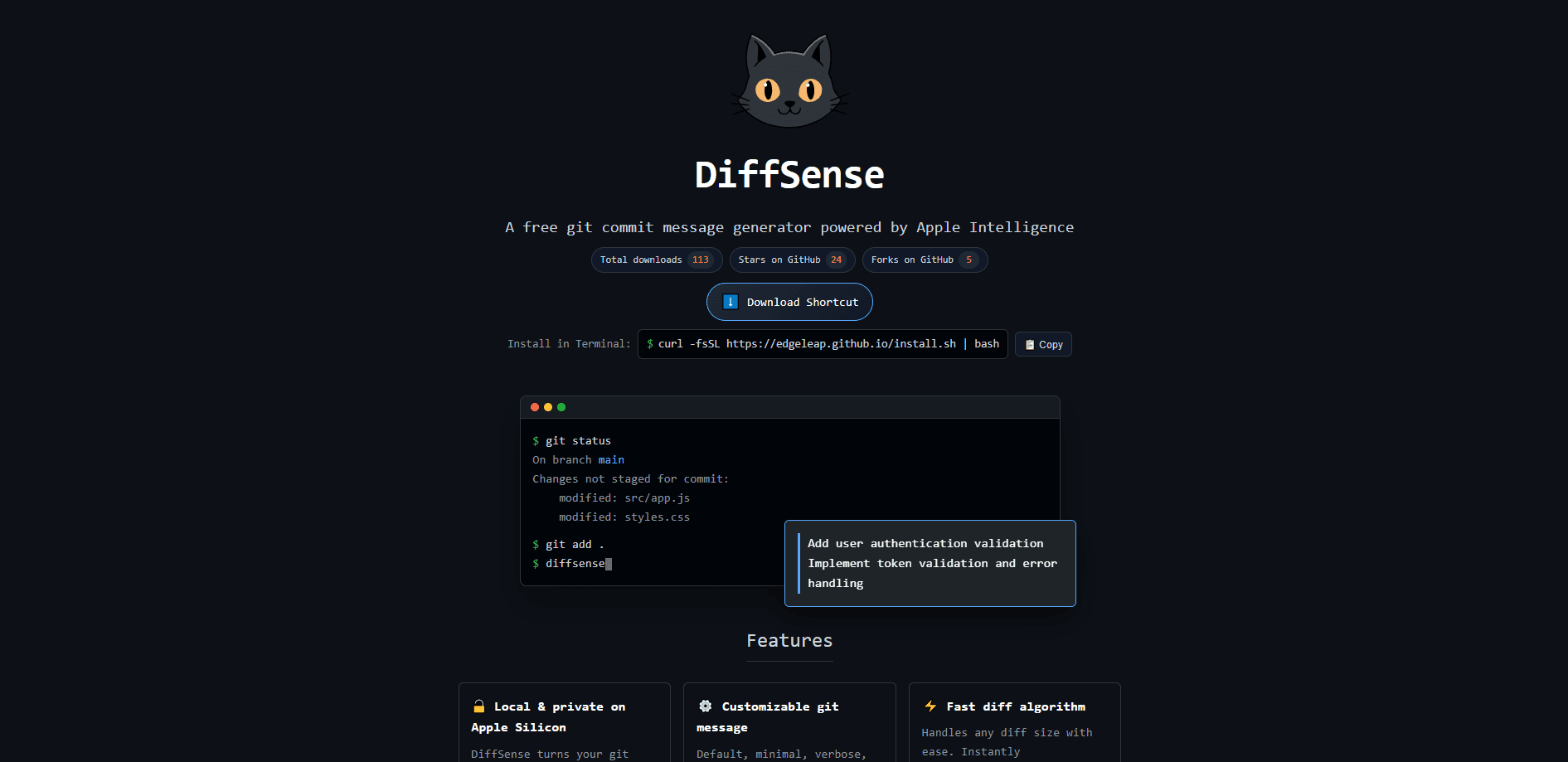
DiffSense is a free AI commit message generator that reads your git diff and writes the message for you. It runs on Apple Silicon Macs and leans on Apple Intelligence, so your code changes stay on your machine. No remote server. You install it in Terminal, type `diffsense` after staging your work, and it suggests a message you can edit before the commit goes through. Think of it as an AI git commit tool that lives in your shell.
About DiffSense
What Is DiffSense
DiffSense is a commit message generator for Mac built for developers who hate writing the same "fix bug" line fifty times a week. The tool inspects what changed in your working tree and turns that diff into a readable summary. So the commit history actually explains what happened. Not just that something did.
So why not just write the line yourself? Because a good diff-to-commit-message habit is the first thing to slip when you're shipping fast.
It's a terminal-first tool, not a GUI. You install it with a single curl command, and it lives in your PATH next to git. No IDE plugin, no desktop app. Just a git commit message tool that runs where you already work. The selling point is privacy: by default it can run entirely on Apple Silicon hardware through local models or Private Cloud Compute, with ChatGPT as an optional backend if you'd rather trade privacy for a bigger model.
The main limitation is platform. DiffSense is built around Apple Intelligence and Apple Silicon, so it's a Mac-only tool. Windows and Linux developers can't run it. It's also early-stage software from a small shop. Expect rough edges, not years of polish.
Getting Started
- Open Terminal and run the install script:
curl -fsSL https://edgeleap.github.io/install.sh | bash. It grabs the latestdiffsense.shfrom the GitHub release and drops it in/usr/local/bin. - Move into any git repository and stage the changes you want to commit with
git add .or a narrowergit add. - Run
diffsense. It reads the diff and pops up a suggested commit message for you to review. - Edit the message if you want a different tone, then confirm to complete the commit. Add
--nopopupwhen you'd rather skip the review step and use it inside scripts.
Product Information
A quick look at DiffSense's pricing, supported platforms, and performance.
Best for
The users, tasks, and scenarios where this tool fits best.
Users
- Solo developers on a Mac
- Teams that care about code privacy
- Developers new to conventional commits
Tasks
- Turning a messy diff into a clean commit message
- Adding a body to your commit
- Wiring commits into a script
Scenarios
- End-of-day cleanup
- Working offline on a plane
- Keeping a personal repo tidy
Key features
Local, Private Commit Messages
Here the tool behaves more like an Apple Intelligence commit tool than a cloud service. The default mode runs the model on your own Apple Silicon chip, so your diff never leaves the machine. That matters if you work on proprietary code and can't send it to a hosted AI. When you want a stronger model, DiffSense can fall back to Apple's Private Cloud Compute or to ChatGPT, and you choose which one fits the job.
Diff-to-Message Generation
Point DiffSense at a staged diff and it turns your git diff into a commit message in plain language, like "Add user authentication validation" for a patch that adds a token check. It reads the actual content of the diff, not just the file names, so the message reflects what the code does.
Customizable Message Styles
You get presets, including default, minimal, and verbose, plus a bring-your-own-rules option for teams with their own conventions. Every suggestion is editable before the commit runs, so the tool assists rather than dictates. Teams with a strict commit style can bend the output to match.
Alias Macros
DiffSense supports git alias macros, so a single alias can prepend git add . or append a git push around the generation step. That collapses a three-command routine into one keystroke. It's a small touch, but it's the kind of thing you set up once and miss on every other machine.
AI Agent Compatibility
The --nopopup flag skips the interactive review and returns the message directly, which makes DiffSense usable inside automated workflows. If you have an agent that commits code, it can call the tool and get a message back without a human in the loop.
Fast Diff Handling
The tool is built to process diffs of any size quickly, from a one-line typo fix to a large refactor. Speed matters here. A commit-message step that takes ten seconds is a step you'll stop using.
Pros and cons
Pros
- Free to use, with no subscription and no account required.
- Local inference keeps your code off third-party servers by default.
- Multiple model backends (local, Private Cloud Compute, ChatGPT) let you trade off speed, privacy, and quality.
- Editable, style-aware output means it adapts to your team's commit conventions.
- The `--nopopup` flag and alias macros fit it cleanly into scripts and git aliases.
Cons
- Mac-only and Apple Silicon-only, so Windows and Linux developers are out entirely.
- It's an early, fast-moving project, which means occasional breaking changes and thin documentation.
- Choosing ChatGPT as your backend sends your diff to OpenAI, which defeats the privacy pitch if you pick it without thinking.
- No public API, so anything beyond local CLI and agent use isn't supported yet.
Frequently asked questions
Yes. DiffSense is a free, open-source-style command-line tool with no paid tier and no account. You install it with one curl command and use it as much as you like.
Related content
Explore related tools, skills, and articles for DiffSense.
DiffSense Alternatives
Forefront
Forefront · CodingForefront is a web platform for building with open-source AI. It lets you fine-tune leading open-source language models on your own data, evaluate how they perform, and run them through an API or export them to host yourself. Developers who want the convenience of a closed-source platform but insist on owning their models and data are the target audience here.

Startkit
StartKit.AI · CodingStartkit is a boilerplate for building AI SaaS and AI wrapper products. Think of it as an AI startup boilerplate with the boring parts already wired up: authentication, Stripe and Lemon Squeezy payments, usage limits, transactional email, and an AI API starter that talks to OpenAI, Anthropic, Groq, or Llama. You clone the repo, set your price, and start on the part of your product that people actually pay for. It's Next.js under React and Tailwind, so most of the boilerplate code already feels familiar.
Testim
Tricentis · CodingTestim is an AI-powered test automation platform for building and running end-to-end tests across web, mobile, and Salesforce applications. It leans on machine learning to keep tests stable when an interface changes, so teams spend less time fixing broken selectors. Not bad for an automated testing tool you can start using today. You create tests by recording actions in a browser, then optionally add JavaScript when you need more control. It's a solid pick for busy QA teams.