

Digen AI
Digen AI · Voice & Language · Video
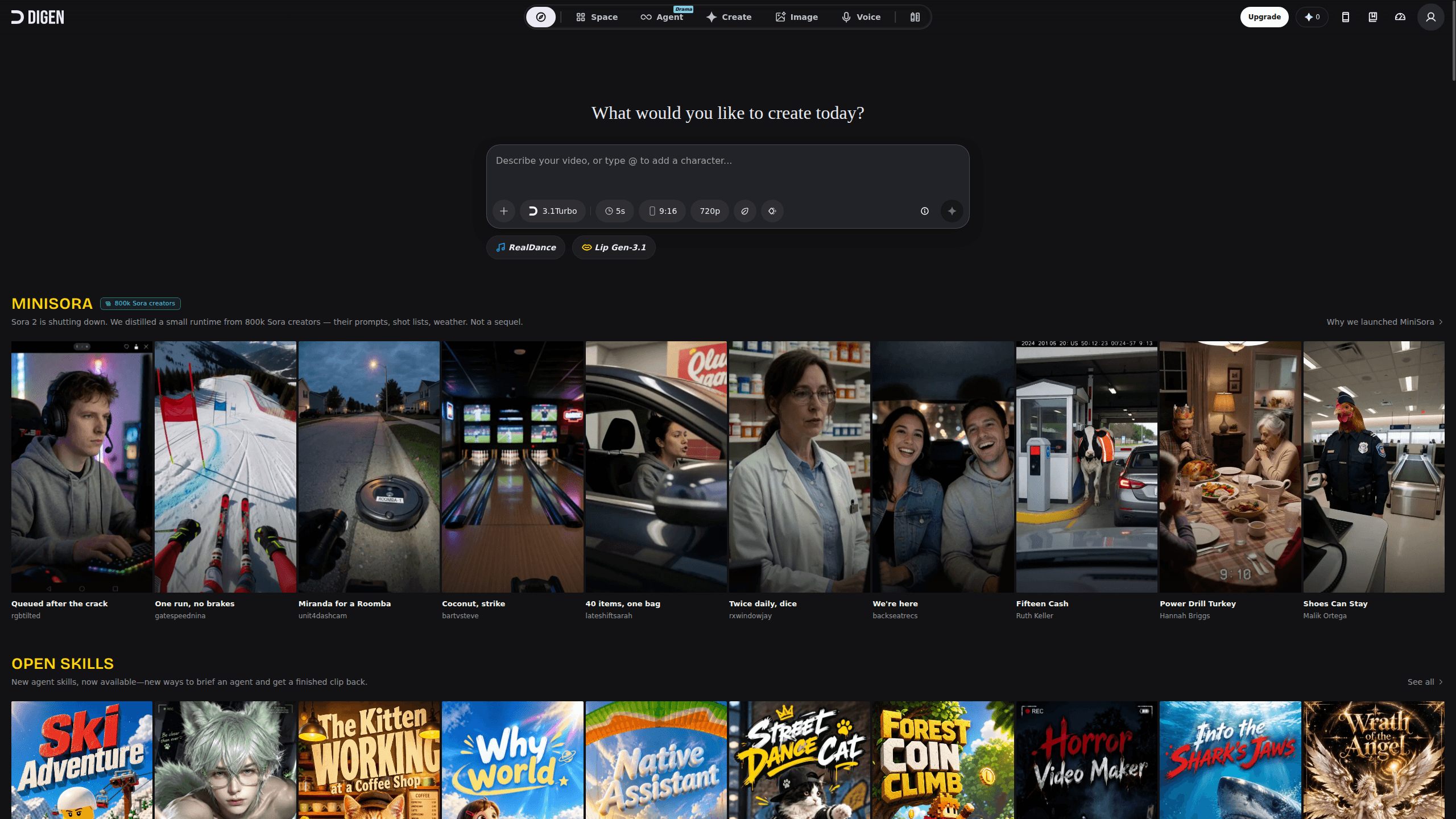
Digen AI is a free AI video generator that turns a single photo, a text prompt, or a short clip into a finished video. It works as an AI video maker, an AI avatar video tool, and a lightweight AI video app all at once, packing lip sync, motion transfer, and multi-model access into one place. That means talking avatars, dance clips, and social-ready shorts without editing skills. The platform runs on the web plus iOS and Android, and it leans on a credit system that lets you start without paying. Nothing complicated about it.
About Digen AI
What Is Digen AI
Digen AI started life in 2024 as a digital human tool that cloned a face and made it speak. Since then it has grown into an aggregator: instead of betting on one model, it wires in several top generators and lets you switch between them without leaving the page. You get RealMotion, Act-Motion, lip sync, effect models, and access to outside engines like Sora 2, Veo 3.1, Runway, and Flux 2 inside a single dashboard that runs in your browser.
The pitch is simple. Most people don't want to learn keyframes or motion tracking. They want to upload a picture, type what they want, and get a clip that looks real. Digen AI targets that audience hard, which is why its creator community has grown past 5 million people. Social teams, solo creators, and small shops make up most of the user base. That's the whole idea.
The main limits are worth stating up front. Free exports carry a watermark, and video length on the free tier is capped. Anything that leans on third-party models also moves at the speed and pricing of those models, not Digen's own, so your mileage varies depending on which engine you pick for a job.
Getting Started
- Sign up at digen.ai with an email or a social login, or install the iOS or Android app if you'd rather work from your phone, and keep in mind that new accounts get starter credits right away.
- Pick a starting point: upload a photo for RealMotion, drop in a clip for Act-Motion, or open the text-to-video playground.
- Choose a model and write a prompt, or select an agent skill like Movie Maker or Dance Video Maker if you'd rather follow a guided flow that handles most of the decisions for you.
- Preview the result, tweak the prompt or settings, then export. Paid plans remove the watermark and lift the length cap.
Product Information
A quick look at Digen AI's pricing, supported platforms, and performance.
Best for
The users, tasks, and scenarios where this tool fits best.
Users
- Social media creators
- Small business owners
- Casual hobbyists
Tasks
- Turning portraits into talking videos
- Motion transfer for dance or sports clips
- Making effect-driven shorts
- Generating images alongside video
Scenarios
- Batch content for a product launch
- Localizing a message for overseas followers
- Quick meme or reaction video
- Pre-production mockups
Key features
RealMotion image-to-video
RealMotion takes one photo and animates it, keeping the face consistent while adding movement. You can push a pet photo, a fantasy scene, or a portrait and get motion that reads as natural rather than jittery. Feed it a pet photo and expect movement that holds the animal's shape, or try a portrait and watch the expression shift without melting. It's the feature most newcomers try first, and it sets the tone for what the rest of the platform can do.
AI lip sync across languages
Upload a face and a script, and the mouth matches the audio. The voice library covers dozens of options across more than 20 languages, so you can make one avatar deliver the same message in different markets without reshooting anything. Lip sync isn't perfect on tricky accents, but for short spoken clips it holds up well. Good enough for social.
Act-Motion motion transfer
Act-Motion pairs an action video with a single photo and retargets the performance onto your image. It keeps facial identity locked while moving the full body, and it works with people, animals, and cartoons. Dance, stunts, and sports demos are the obvious uses. No green screen required. No manual keyframes either. The face stays put while the body moves, which is the hard part most tools get wrong.
Access to third-party models
Rather than locking you into one engine, Digen AI plugs in outside generators. The supported lineup has included Sora 2, Veo 3.1, Runway, Nano Banana Pro, Flux 2, and Z-Image, with more added over time. This matters because different models suit different jobs, and you can compare results without juggling separate subscriptions. One AI video app, several engines underneath. That's the advantage.
Effect models and agent skills
Effect models apply stylized transformations, while agent skills package a whole workflow into one click. Movie Maker returns a finished cinematic clip, Dance Video Maker turns a photo into a dancer, and skills like Drama Legend and Music Video target specific formats. It's a shortcut for people who want an outcome, not a toolset. Want your dog mid-backflip? There's likely a skill for that.
Built-in AI image generator and editor
The platform also generates images from text and edits them with a brush, covering background replacement, recoloring, and object add/remove. The image side is described as having no daily cap on free generations, which is generous compared to most tools in this space. Having video and image in one place cuts the back-and-forth between separate apps. It saves time.
Pros and cons
Pros
- Free tier lets you test core features before spending anything.
- Multiple models in one dashboard save you from paying for several subscriptions.
- Lip sync and motion transfer cover the two jobs most creators actually need.
- Works on web, iOS, and Android, so you can start on your phone and finish on desktop.
- Agent skills shorten the path from idea to finished clip for non-editors.
Cons
- Free exports carry a watermark, which rules them out for professional use.
- Free-tier video length is capped, so longer projects need a paid plan.
- Quality swings depending on which third-party model you choose, and that's out of Digen's hands.
- No public API is documented, so you can't easily wire it into your own pipeline.
Frequently asked questions
It's an AI video generator for turning photos, text, or short clips into finished videos. People use it for talking avatars, dance clips, product demos, and social media shorts that would otherwise take hours in a traditional editor. If you can describe it, the platform usually has a mode or skill for it.
Related content
Explore related tools, skills, and articles for Digen AI.
Digen AI Alternatives

Foley
Hanamori Labs, LLC · Voice & Language · Productivity · AI AssistantFoley is a voice to-do list that turns a spoken sentence into a filed task, complete with project, date and time, then helps you plan the day around what is already there.

HireKey
HireKey · Voice & Language · Productivity · LeaningHireKey is an AI job search copilot built by a former tech recruiter. It checks role fit, tailors resumes, runs interview practice and tracks every application.

Fluence
Yay Software (Yannick Huchard) · Writing · Voice & Language · ProductivityFluence is an Android app that reads PDFs, EPUBs, Word files and web articles aloud, follows each sentence as it speaks, and answers questions about the text on the phone itself.