

Docky.AI
Thin Underline LLC · Other
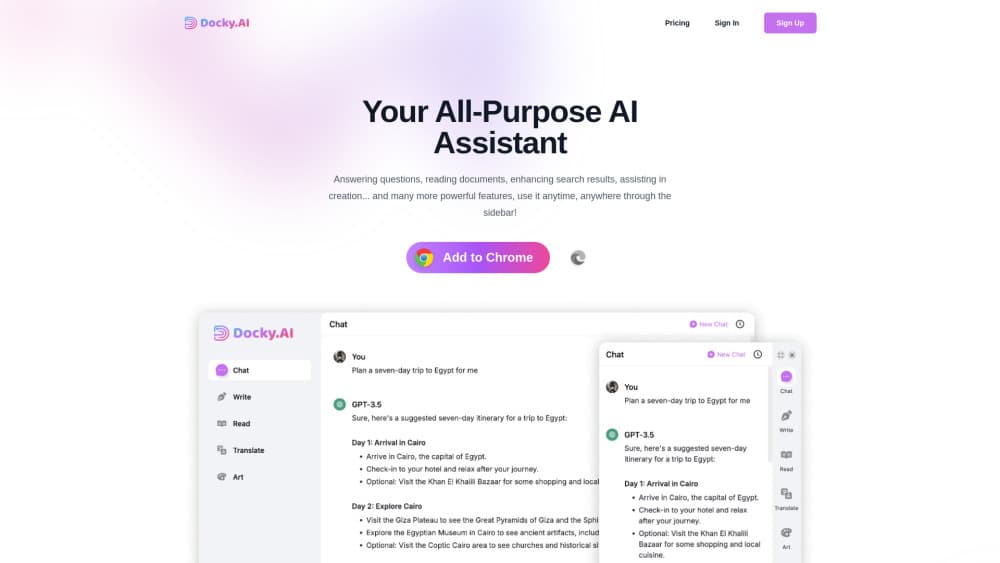
Docky.AI is a browser sidebar that puts GPT, Claude, Gemini and other AI models beside any web page, so you can summarize, write, translate and generate images without switching tabs.
About Docky.AI
What Is Docky.AI
Docky.AI is an AI sidebar extension for Chrome and Edge built by Thin Underline LLC. Press Cmd or Alt plus K on any page and a chat panel slides out with your choice of models, including GPT-5.4 and GPT-5.5, Claude Sonnet and Opus, Gemini, DeepSeek, Qwen and Grok. The idea is simple: you keep reading, writing or shopping in the tab you already have open, and the assistant works on top of it.
The extension covers four jobs. It answers questions with live web search, works as a chatgpt sidebar on any tab, reads the page or a PDF, Word or PowerPoint file you feed it, writes and rewrites text in a tone you pick, and opens an ai image generator with Flux, DALL-E, SDXL or Ideogram inside it. Ask it to summarize web pages and the answer points back to the passage it used. A small toolbar also pops up when you highlight text, which handles explain, translate and continue writing requests. Search results on Google and Bing get a side panel with a generated answer.
The tradeoffs sit in the pricing model. Docky runs on credits, and the stronger models cost advanced credits that run out faster than the basic pool. It's a browser tool first, so there's no iOS or Android app, and there's no public API for developers. The Chrome listing also carries an account requirement, since every chat is tied to your Docky login.
Getting Started
- Install Docky.AI from the Chrome Web Store or the Edge Add-ons store, then pin the icon to your toolbar.
- Sign up with an email address or a Google account. The free plan starts at 30 basic credits per day with no card.
- Press Cmd plus K on a Mac or Alt plus K on Windows to open the sidebar, then pick a model from the dropdown.
- Ask a question about the page, drop in a file, or highlight text and use the popup menu for explain and translate. Upgrade to Standard, Pro or Mega when the daily credits stop covering your use.
Product Information
A quick look at Docky.AI's pricing, supported platforms, and performance.
Best for
The users, tasks, and scenarios where this tool fits best.
Users
- Students and researchers
- Content writers and marketers
- Analysts and consultants
- Translators and bilingual workers
Tasks
- Summarizing a long report
- Clearing an inbox
- Checking a claim
- Making a quick visual
Scenarios
- Reading a dense research paper for a lit review, where you need summaries and definitions while the source stays visible.
- Writing inside web apps such as Gmail, Notion or LinkedIn, where jumping to a chat tab breaks your flow.
- Following up on a Google search, where a generated answer next to the results saves opening five links.
Key features
Multi-model chat with @mentions
Type @gpt, @claude or @gemini in one thread and every mentioned model answers the same prompt. You get the replies side by side and pick the one that holds up. The model list spans OpenAI, Anthropic, Google, DeepSeek, Qwen and Grok, with image models kept in a separate picker.
Page and file reading
Docky reads the tab you're on, plus PDF, Word and PowerPoint files you upload. OCR pulls text out of screenshots and scanned documents, which matters for older papers that were never digitized properly. Summaries and follow-up questions stay tied to that source.
Writing and rewriting tools
The writing panel composes new text, answers an existing message or checks grammar. You set the language, tone and length before it generates, so a short formal reply and a long casual post come from the same box. It works on selections, which makes it useful inside email and social editors.
Image generation
Four image models sit behind one button: Flux, DALL-E, SDXL and Ideogram. Each has a different look, and switching is a click rather than a new subscription. Simple blog headers and social images are the realistic use, not print work.
Text selection toolbar
Highlight anything on a page and a small menu appears with explain, translate and continue writing. It's the fastest path for short tasks, since you never open the full sidebar or copy the paragraph elsewhere.
Search enhancement and the Cmd+K sidebar
The ai browser assistant adds a generated answer beside Google and Bing results, and the same panel opens anywhere with one shortcut. On any site, in any tab, the chat is one keystroke away, which is the core reason people keep it installed.
Pros and cons
Pros
- One subscription covers chat, reading, writing and image generation, which replaces several separate AI tools for casual users.
- Page-aware context means you don't paste text into a chat window, and the assistant already knows what you're looking at.
- The free tier is usable for light work at 30 basic credits per day, with no card required.
- The Cmd plus K shortcut and selection toolbar cut the tab-switching that makes browser AI feel slow.
Cons
- Advanced models run on a separate credit pool, and a heavy month on GPT-5.5 or Claude Opus burns through the allowance quickly.
- There's no mobile app and no public API, so the tool stops at the desktop browser.
- Reviews are thin, with a 3.5 rating from 10 ratings on the Chrome Web Store, so there's little independent testing to lean on.
Frequently asked questions
It's an ai sidebar extension for reading, writing and research inside the browser. You summarize pages and files, draft text, translate selections and generate images without leaving the tab you're working in.
Related content
Explore related tools, skills, and articles for Docky.AI.
Docky.AI Alternatives

Odyssey 3
Odyssey · OtherOdyssey-3 is Odyssey's foundation world model. It simulates physics in real time, turns a prompt into an interactive environment, and adapts to robots, cars and games.

JarvisCore
Prescott Data · Coding · Productivity · OtherJarvisCore is an open source Python runtime where AI agents work as equal peers on an agent mesh, claim tasks from a shared ledger, and reach external services through a zero-trust broker.
Clef
Cloudflare · Business · OtherClef is Cloudflare's open-source decision model for Workers AI. It returns calibrated probabilities for typed questions, not generated text, so agents can classify, route, and act fast.