

DocTransGPT
DocTransGPT · Writing · Productivity
DocTransGPT is a free browser-based AI workspace that translates documents, converts PDFs, runs OCR, and writes or summarizes text across 100+ languages, with no sign-up needed for the core tools.
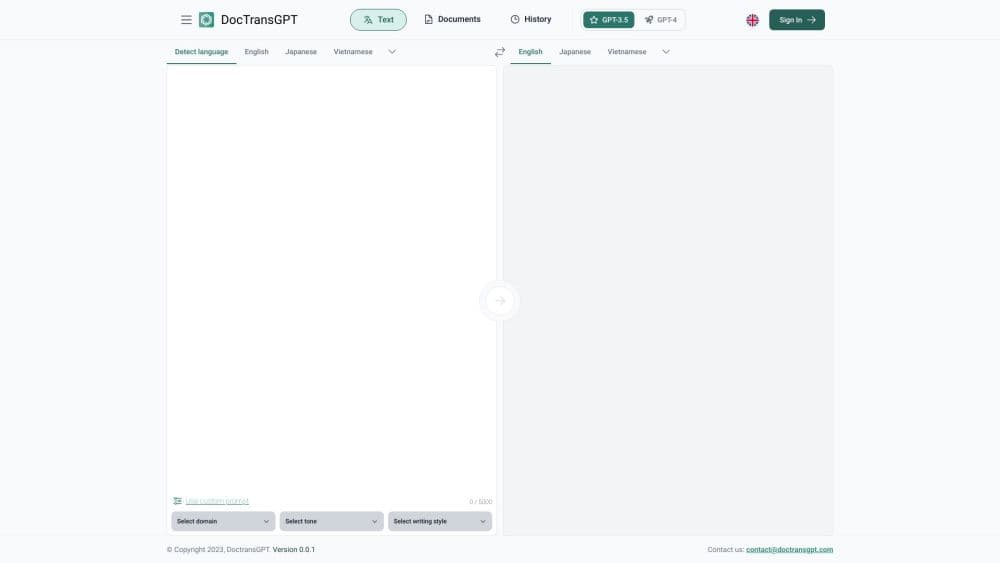
About DocTransGPT
What Is DocTransGPT
DocTransGPT is an all-in-one AI productivity platform that runs entirely in your browser. Instead of juggling a translator, a PDF converter, and a grammar checker across three different sites, you open one workspace and pick the tool you need. It covers translation, document utilities, writing help, and text cleanup in a single place.
The pitch is simple. Most people dealing with documents just want to move text from one format or language to another without losing the layout, and without paying for software they use twice a year. DocTransGPT targets that gap with fast, free tools that work on any device.
The main limitation is depth. This is a generalist platform, so a tool like the translator caps input at 500 characters per pass, which suits emails, snippets, and short documents rather than a full 200-page manual in one go. Files are encrypted in transit and deleted after processing, so security is handled, but you should still avoid feeding it anything you would not upload to a web tool.
Getting Started
- Open doctransgpt.com in any browser and pick a tool such as Translation, PDF to Word, or Image to Text.
- Paste your text, upload a document, or drop in an image, then set the source and target languages.
- Run the tool and wait a couple of seconds for the result.
- Copy the output or download it, then keep refining if you need to. No account is required for the core tools.
Product Information
A quick look at DocTransGPT's pricing, supported platforms, and performance.
Best for
The users, tasks, and scenarios where this tool fits best.
Users
- Students
- Content creators
- Small business owners
Tasks
- Document translation
- PDF conversion
- OCR extraction
- Writing cleanup
Scenarios
- Handling a weekly batch of repetitive documents
- Early project research
- Cross-language customer replies
Key features
AI Translator with 100+ Languages
The translator moves text between English, Hindi, Gujarati, Spanish, French, German, and more than 100 other languages. It reads context rather than swapping words one by one, so sentences come out in a natural order. Input is capped at 500 characters per translation for accuracy, which fits emails and short passages.
PDF Toolkit
The PDF tools convert, merge, split, and compress files without wrecking the original layout. The PDF to Word converter is the daily driver here: it turns a locked PDF into a fully editable Word document in seconds. If you deal with scanned reports or contract bundles, this saves you from retyping.
OCR Scanner
The Image to Text tool pulls editable text out of images, scans, and photos. Teams have used it to digitize years of scanned invoices without retyping a single line. Accuracy holds up on clean scans, while faint or handwritten text is where any OCR tool starts to struggle.
AI Writing and Grammar Checker
The grammar checker fixes grammar, spelling, and punctuation while leaving your tone intact, and the AI writer helps you draft blog posts, emails, and essays. Both are aimed at people who want a second pass before they hit send, not at replacing a human editor.
Caption and Content Generators
The caption generator produces on-brand captions with hashtags for Instagram, travel, love, and birthdays in one click. A content generator covers outlines, product descriptions, and ad copy. These are handy for creators who post often and need a starting point fast.
Text Summarizer
The summarizer condenses long articles, reports, and PDFs into key points you can actually use. It is built for students and researchers who paste in dense material and want a clean summary they can work from, rather than reading every page line by line.
Pros and cons
Pros
- Free to start with no sign-up for the core tools, so you can convert a PDF or translate a contract before creating any account.
- Dozens of tools in one workspace, which cuts down on juggling separate sites for translation, PDFs, and writing.
- Handles over 100 languages, making it usable for multilingual teams and cross-border work.
- Files are encrypted in transit and deleted after processing, which is a reasonable privacy baseline for a web tool.
- Runs in the browser on desktop, tablet, and mobile, so there is nothing to install.
Cons
- Translation input is capped at 500 characters per pass, so long documents need to be split into chunks.
- No published API, which means you cannot wire it into your own app or automate it at scale.
- Pricing above the free tier is not clearly spelled out on the site, so heavy users may need to check before relying on it.
- Because everything runs in a browser, there is no offline mode, and an unstable connection interrupts your work.
Frequently asked questions
DocTransGPT is a browser platform for translating documents, converting and cleaning up PDFs, extracting text from images with OCR, and writing or summarizing content. It bundles dozens of AI tools into one workspace across 100+ languages.
Related content
Explore related tools, skills, and articles for DocTransGPT.
DocTransGPT Alternatives

Google EmbeddingGemma 2
Google DeepMind · Writing · Image · CodingGoogle EmbeddingGemma 2 is a 740M-parameter open model that turns text, code, images, audio, and video frames into vectors in one 768-dimension space, running on phones and laptops.

MePersona
MePersona, Inc. · Writing · Productivity · MarketingMePersona is an AI unified inbox for creators. It learns your voice, drafts replies to fan messages from 12 platforms, and sends only what you approve.

Fluence
Yay Software (Yannick Huchard) · Writing · Voice & Language · ProductivityFluence is an Android app that reads PDFs, EPUBs, Word files and web articles aloud, follows each sentence as it speaks, and answers questions about the text on the phone itself.