

Dottie
Björn Schefzyk · Writing · Productivity
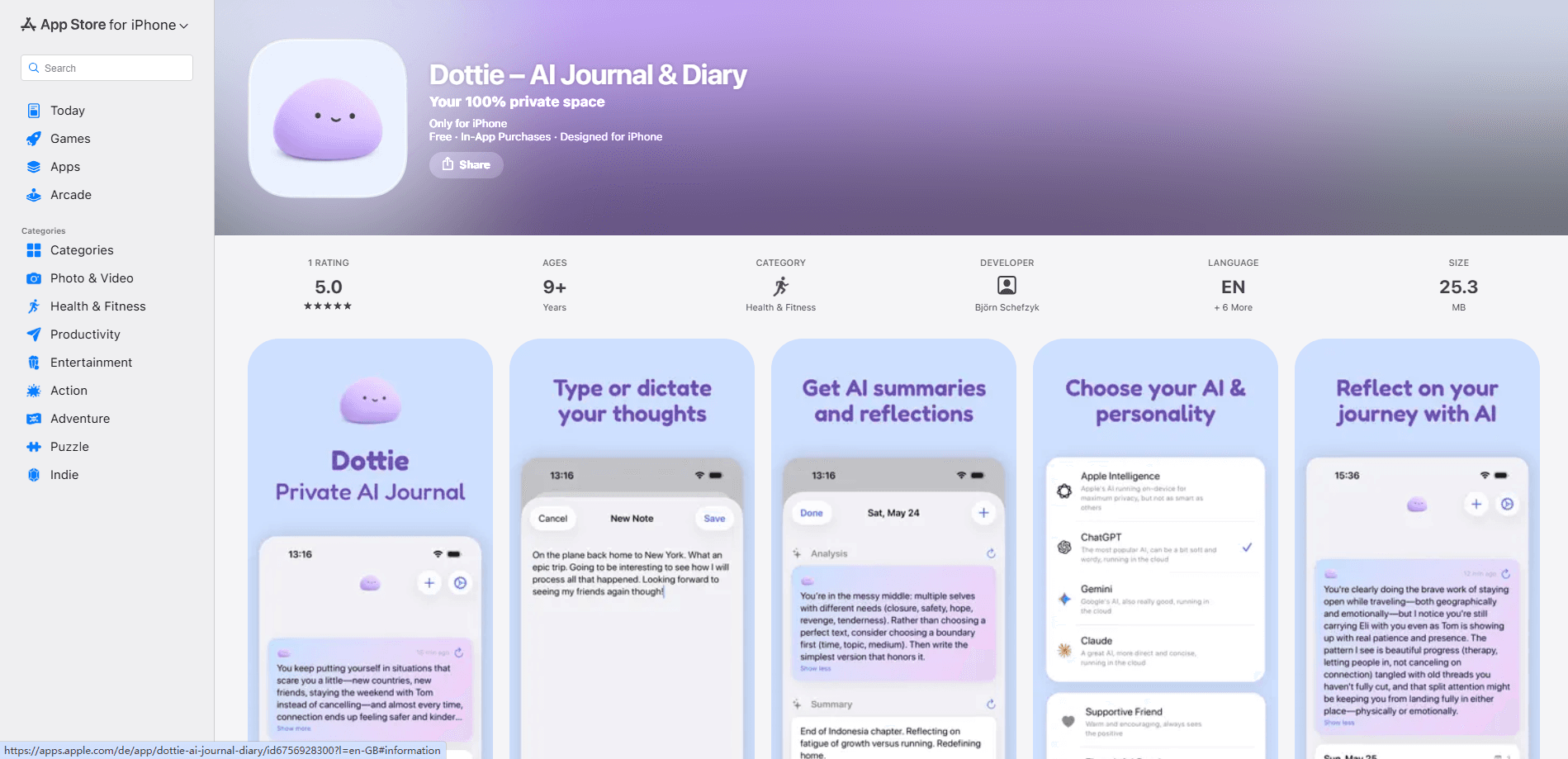
Dottie is a private AI journaling app for iPhone that turns a few spoken or typed lines into a clean summary and a short reflection. It runs Apple Intelligence on your device by default, stores entries locally, and asks for no account, so your thoughts stay on your phone. You can also bring in ChatGPT, Claude, or Gemini when you want a deeper read.
About Dottie
What Is Dottie
Dottie is an AI diary app built around one idea: your journal should belong to you. Most journaling apps quietly push your most personal thoughts to a server, and that tradeoff has always felt backwards to us, so Dottie flips the default and keeps your writing where it starts. The default model is Apple Intelligence running on-device, entries live in local storage, and going online is something you opt into rather than something buried in the fine print.
The app has one reader in mind: you. You open it, say what happened, and Dottie does the rest, writing a recap and offering a gentle reflection that reads back what you just described. Over time it points out patterns you'd miss on your own. Want a different tone? Five companion personalities, from a supportive friend to a snarky sidekick, change how that reflection sounds. The interface ships in ten languages, and you can journal in any language and get a reply in kind.
The limits are worth naming up front. Dottie is iPhone-only and leans on Apple Intelligence, so the best experience needs a recent device running iOS 18.1 or later. There's no cloud sync, which means your notes don't follow you to a new phone unless you export them yourself. And the snarky companion is genuinely snarky, so if you want pure encouragement, pick a softer voice.
Getting Started
- Download Dottie from the App Store. There's no sign-up, no email, and no profile to create.
- Open the app and pick a companion personality that fits how you want to be spoken to.
- Type a quick line or tap Dictate and talk for a few seconds. A few words is enough.
- Read the AI summary and reflection Dottie generates from what you wrote.
- Come back over several days and check the patterns Dottie surfaces across your entries. Export everything from Settings whenever you want a backup.
Product Information
A quick look at Dottie's pricing, supported platforms, and performance.
Best for
The users, tasks, and scenarios where this tool fits best.
Users
- Private journalers
- Busy professionals
- People exploring AI journaling
Tasks
- Daily reflection
- Voice journaling
- Pattern spotting
Scenarios
- Winding down at night with a few lines instead of a blank page and a prompt to fill.
- Keeping a private record of mood and events when you don't want a running cloud copy of your most personal notes.
- Reviewing a stretch of days before a decision, using the app's recaps to see what keeps coming up.
Key features
On-Device AI by Default
Dottie runs Apple Intelligence locally, so summaries and reflections never travel to a server. That's the core promise of a private journal app, and it's the setting you get without changing anything. You only leave the device when you deliberately choose a cloud model.
Bring Your Own Cloud Model
If you want a deeper analysis, you can opt into ChatGPT, Claude, or Gemini through a private proxy. Dottie labels cloud models clearly and sends your text only when you ask for a summary or reflection. Nothing from those calls is stored on Dottie's servers.
Five Companion Personalities
Journaling apps tend to sound the same, and encouragement gets old fast. Dottie offers five voices, from a supportive friend to a snarky sidekick, so the tone of the reflection matches what you actually want to hear that day.
Write or Dictate, Anywhere
You can type a line or tap Dictate and speak. Neither needs a prompt or a system to set up, which matters because most people quit journaling apps over the setup, not the writing. A few words is enough to get a recap back.
Local Storage With No Cloud Sync
Entries are kept with SwiftData on your iPhone only. That's a real tradeoff: your notes stay private and offline, but they don't appear on a second device unless you export and move them yourself.
Full Export Anytime
You can export every entry from Settings whenever you like. For a local-only journal, this is the safety valve. It means you're never locked in, and you can carry your history to a new phone on your own terms.
Ten-Language Interface
The app ships in ten languages. You can journal in any language you like and Dottie replies in the same one, which helps bilingual users who think in one language and write in another.
Pros and cons
Pros
- Runs on-device by default, so entries and AI reflections stay on your iPhone.
- No account, email, or profile required to start journaling.
- Voice dictation makes short, low-effort entries practical.
- Optional ChatGPT, Claude, and Gemini support when you want deeper analysis.
- Full export from Settings keeps your data portable.
Cons
- No cloud sync means your journal won't follow you to a new device unless you export it first.
- iPhone-only and best on recent hardware running iOS 18.1 or later, so Android users are out.
- On-device Apple Intelligence works only on supported Apple devices, which limits older iPhones.
Frequently asked questions
Yes. Dottie is free to download and use, and the core journaling, dictation, and on-device Apple Intelligence features come at no cost. There's no account or subscription needed to start.
Related content
Explore related tools, skills, and articles for Dottie.
Dottie Alternatives

Google EmbeddingGemma 2
Google DeepMind · Writing · Image · CodingGoogle EmbeddingGemma 2 is a 740M-parameter open model that turns text, code, images, audio, and video frames into vectors in one 768-dimension space, running on phones and laptops.

MePersona
MePersona, Inc. · Writing · Productivity · MarketingMePersona is an AI unified inbox for creators. It learns your voice, drafts replies to fan messages from 12 platforms, and sends only what you approve.

Fluence
Yay Software (Yannick Huchard) · Writing · Voice & Language · ProductivityFluence is an Android app that reads PDFs, EPUBs, Word files and web articles aloud, follows each sentence as it speaks, and answers questions about the text on the phone itself.