

draft1.ai
draft1.ai · Coding · Productivity
draft1.ai is an AI diagram generator that turns plain text into editable draw.io diagrams and short documents. It fits engineers who need architecture and infrastructure diagrams fast.
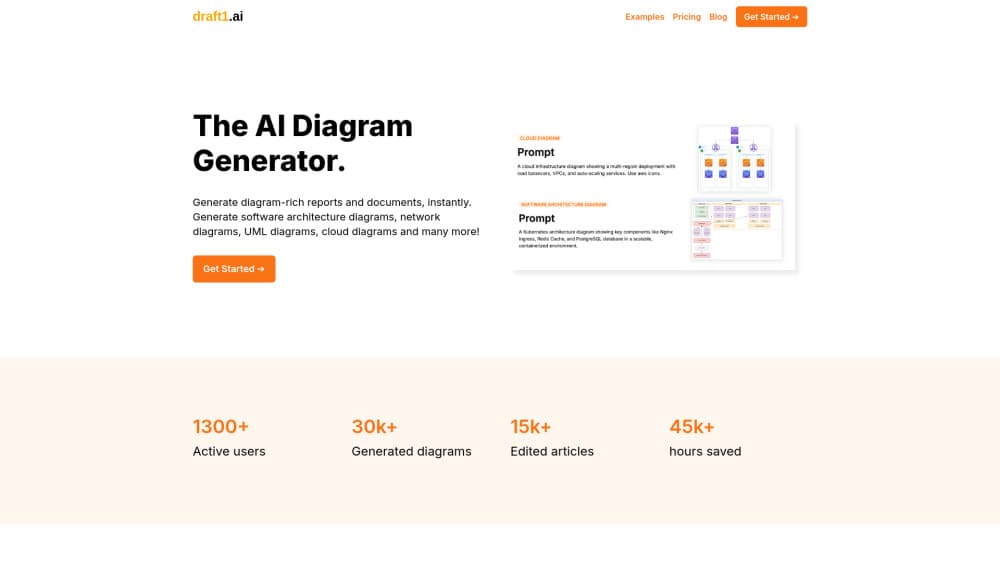
About draft1.ai
What Is draft1.ai
draft1.ai is a web tool that turns a written description into a diagram and a short supporting document. You paste rough notes, a Slack thread, a meeting summary, or a chunk of infrastructure code, and it returns a visual plus a first draft you can edit.
The product is aimed at people who draw systems for a living: software architects, developers, DevOps engineers, and the technical writers who document what those teams build. It handles the usual set of technical formats, including entity-relationship diagrams, UML, Kubernetes layouts, network diagrams, and cloud infrastructure, and it generates them in a hand-drawn or clean style depending on the prompt.
Two things shape how far you can take it. Every diagram stays editable in draw.io, so you are not locked into the tool that made it, and the output is a draft rather than a finished artifact. Complex systems still need a careful read, since a generated diagram can miss a component or misplace a connection, and the paid tiers cap how many prompts you get each month.
Getting Started
- Open draft1.ai in a browser and create a free account, which comes with three diagrams and no card.
- Paste your notes, a question, or a block of Terraform, docker-compose, or SQL into the input box.
- Let it generate the diagrams and the first draft report, which arrives in a few seconds.
- Edit the result in the built-in editor, changing text, colors, and images, or open the draw.io file for finer work.
- Download the assets as PDF, DOCX, PNG, or Markdown for publishing or further edits.
Product Information
A quick look at draft1.ai's pricing, supported platforms, and performance.
Best for
The users, tasks, and scenarios where this tool fits best.
Users
- Software architects
- DevOps and platform engineers
- Technical writers and product managers
- Developers documenting an unfamiliar system
Tasks
- Turning a text description into a system diagram
- Diagramming cloud infrastructure
- Generating an ER diagram from a schema
- Editing a diagram in plain English
- Downloading a diagram and document
Scenarios
- Preparing a design review
- Documenting infrastructure before a migration
- Explaining a system to non-engineers
Key features
Text to diagram generation
The core feature takes a plain-language description and returns a set of diagrams that illustrate different angles of the same idea. You can paste notes, a question, or a rough draft, and it produces colorful visuals without a structured input format. For someone starting from scattered notes, that means a diagram is one paste away instead of an afternoon in a drawing tool. Accuracy still depends on how clearly the input describes the system.
Editable draw.io output
Every diagram export keeps a draw.io file, so you can open it in the draw.io editor and change any element by hand. This matters because most diagram tools produce an image you cannot easily adjust, while here the generated layout is a starting point rather than a locked picture. The trade-off is that heavy manual edits push the work back into draw.io, which is where many engineers already work anyway.
Infrastructure and cloud diagrams
The tool drafts infrastructure diagrams for a range of cloud and on-premises technologies, using icon sets that match the provider you name. A prompt describing a multi-region deployment returns load balancers, VPCs, and auto-scaling services in a readable layout. It saves the tedious part of infrastructure drawing. A generated map still needs a check against the real environment before anyone trusts it.
Diagrams from code and schemas
You can paste Terraform, docker-compose, or a SQL schema and get a diagram back, which turns a configuration file into a visual description of the system. A pasted SQL schema becomes an entity-relationship diagram that shows how tables connect. This suits engineers who would rather reuse what they already have than redraw it, and it keeps the diagram tied to the source that defines the system.
Document drafting
Alongside the diagram, draft1.ai produces a first draft document with sections you would otherwise write by hand. It builds a short report around the visual, which is useful when the diagram needs explaining to a reader who is not going to study it closely. The draft is a starting point for editing, not a finished document, so the writing still needs a pass before it ships.
API and agent integration
The product ships an HTTP API plus an MCP server, a GitHub Action, and setup snippets for Claude, Cursor, and Codex. An agent can create a key, generate a diagram, read it back, and iterate on it in plain English without a human opening the dashboard. Quota checks come first through a dedicated endpoint, so an automated run does not waste a turn on a failed call.
Pros and cons
Pros
- Diagrams stay editable in draw.io, so the output fits an existing workflow instead of locking you into a new one.
- A free tier with three diagrams lets you test the quality before committing to a plan.
- Code and schema inputs reuse work you already have, turning Terraform or SQL into a diagram without redrawing anything.
- The API and MCP server make it usable from an agent or a CI pipeline, not just from the web app.
- Static exports cover PDF, DOCX, PNG, and Markdown, which fits reports, wikis, and slide decks.
Cons
- Every plan caps prompts per month, so heavy users can hit the ceiling and need to watch usage.
- Generated diagrams are drafts that can miss a component or a connection, so a review pass is required before sharing.
- The paid tiers add up for a team, since the company plan is billed per user at a higher rate.
- Deep manual adjustments send you back to draw.io, which some users may find breaks the flow.
Frequently asked questions
draft1.ai is an AI diagram generator that turns text into diagrams and short documents. You paste notes, a description, or a piece of infrastructure code, and it produces visuals such as architecture, network, Kubernetes, or entity-relationship diagrams along with a draft report.
Related content
Explore related tools, skills, and articles for draft1.ai.
draft1.ai Alternatives

Base Code
Base44 (Wix) · Coding · ProductivityBase Code is a shared cloud development environment from Base44. Teammates describe changes to an existing GitHub codebase in chat, preview them live and send them back as pull requests.

Google EmbeddingGemma 2
Google DeepMind · Writing · Image · CodingGoogle EmbeddingGemma 2 is a 740M-parameter open model that turns text, code, images, audio, and video frames into vectors in one 768-dimension space, running on phones and laptops.

GitGlow
GitGlow · Coding · ProductivityGitGlow is a local-first desktop Git client that lets independent developers review their own code and their AI agents' changes in one place before shipping.