

DreamShorts
Arucy Enterprises · Writing · Video
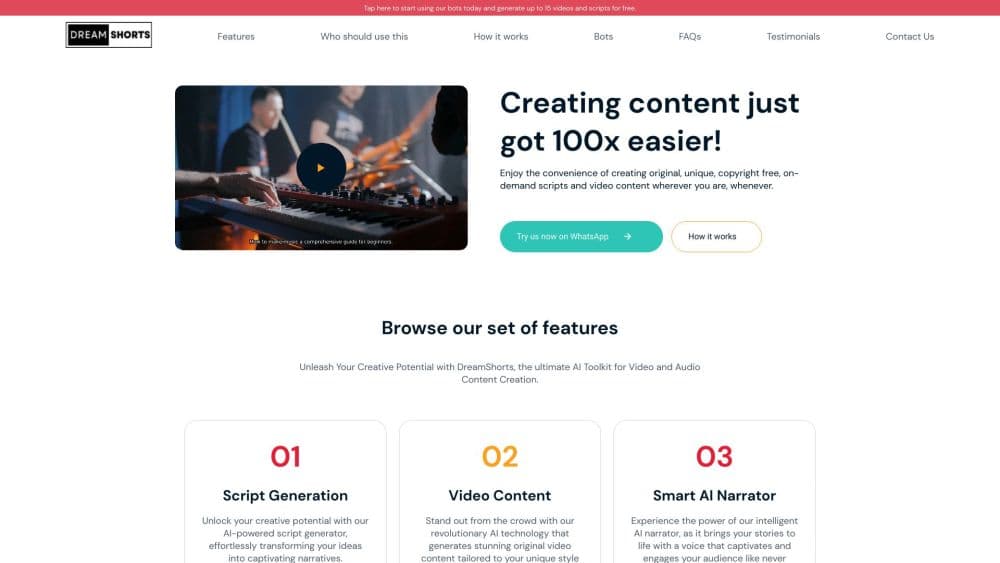
DreamShorts is an AI short video generator that turns a topic into a script, AI voiceover, captioned vertical video, and scheduled posts for TikTok, YouTube Shorts, and Instagram Reels.
About DreamShorts
What Is DreamShorts
DreamShorts is a browser studio for people who publish short video every week and would rather not open an editor. You type a topic. The platform writes the script, builds a scene list from stock footage, records the voiceover, adds word-level captions, and renders a vertical MP4. Then it pushes the file to TikTok, Instagram, YouTube, Facebook, LinkedIn, X, or Pinterest.
The product is built around one path: idea in, published post out, same session. Most short video maker tools stop at the clip and leave captions and scheduling to you. The output here targets 9:16 feeds, so you get Reels and Shorts rather than long-form video. The same account also writes SEO articles, makes thumbnails, reads trending sounds on TikTok and Instagram, and runs a link-in-bio page at dshorts.co. DreamShorts says everything it generates is original and copyright free.
Depth is the weak spot. Scene edits are light, the visual track comes mostly from Pexels stock clips and your own uploads, and every action runs on credits. Native mobile apps sit on the roadmap, not in the app stores, so the whole workflow lives in a browser tab.
Getting Started
- Sign up at dreamshorts.com and confirm your email address.
- Choose a starting point: a video project, a script, a photo collection, or the clipper.
- Describe the video you want, pick a voice, and let the platform draft the script and scenes.
- Review each scene, swap footage or rewrite lines, then render the final file.
- Connect your social accounts and publish now or drop the post into the content calendar.
Product Information
A quick look at DreamShorts's pricing, supported platforms, and performance.
Best for
The users, tasks, and scenarios where this tool fits best.
Users
- Solo creators running a faceless channel
- Social media managers juggling several brand accounts
- Small business owners with no editing budget
Tasks
- Turning a trend into a post the same day
- Repurposing long recordings
- Holding a posting streak
- Writing companion articles
Scenarios
- A finance explainer account that needs a fresh 45 second clip every morning without filming.
- An online store turning product photos into scheduled Pinterest pins and Reels at once.
- A coach who records one long Q&A and needs six clips from it for the week.
Key features
One Prompt to Finished Video
Type a topic and DreamShorts returns a script, a scene list, matched stock footage, and a rendered vertical video. Each scene can be rebuilt on its own, so one weak shot doesn't force a full re-render. Most videos finish in two to five minutes, according to the company.
AI Narration With 24+ Voices
The narrator reads your script in one of more than 24 AI voices across several languages, with emotion cues built into the delivery. You can generate audio scene by scene, listen back, and change the voice before the final render. Voice cloning appears on the roadmap and isn't live yet.
Word-Level Captions and AI Thumbnails
Captions follow each spoken word, and you set the font, color, highlight style, and placement. The same account generates cover images with platform-sized crops, which saves a second tool for anyone who needs a thumbnail as well as the clip.
Long Video Clipper
Upload a podcast, interview, or webinar and the clipper transcribes the audio, scores the visuals, and ranks the moments worth cutting. It returns clips between 10 and 30 seconds, and a clip can go straight into a collection for scheduling.
Autoposting to Seven Platforms
Connect TikTok, Instagram, Facebook, YouTube, LinkedIn, X, and Pinterest once, then publish now or from the calendar. Captions and formats adjust per channel, and the background publisher retries a failed post without a manual upload.
Creative Vault and Trending Insights
The vault keeps research, references, and brand notes as project files the AI can draw on. Trending views show hashtags, songs, and topics gaining ground on TikTok, Instagram, and YouTube, which feeds scripts as well as article outlines.
DreamLinks Bio Pages
Each account can claim a dshorts.co username for a link-in-bio page with click analytics and geo-routed short links. It's a side product next to the video tools, yet it keeps the audience funnel in the same dashboard.
Pros and cons
Pros
- Script, voice, visuals, captions, and publishing share one tab, which removes most of the handoff work from short video production.
- The 7-day trial with 20 credits is enough to judge output quality before paying.
- Credits don't expire, so a quiet month doesn't burn your balance.
- The clipper and article writer stretch one subscription past video work.
Cons
- Visuals lean on stock footage, so the result looks generic next to hand-shot clips or premium AI video models.
- Every render, script, and article spends credits, and steady use pushes you toward the $29.99 plan.
- There's no mobile app yet, and scene editing is basic next to a real editor.
- Public API documentation is thin, so developers have to read responses to learn the endpoints.
Frequently asked questions
It writes a script from your topic, builds scenes with stock footage, records an AI voiceover, adds captions, and renders a vertical video ready for TikTok, Reels, Shorts, or Pinterest.
Related content
Explore related tools, skills, and articles for DreamShorts.
DreamShorts Alternatives

Google EmbeddingGemma 2
Google DeepMind · Writing · Image · CodingGoogle EmbeddingGemma 2 is a 740M-parameter open model that turns text, code, images, audio, and video frames into vectors in one 768-dimension space, running on phones and laptops.

MePersona
MePersona, Inc. · Writing · Productivity · MarketingMePersona is an AI unified inbox for creators. It learns your voice, drafts replies to fan messages from 12 platforms, and sends only what you approve.

Fluence
Yay Software (Yannick Huchard) · Writing · Voice & Language · ProductivityFluence is an Android app that reads PDFs, EPUBs, Word files and web articles aloud, follows each sentence as it speaks, and answers questions about the text on the phone itself.