

Duck, Duck, Duck! by IDEO
IDEO · Voice & Language · Coding
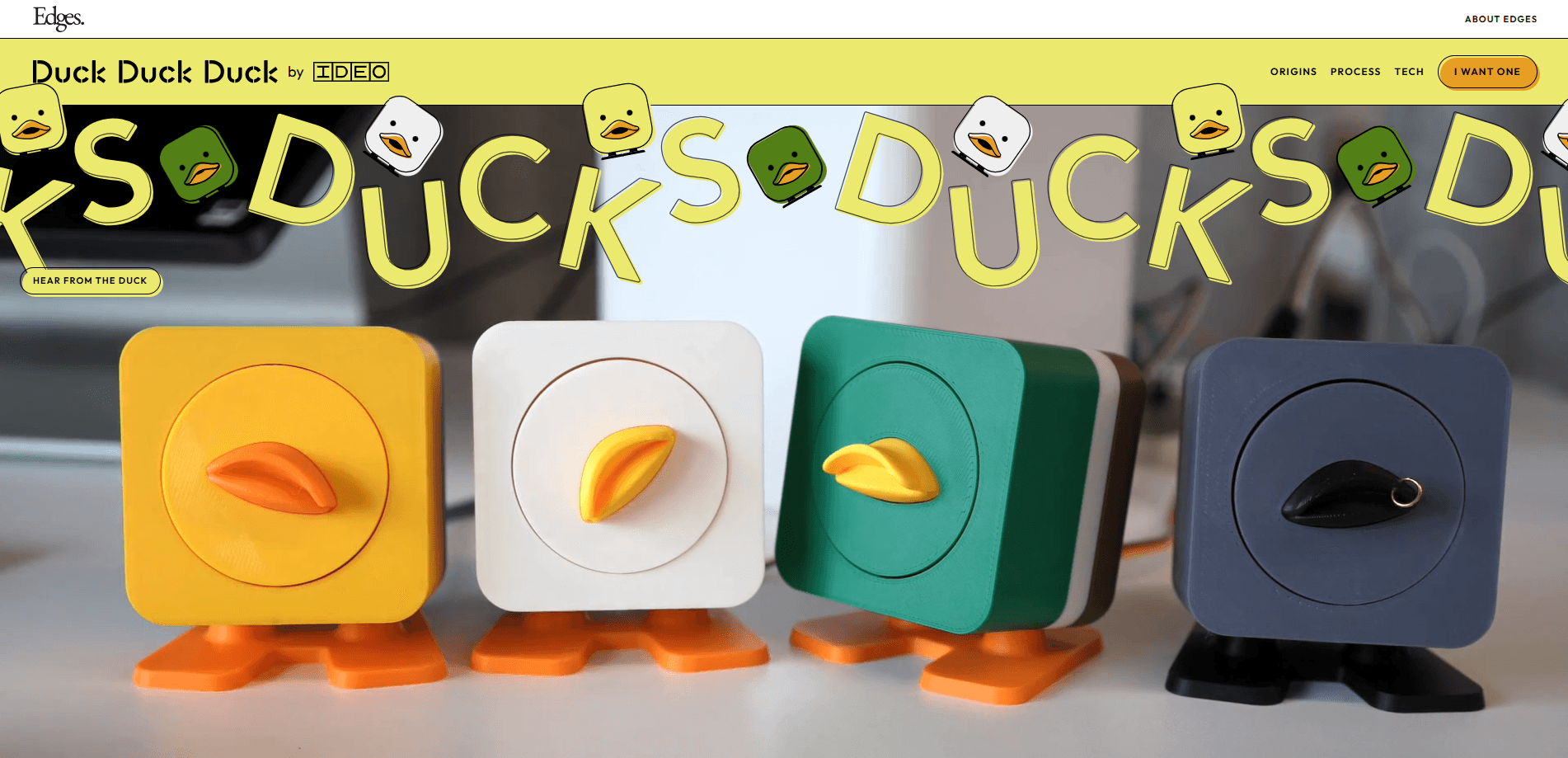
Duck, Duck, Duck! by IDEO is a desktop companion for developers who use Claude Code on a Mac. It listens in on your coding sessions, reacts when Claude runs, fails, or hesitates, and lets you approve permission requests out loud instead of clicking through dialog boxes. You can run it as a software widget on M3+ Apple Silicon, or build the optional physical duck on a single USB-C cable. It's a playful take on rubber duck debugging, where the duck actually talks back.
About Duck, Duck, Duck! by IDEO
What Is Duck, Duck, Duck! by IDEO
Duck, Duck, Duck! is an AI coding companion built for Claude Code, Anthropic's terminal-based coding agent. IDEO, the design firm behind it, describes it as rubber duck debugging where the duck has opinions. The idea is simple: instead of staring at a silent terminal while Claude works, you get a small character that watches the session and says something about it.
The product comes in two forms. There's a desktop widget you can download right now, and there's a hardware kit with a real moving duck that connects over USB-C. Both share the same personality. The widget handles the on-screen reactions, and the physical duck adds movement, sound, and a microphone for voice commands.
The biggest limitation is scope. Duck, Duck, Duck! only works with Claude Code, and the desktop version needs an M3 or newer Mac for the free on-device AI scoring. On M1 and M2 machines you have to add your own free Gemini API key for fast reactions. It's a companion, not a coding tool, so it won't write or edit code for you.
Getting Started
- Download the widget from the official site, or order the hardware kit if you want the physical duck.
- If you're on M3 or newer Apple Silicon, launch it and everything runs locally out of the box.
- On M1 or M2, add a free Gemini API key so the duck can score responses quickly.
- Say "ducky" followed by a command to speak directly to your Claude Code session.
- Toggle between Companion mode for running commentary and Permissions mode when you want help tracking where Claude gets stuck.
Product Information
A quick look at Duck, Duck, Duck! by IDEO's pricing, supported platforms, and performance.
Best for
The users, tasks, and scenarios where this tool fits best.
Users
- Claude Code users on Mac
- Developers who work alone
- Design and hardware tinkerers
Tasks
- Approving permissions by voice
- Tracking where Claude gets stuck
- Keeping context while you work
Scenarios
- Long coding runs in the terminal
- Hands-on hardware desks
- Co-working and shared workspaces
Key features
Two Modes for Different Working Styles
Duck, Duck, Duck! runs in Companion mode and Permissions mode. Companion mode gives you a duck that shares its inner monologue on how you work with Claude, while Permissions mode focuses on tracking when Claude gets stuck. Switching between them takes a single toggle, so you can match the duck to your mood rather than committing to one personality.
Voice-Activated Control
You talk to your Claude Code session by saying "ducky" followed by a command. When Claude needs permission to run something, the duck asks you out loud, so you answer without a modal dialog or a context switch. Your hands stay free, which matters when you're mid-task on something else.
Reactions to Your Coding Session
The duck doesn't just relay what's happening. It stays mostly ambivalent, but when things go right it's the first to celebrate, and when they go wrong it has a comment ready. Shell hooks fire on every prompt and response, so the reactions track the actual session rather than a canned script.
Runs Locally on Apple Silicon
On M3 or newer Macs, Duck, Duck, Duck! runs everything locally through on-device AI scoring, which is instant and free. Older M1 and M2 machines still work, but they need a free Gemini API key for fast reactions. Either way, there's no subscription.
Optional Physical Duck
The hardware version is a real desk companion built on an ESP32-S3 with a micro-servo, an I2S amplifier and speaker, a MEMS microphone, and a tactile button. It connects over a single USB-C cable that carries power, data, and audio at once.
Built Around Claude Code
The duck hooks into Claude Code rather than sitting beside it. Permission requests get resolved by voice, and commands are injected through tmux. If you don't know what tmux is, the setup walks you through it, so the tooling stays out of your way.
Pros and cons
Pros
- Adds spoken permission handling to Claude Code, which cuts out dialog boxes and window switching during a session.
- Runs free on M3 or newer Macs with no account and no subscription.
- Works as a plain software widget, so you don't need the hardware to try it.
- The physical duck connects with one USB-C cable for power, data, and audio together.
- On M1 and M2, a free Gemini API key keeps reactions fast without a paid plan.
Cons
- It only works with Claude Code, so users of other coding agents can't use it at all.
- The desktop version needs an M3 or newer Mac for free on-device scoring, which leaves older machines depending on a Gemini key.
- Voice features mean you'll want a private space or headphones, since the duck talks to you out loud.
- Pricing for the hardware kit isn't published on the site, so you have to request one to find out the cost.
Frequently asked questions
It's a companion for Claude Code that watches your coding session, reacts to what happens, and lets you handle permission requests by voice. Think of it as a rubber duck that talks back instead of staying silent.
Related content
Explore related tools, skills, and articles for Duck, Duck, Duck! by IDEO.
Duck, Duck, Duck! by IDEO Alternatives

Prosp
Prosp · Writing · Voice & Language · MarketingProsp is an AI LinkedIn outreach tool built for agencies and sales teams, and it writes the message and the voice note in your own voice for each prospect so they actually reply. You connect your accounts, find leads, and let the AI draft and send personalized messages at scale, all from one inbox. It's built for people running outbound at volume. That's the whole pitch. Every touchpoint still has to feel human.

Wordly AI Translation
Wordly · Voice & Language · ProductivityWordly AI Translation is a real-time AI translation and captioning platform built for meetings, conferences, and events. It delivers live translation, captions, transcripts, and summaries in more than 60 languages, and attendees join by scanning a QR code or opening a link instead of using dedicated headsets. The platform works with Zoom, Microsoft Teams, Google Meet, and Webex, and it's designed for organizations that want multilingual access without hiring human interpreters for every session. Simple as that.
Musicful
Musicful AI · Voice & Language · VideoMusicful is an AI music generator and AI music video maker that turns text to music in minutes. Give it a text prompt, a set of lyrics, or a hummed melody and it returns a finished track with vocals and instruments. It also doubles as an AI song generator, produces music videos from the songs you create, and offers an AI cover tool plus a developer API. The platform runs in a web browser and through an Android app, so you can start a song on desktop and pick it up on your phone.