

Duory
Adegboyega Dada · Writing · Productivity
Duory is an iOS app for language learning notes. It captures phrases, translates and records them, and keeps every target language in one place, so study stops living across five different apps.
About Duory
What Is Duory
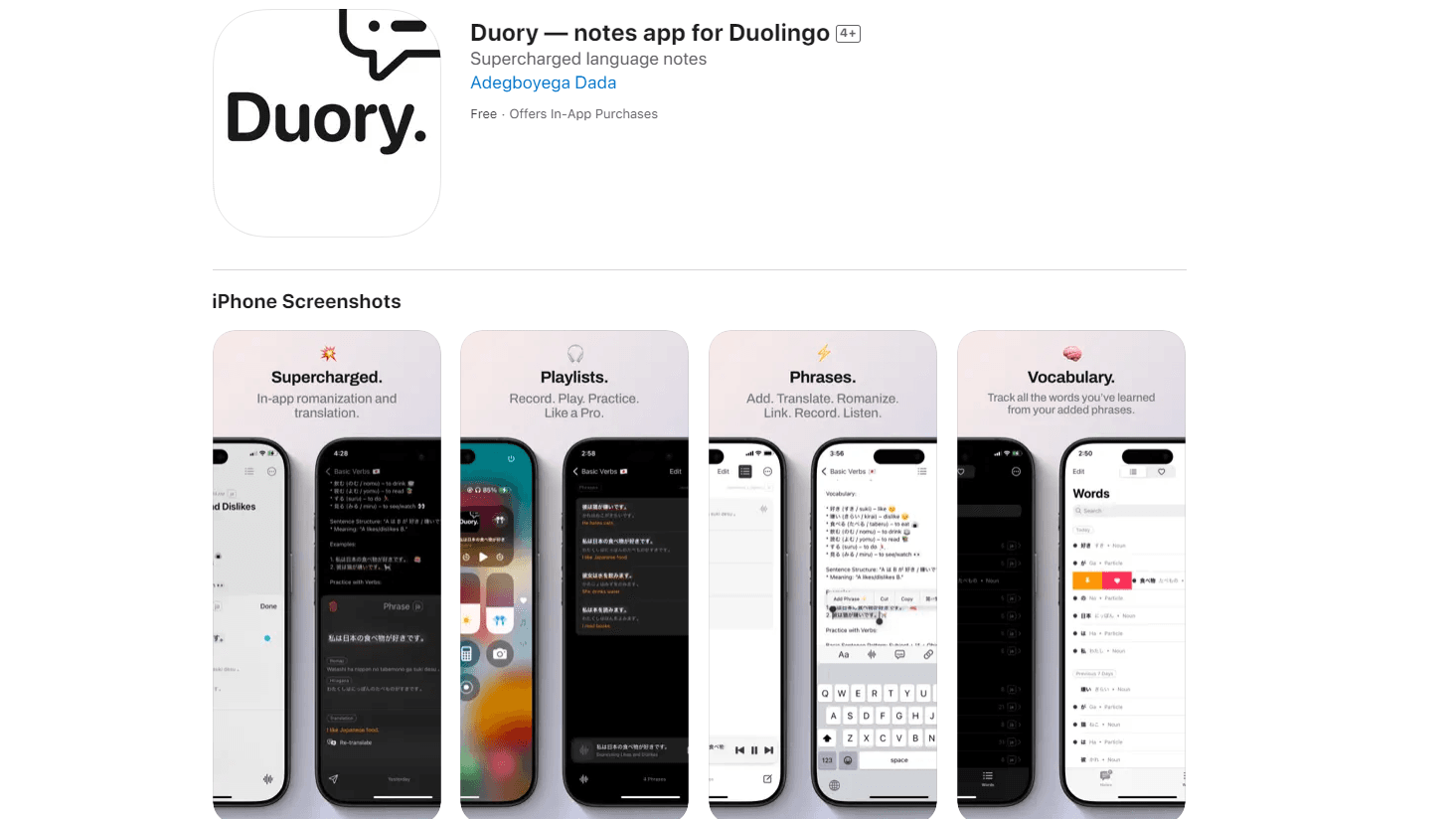
Duory is an iOS app that turns language study into a single, organized notebook. Instead of screenshotting phrases, pasting them into a notes app, and then opening a separate translator, you capture a phrase once and Duory attaches the translation, transliteration, and a recording to it. It works as a Duolingo companion app, sitting beside your lessons rather than replacing them.
The app runs its language tasks on-device. According to the developer, translation and transliteration use Apple's language APIs plus offline language tools, so a lot of the work happens without a network round trip. iOS downloads a dictionary for each language pair you use, and that download only happens once per pair.
The biggest limitation is platform. Duory is iOS-only and needs iOS 18.6 or later, so Android users are left out entirely. The free tier also caps you at one target language, and anything you hold beyond that turns read-only once a subscription lapses.
Getting Started
- Install Duory from the App Store on a device running iOS 18.6 or later, then open it and pick your first target language.
- Grant microphone and camera access if you plan to record pronunciation or scan text from books and screens.
- Capture a phrase by typing it, speaking it, or pointing your camera at a textbook page, a Duolingo screen, or a PDF.
- Review the auto-attached translation, transliteration, and recording, then edit or tag the note however you like.
- Upgrade to Duory Plus if you want more than one target language, playlists, or iCloud sync across your devices.
Product Information
A quick look at Duory's pricing, supported platforms, and performance.
Best for
The users, tasks, and scenarios where this tool fits best.
Users
- Duolingo learners
- Independent language students
- Polyglots juggling several languages
Tasks
- Building a personal phrase bank
- Practicing pronunciation
- Journaling in a target language
Scenarios
- Reviewing on a commute
- Practicing hands-free during chores
- Capturing idioms on the go
Key features
On-device language notes
Note-taking is the core of Duory. Every phrase you save can carry its translation, transliteration, and a voice recording in the same card. Because the app leans on Apple's on-device language APIs, much of this works offline, which matters when you're studying on a plane or in a spotty signal area.
Capture from almost anywhere
Duory pulls phrases in from a textbook, a Duolingo session, a photo, or an RTF/PDF document. The camera scans text directly, so you don't retype anything. For learners who study from printed material, this removes the most tedious step: manually copying vocabulary into a second app.
Translation and transliteration
The app translates inline and adds transliteration, including Hiragana for Japanese and Pinyin for Chinese. That last part matters most for scripts you can't yet read, since it gives you a pronunciation bridge without leaving the note. Translatable coverage spans 40 target languages.
Voice recording and playback
You can record your own pronunciation of any phrase and play it back later. This voice recording stays tied to the note on the free plan. Paying for Duory Plus turns those recordings into playlists, and you can control playback from the Lock Screen or Control Center.
Study playlists and widgets
Playlists turn your saved phrases into audio you can run in the background, which is what makes hands-free practice possible. Widgets push recently learned words onto the Home and Lock Screen, giving you passive reinforcement every time you glance at your phone.
iCloud sync and journaling
Duory Plus syncs notes and journals to iCloud so the same notebook follows you across devices. The app also hooks into Apple's Journaling Suggestions, which nudges you to write short entries in your target language. Both features are designed to keep a study habit alive rather than to store data for its own sake.
Pros and cons
Pros
- Combines notes, translation, and recording in a single app
- On-device processing keeps much of the work usable offline
- Supports 40 target languages, including non-Latin scripts
- Free tier is genuinely usable for one target language
- Notes from trials and subscriptions stay accessible forever
Cons
- iOS only, and needs iOS 18.6 or later
- Free plan limits you to a single target language
- Extra languages go read-only when a subscription ends
- Playlists and iCloud sync sit behind the paid tier
Frequently asked questions
Duory has a free plan that never expires, covering one target language, phrase capture, in-app translation, and voice recording. Duory Plus adds multiple languages, playlists, and iCloud sync through a monthly or annual subscription.
Related content
Explore related tools, skills, and articles for Duory.
Duory Alternatives

Google EmbeddingGemma 2
Google DeepMind · Writing · Image · CodingGoogle EmbeddingGemma 2 is a 740M-parameter open model that turns text, code, images, audio, and video frames into vectors in one 768-dimension space, running on phones and laptops.

MePersona
MePersona, Inc. · Writing · Productivity · MarketingMePersona is an AI unified inbox for creators. It learns your voice, drafts replies to fan messages from 12 platforms, and sends only what you approve.

Fluence
Yay Software (Yannick Huchard) · Writing · Voice & Language · ProductivityFluence is an Android app that reads PDFs, EPUBs, Word files and web articles aloud, follows each sentence as it speaks, and answers questions about the text on the phone itself.