

Dynobase
Dynobase · Other
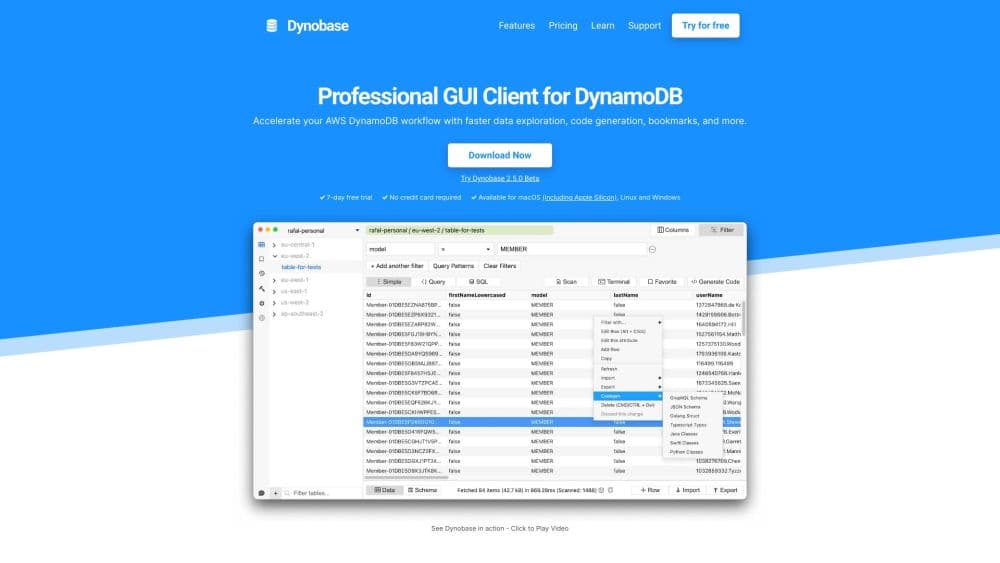
Dynobase is a desktop GUI client for Amazon DynamoDB. It replaces console tab hopping with fast query building, JSON style item editing, and AI generated code snippets in four languages.
About Dynobase
What Is Dynobase
Dynobase is a native DynamoDB GUI client for Amazon's managed NoSQL database. It targets the day to day work the AWS console makes slow: finding the right table, checking what an item actually contains, and changing one attribute without breaking the rest of the document. The app runs on macOS, Windows, and Linux and reads the same credential files your CLI already uses.
Speed is the whole pitch. Profiles and regions switch from a sidebar, queries build themselves once you name a table and an index, and items open in an editable JSON view. According to Dynobase, that replaces browser extensions, extra windows, and repeated logins between roles.
Version 3.0 added discovery tools: a schema explorer that maps nested paths and mixed types, vector search against an existing DynamoDB vector index, and JSON path filters that turn nested attributes into saved grid columns. There's no free tier, only a seven day trial, and no public API to script against.
Getting Started
- Download the build for your OS from dynobase.dev and install it. Apple Silicon, Intel Macs, Windows, and Linux are all covered.
- Point the app at your AWS profiles. Dynobase reads ~/.aws, so SSO identities, MFA protected profiles, and aws-vault setups usually work with no extra configuration.
- Pick a profile and a region, then open a table. The query builder works out whether you need Query or Scan and which index fits.
- Edit items in the JSON view or run a PartiQL statement, then copy the generated snippet into your project.
Product Information
A quick look at Dynobase's pricing, supported platforms, and performance.
Best for
The users, tasks, and scenarios where this tool fits best.
Users
- Backend developers who touch DynamoDB daily
- Teams running several AWS accounts
- Data engineers debugging a single table design
- Consultants and freelancers
Tasks
- Writing a query against a secondary index
- Fixing one bad item
- Moving data between environments
- Generating SDK code
Scenarios
- A production incident at an odd hour
- Exploring an unfamiliar table
- Local development against DynamoDB Local
Key features
Profile and Region Switching
Dynobase reads credentials from ~/.aws, the same place the AWS CLI and SDKs look. Profiles with MFA, SSO based identities, and aws-vault setups show up in a sidebar, and you can jump between accounts and regions without closing a window. Short lived and long lived credentials both work.
Query Builder with PartiQL and SQL
You name a table and the builder handles the rest: Query versus Scan, which index, how the key condition should read. PartiQL and SQL statements are accepted too, which helps when you already know the syntax. Every query exports as a CLI command or an SDK snippet.
JSON Style Item Editing
Items open as editable JSON, maps and lists included. You change a nested attribute in place and save, and this DynamoDB editor writes only what changed. For anyone who has hand built an UpdateExpression, that removes most of the syntax errors.
Operation Builder
Update, delete, and transaction operations get a form based builder that outputs production ready code. It matters most for conditional writes and multi item transactions, where a typo in a condition expression turns into a silent no-op.
AI Code Generation
Dynobase AI turns a plain description into a DynamoDB snippet for JavaScript, TypeScript, Python, Go, or Rust. You describe the operation, review the output, and paste it into your project. Treat it as a first draft, since the generated code still needs a read before it ships.
Semantic and Vector Search
If your table holds embeddings, you can query the vector index with text, a pasted embedding, or an existing item, then inspect ranked matches. That saves writing a throwaway script every time you want to check retrieval quality.
Schema Explorer and Nested Filters
The explorer maps nested paths, missing attributes, and mixed types across loaded results or a bounded sample. JSON path filters then pull a nested value into the data grid as a saved column, so a table with deep documents stays readable.
Pros and cons
Pros
- Fast profile and region switching across accounts, with SSO, MFA, and aws-vault support.
- The query builder removes the Query or Scan guesswork and exports working code.
- JSON editing and the operation builder cut down on hand written expressions.
- Version 3.0 makes it a fuller AWS DynamoDB tool, adding vector search and schema discovery the AWS console doesn't offer.
Cons
- No free tier. You get seven days, then $9/mo or $199 once, and teams pay $79/mo.
- Desktop only, with no browser or mobile version, so a locked down laptop or a Chromebook is out.
- AI snippets need a review, and the docs don't say which model sits behind that feature.
Frequently asked questions
Dynobase is a GUI client for Amazon DynamoDB. It handles table browsing, item editing, query building, and data import or export, which is the work most teams do in the AWS console or through one-off scripts.
Related content
Explore related tools, skills, and articles for Dynobase.
Dynobase Alternatives

JarvisCore
Prescott Data · Coding · Productivity · OtherJarvisCore is an open source Python runtime where AI agents work as equal peers on an agent mesh, claim tasks from a shared ledger, and reach external services through a zero-trust broker.
Clef
Cloudflare · Business · OtherClef is Cloudflare's open-source decision model for Workers AI. It returns calibrated probabilities for typed questions, not generated text, so agents can classify, route, and act fast.

iFixAi
iFixAi · Business · OtheriFixAi is an open-source auditor for AI agents. It runs your agent through a simulation of your business, grades every reply, and returns an A to F scorecard backed by evidence.