

eapy
Pozalabs · Voice & Language · Productivity
eapy is a web-based music canvas and EPK builder that helps artists capture ideas, organize projects, and pitch their work with one shareable link.
About eapy
What Is eapy
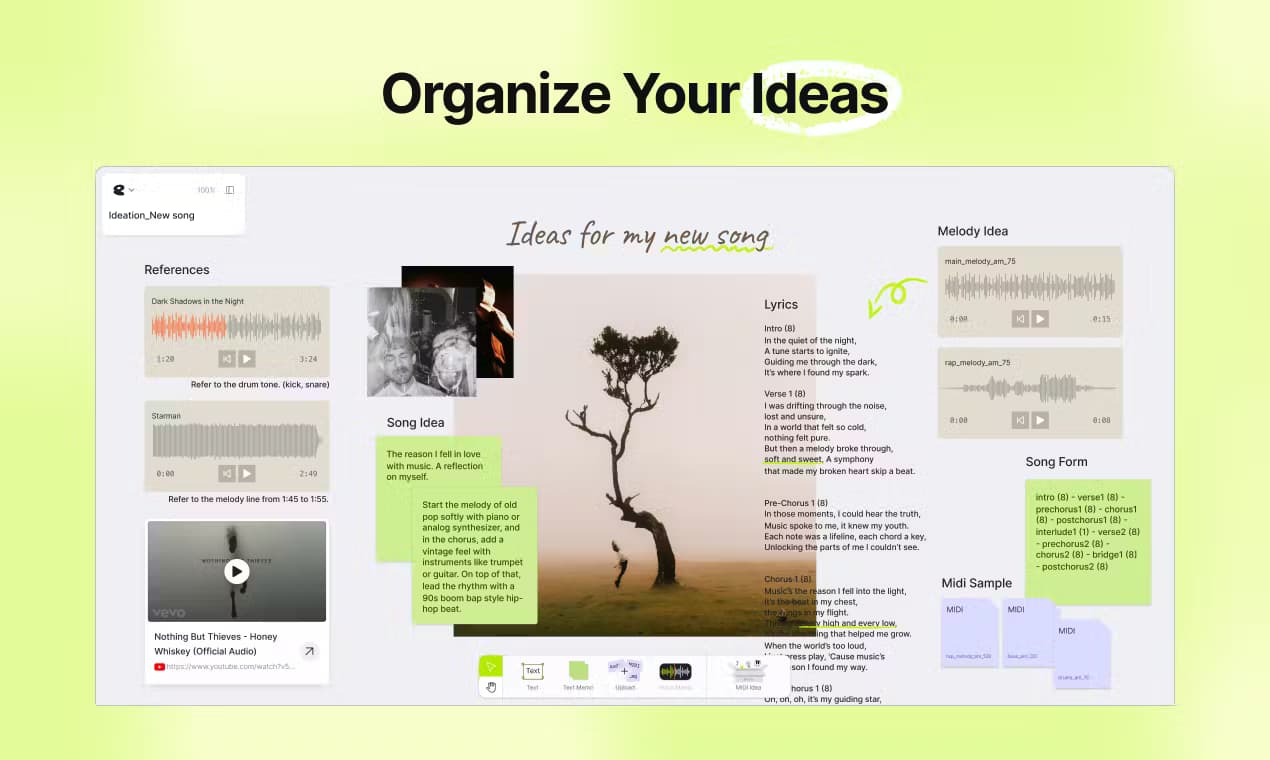
eapy is a music creation platform built for artists, and it ships two tools that cover different parts of the job. Canvas is an infinite whiteboard where you drop audio, MIDI, images, text, and YouTube links to map out a song or a whole release. Slide turns that raw material into an Electronic Press Kit you can send to labels, sync agents, and A&Rs. Both run in the browser. Nothing to install.
The pitch is that most music software fights you on housekeeping. Ideas live in voice memos, project files sit in folders with names you'll never decode again, and an EPK often means wrestling a design tool you don't own. eapy folds all of that into one place, and the AI layer is there to push a half-formed spark into something you can actually work with. According to the company, more than 5,000 creators use it.
So who is it for? Mostly independent artists who want one space for the thinking and the presentation. As a music ideation tool, Canvas is loose on purpose, which is either freeing or unnerving depending on how you like to work.
The main limit is scope. eapy isn't a DAW, so you won't mix or master a track inside it. It's for the thinking and the presentation around the music, not the final audio production. There's also no public API, which rules it out if you're hoping to wire it into your own pipeline.
It works as an artist profile builder too, which is where the money sits. You can ship a clean press page in an afternoon.
Getting Started
- Create a free account at eapy.io with your email or a social login.
- Open Canvas and start a board, then drag in audio, images, text, or YouTube links to lay out the idea.
- Type a style prompt to generate MIDI samples if you want a starting point for chords, toplines, or instrumental parts.
- Switch to Slide, add text and media, and pick a style for your artist profile.
- Share the board or the EPK with a single link, and set a password if you want it private.
Product Information
A quick look at eapy's pricing, supported platforms, and performance.
Best for
The users, tasks, and scenarios where this tool fits best.
Users
- Independent artists and singer-songwriters
- Producers and beatmakers
- A&Rs and music managers
Tasks
- Building an Electronic Press Kit
- Capturing song ideas
- Organizing a release
- Sketching chords and toplines
Scenarios
- Sending a pitch to a label or sync agent and wanting one clean link instead of attachments.
- Sorting through a folder of unfinished demos and turning the good ones into structured projects.
- Collaborating with a co-writer who works in a different city and needs to see your references.
- Pulling audio from a YouTube reference video for a quick sample.
Key features
Infinite Music Canvas
Canvas is a whiteboard with no edges, built for music thinking rather than task management. You can pin audio, MIDI files, images, text, and YouTube links anywhere on it, then draw connections between ideas that belong together. No folders. No naming rules. It suits artists who think visually and hate losing a good spark in a notes app.
AI-Generated MIDI Samples
Describe a style in plain text and eapy returns MIDI samples in three types: chord progressions, vocal toplines, and instrumental tracks. It's a way to break a blank-page moment without opening a DAW or scrolling sample packs. The output is a starting point you can edit, not a finished part. Treat it as a nudge, and it earns its place in a session; expect finished parts and you'll be disappointed.
One-Link EPK Slides
Slide builds a professional Electronic Press Kit from your text, images, and audio, and the design is handled for you. Send one link and A&Rs can stream your tracks and read your story in the same place. It looks fine on a phone, which matters when someone reviews you between meetings.
YouTube Link Integration and Audio Extraction
You can embed YouTube videos directly on a canvas and play them without leaving the page, which keeps references next to the work they inspired. There's also a tool to convert a YouTube video into an MP3 at 320kbps, handy for pulling a sample or a reference into a session.
Custom Links and Link Previews
On the Pro plan you can set a custom link and edit the preview image, logo, and title that shows before someone clicks. That's a small detail with an outsized effect when your EPK gets forwarded around an inbox. First impressions again, just in link form. You can also remove the eapy branding from your pages.
Private Canvas Sharing
Every board can be shared with a link, and you can lock it behind a password when the material isn't for public eyes. Co-writers get access to your references and structure without you emailing files back and forth. The same link works on any device.
Asset Library in One Place
Audio, MIDI, text, images, and links all live in the same space instead of spread across five apps. Everything autosaves, so a browser crash won't cost you an afternoon. It's the boring feature that ends up mattering most once your catalog grows. Boring, but the one you'll rely on daily.
Pros and cons
Pros
- Combines ideation and artist presentation in a single web tool, which cuts down on app-switching.
- Free Starter plan covers up to 3 Slides and 10 pages each, enough to test it properly.
- Pro is $4/month, cheap compared with hiring a designer for an EPK.
- Password-protected sharing keeps unreleased material out of public view.
Cons
- No offline mode or mobile app, so you're tied to a browser and a connection.
- It isn't a DAW, so mixing, editing, and mastering still happen elsewhere.
- No public API means you can't automate it or plug it into an existing workflow.
- Free plan limits you to 3 Slides, which gets tight if you manage more than one artist.
Frequently asked questions
eapy is used for two jobs: mapping out music ideas on a visual canvas and building Electronic Press Kits to pitch your work. Artists use it to keep references, demos, and project notes together, then share a polished profile page.
Related content
Explore related tools, skills, and articles for eapy.
eapy Alternatives

Foley
Hanamori Labs, LLC · Voice & Language · Productivity · AI AssistantFoley is a voice to-do list that turns a spoken sentence into a filed task, complete with project, date and time, then helps you plan the day around what is already there.

HireKey
HireKey · Voice & Language · Productivity · LeaningHireKey is an AI job search copilot built by a former tech recruiter. It checks role fit, tailors resumes, runs interview practice and tracks every application.

Fluence
Yay Software (Yannick Huchard) · Writing · Voice & Language · ProductivityFluence is an Android app that reads PDFs, EPUBs, Word files and web articles aloud, follows each sentence as it speaks, and answers questions about the text on the phone itself.