

EchoWave
Lemon Vault LLC · Voice & Language · Video · Marketing
EchoWave is a browser-based video and audio editor for podcasters, musicians and social creators. It turns audio into shareable videos with captions, waveforms and AI voiceovers.
About EchoWave
What Is EchoWave
EchoWave is an online video and audio editor that runs in your browser. It started in 2018 as an audio to video converter that turned a podcast to video with a waveform, and it has grown into a full multitrack editor. The pitch is simple: professional-looking video without professional software or a download.
The core idea is repurposing. If you record audio, EchoWave gives that audio a visual form you can post on video-first platforms like YouTube, Instagram and TikTok. Podcasters slice episodes into clips with captions and waveform visualizers, musicians add reactive visuals to a track, and clippers cut long videos into Shorts and Reels.
The limits are worth knowing before you commit. Free editor exports stop at 720p with a small EchoWave badge, and the free plan keeps rendered videos for 24 hours. AI subtitles in 86 languages, AI voiceovers and voice cloning sit on the Pro plan and up, so the paid tiers are where most of the AI side actually lives. Videos cap at 60 minutes each on the free plan.
EchoWave is owned and operated by Lemon Vault LLC, a US company. Pricing is localized, so the dollar figures here may differ from what you see at checkout in another country.
Getting Started
- Open the editor in any modern browser. You can start without an account, and nothing needs installing.
- Upload video, audio or photos, paste from your clipboard, or record your screen, camera or mic straight into the timeline.
- Add captions with auto transcription, drop in AI voiceovers, and pick a music visualizer or template to give the project a look.
- Arrange everything on the multitrack timeline, then preview live before you commit to a render.
- Export in the cloud at up to 720p on the free plan or up to 8K on paid plans, and download the finished file.
Product Information
A quick look at EchoWave's pricing, supported platforms, and performance.
Best for
The users, tasks, and scenarios where this tool fits best.
Users
- Podcasters
- Musicians
- Social creators and clippers
- Marketers and teams
- Educators
Tasks
- Turning a podcast into a video
- Adding subtitles
- Creating a voiceover
- Converting files
- Batch-producing videos
Scenarios
- A weekly podcast episode
- A single release
- A month of social content
- A course module
- A client campaign
Key features
Auto subtitles in 86 languages
EchoWave transcribes your video and turns the speech into editable text. You style captions with 176 presets and karaoke word highlights, then translate the result into any of 86 languages. Export captions baked into the video or as SRT and VTT files for editors.
AI voiceovers and voice cloning
AI Voice Studio turns a typed script into narration, splitting every paragraph into its own clip. You pick from 63 studio voices, or clone your own voice once and reuse it across projects. That makes voiceovers practical without recording gear.
Music visualizers and motion
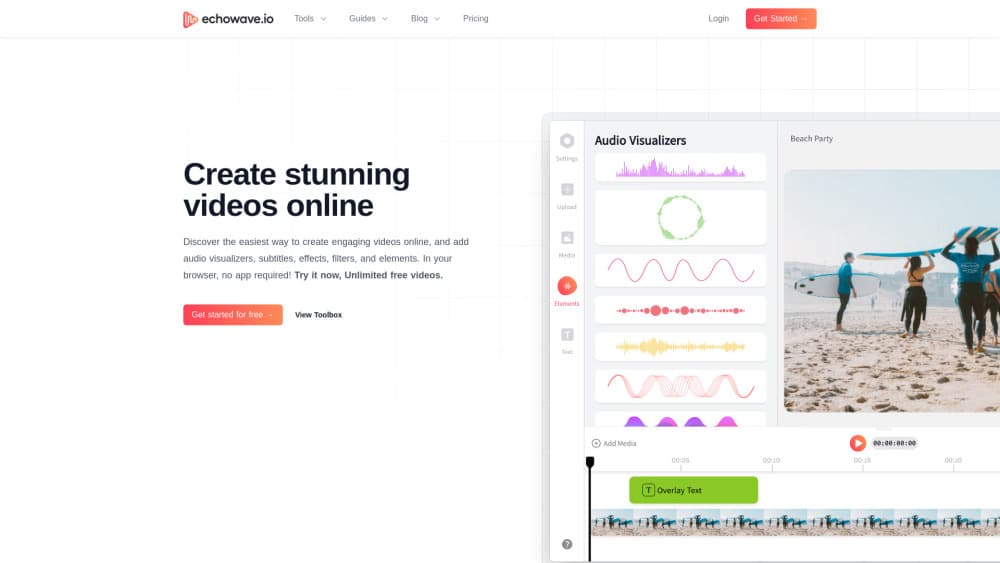
There are 93 visualizer styles that react to your audio, plus progress bars, shapes and 126 ready-made animations. When a preset is not enough, you can keyframe 72 properties, and every frame previews live on the timeline.
Multitrack browser editor
The editor handles video, audio, images, text and overlays on a real multitrack timeline. Screen, camera and mic recording happen in the same tab, and stock photos, videos and sound effects are one panel away. Projects autosave and follow you between devices.
Batch rendering and API
Save any project as a template with text, image, video and audio placeholders. Batch render hundreds of variations from a CSV, or generate videos programmatically with the REST API and MCP server for AI agents.
Cloud rendering up to 8K
Exports render on EchoWave cloud servers, not your machine, so you can close the tab while a file processes. Paid plans reach 4K and 8K at up to 120 fps, in eight formats including MP4, WebM, MOV and GIF.
Pros and cons
Pros
- No install or account needed to start: the whole editor runs in a browser on Mac, Windows, Linux and Chromebooks.
- Strong AI toolkit on the Pro plan: subtitles in 86 languages, 63 AI voices and voice cloning cover captioning and narration in one place.
- Batch and API workflows: templates, CSV rendering and a REST API let teams produce hundreds of videos without manual editing.
- Generous free tier to evaluate: unlimited projects and videos at 720p, plus 90+ tools that export clean files with no watermark.
- Cloud rendering: exports run on EchoWave servers, so long renders do not tie up your device.
Cons
- The free editor carries a badge and a 720p ceiling: you cannot publish a clean, full-HD video without a paid plan.
- AI subtitles and voiceovers are locked to Pro: the $17 a month tier is the real entry point for the AI features most people come for.
- Cloud rendering means a wait: jobs queue on EchoWave's servers rather than finishing instantly on your machine.
- Account storage is short on the free plan: rendered videos are kept for just 24 hours, so you have to download them quickly.
Frequently asked questions
EchoWave turns audio and video into share-ready clips in your browser. Its main jobs are turning podcasts into captioned videos, adding subtitles in 86 languages, creating music visualizers and lyric videos, and converting between file formats.
Related content
Explore related tools, skills, and articles for EchoWave.
EchoWave Alternatives

Prosp
Prosp · Writing · Voice & Language · MarketingProsp is an AI LinkedIn outreach tool built for agencies and sales teams, and it writes the message and the voice note in your own voice for each prospect so they actually reply. You connect your accounts, find leads, and let the AI draft and send personalized messages at scale, all from one inbox. It's built for people running outbound at volume. That's the whole pitch. Every touchpoint still has to feel human.

Wordly AI Translation
Wordly · Voice & Language · ProductivityWordly AI Translation is a real-time AI translation and captioning platform built for meetings, conferences, and events. It delivers live translation, captions, transcripts, and summaries in more than 60 languages, and attendees join by scanning a QR code or opening a link instead of using dedicated headsets. The platform works with Zoom, Microsoft Teams, Google Meet, and Webex, and it's designed for organizations that want multilingual access without hiring human interpreters for every session. Simple as that.
Musicful
Musicful AI · Voice & Language · VideoMusicful is an AI music generator and AI music video maker that turns text to music in minutes. Give it a text prompt, a set of lyrics, or a hummed melody and it returns a finished track with vocals and instruments. It also doubles as an AI song generator, produces music videos from the songs you create, and offers an AI cover tool plus a developer API. The platform runs in a web browser and through an Android app, so you can start a song on desktop and pick it up on your phone.