

editGPT - Proofread, Edit, and Track Changes in chatGPT
Cluster Software Ptd Ltd · AI Detection
editGPT is an AI proofreader and editor for your writing. It suggests tracked changes you accept or reject one by one, works in many languages, and edits Word documents while keeping track changes.
About editGPT - Proofread, Edit, and Track Changes in chatGPT
What Is editGPT
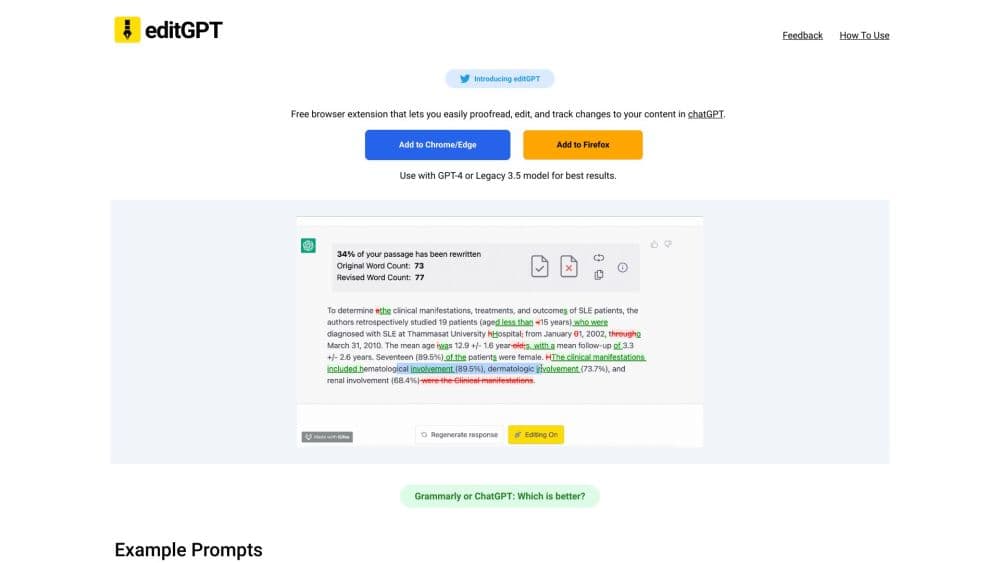
editGPT is a proofreading and editing tool built on the idea that AI should improve your writing without replacing your voice. Instead of asking a chatbot to rewrite a paragraph and hoping the meaning survives, you paste your text and get back a list of suggested edits shown as tracked changes. Each suggestion can be accepted or rejected on its own, so you stay in control of the final wording.
The product began as a Chrome extension that added an editing surface on top of the ChatGPT website. As users started pasting longer documents, the team turned it into a standalone rich text editor late in 2023, while keeping the original extension for people who prefer to work inside ChatGPT. Today it runs as a web app that also handles Microsoft Word files.
Two things set it apart. It treats editing as a review process rather than a black box rewrite, and it preserves the formatting of documents you bring in, including Word files with tracked changes. That makes it a fit for anyone who has to hand off clean, defensible edits rather than an opaque new draft.
Getting Started
- Sign up at editgpt.app with an email or a social account. The free tier works without a credit card.
- Paste or type your text into the editor, or import a Word file to work on it directly.
- Pick an editing level from the toolbar, from grammar-only fixes up to a deeper rewrite that sharpens structure.
- Review the suggestions. Accept or reject each one on its own, or handle them in bulk.
- Export the result. You can copy the text, share it, or send it back out as a .docx file with the changes tracked.
Product Information
A quick look at editGPT - Proofread, Edit, and Track Changes in chatGPT's pricing, supported platforms, and performance.
Best for
The users, tasks, and scenarios where this tool fits best.
Users
- Students and researchers
- Writers and authors
- Professionals who revise reports
- Non-native English speakers
- Anyone leaving Grammarly
Tasks
- Proofreading a draft
- Editing a Word document
- Adjusting tone and style
- Applying custom prompts
- Working in another language
Scenarios
- Cleaning up a paper before submission
- Handling a client edit pass in Word
- Keeping a house style consistent
Key features
Track Changes Workflow
Every suggestion arrives as an edit you can accept or reject, individually or in bulk, instead of a silent rewrite. That review loop is the core of the product. It lets you see exactly what the AI wants to change and keep only the parts you agree with, which matters when the final text carries your name and not a model's.
Word Document Editing
editGPT imports Microsoft Word files, edits them with AI, and exports them back as .docx while maintaining track changes. Formatting such as bold and italics is preserved through the process. For anyone who lives in Word, this removes the copy-paste shuffle between a chat tool and a document editor, and it means the changes are reviewable in the same place your colleagues expect them.
Multiple Editing Levels
The toolbar offers a range of editing intensity, from grammar-only fixes through minor readability tweaks to a deeper pass that reduces awkward phrasing, clarifies complex text, and tightens structure. You pick how far the tool is allowed to go, so a careful proofread and a heavier rewrite are the same tool at different settings.
Custom Prompts
Beyond the built-in levels, you can write your own editing prompts and save them for reuse. This is how you teach editGPT a specific style, a particular tone, or a recurring document type, so repeated jobs do not start from a generic default each time. Saved prompts turn the tool into a reusable part of a writing process rather than a one-off fix.
Multilingual Editing
editGPT works across more than 80 languages, and the interface and suggestions follow the language you select or the one it detects automatically. It is a useful second pair of eyes for non-native speakers and for anyone producing content in more than one language, and the depth of the edits tracks the level you choose.
Browser Extension
The original Chrome and Edge extension puts an editing surface directly inside the ChatGPT website. You send a prompt, an editGPT button appears in the page, and you turn it on to accept or reject changes without leaving the tab. It is the lighter option for people whose writing already happens inside ChatGPT.
Pros and cons
Pros
- Tracked changes you accept or reject one by one keep you in control of the final text.
- It imports and exports Word documents while preserving formatting and track changes.
- Several editing levels cover both light proofreading and heavier rewriting.
- Custom prompts let you reuse a house style across recurring jobs.
- The free tier lets you test the editing workflow before paying.
Cons
- The free plan caps how much you can process, so heavy use needs a paid tier.
- Suggestion quality depends on the language and can be thinner outside English.
- It edits and suggests rather than fully rewriting, which some users expect from an AI writer.
- The most generous limits and advanced tools sit behind the pricier plans.
Frequently asked questions
editGPT proofreads and edits your writing with AI while showing the changes as tracked edits. You can accept or reject each suggestion, work through several editing levels, and import or export Word documents with track changes kept intact.
Related content
Explore related tools, skills, and articles for editGPT - Proofread, Edit, and Track Changes in chatGPT.
editGPT - Proofread, Edit, and Track Changes in chatGPT Alternatives
Isgen AI
Isgen · AI DetectionIsgen AI is a web-based AI detector that scores text for machine authorship and shows you which sentences and phrases push the number up. It's built for teachers, editors, students, and writers. Their question is simple: did this draft come from ChatGPT, GPT-5, Claude, Gemini, DeepSeek, or another model? You paste or upload content, run a scan, and get a Human, AI, and Mixed breakdown in seconds. There's also a companion editor that scores text while you write it.
Humanizeai Tools
Humanizeai Tools · Writing · AI DetectionHumanizeai Tools is a web-based AI humanizer that rewrites machine-generated text so it sounds like a person wrote it, which is the whole point of the category it belongs to. Paste a draft from ChatGPT, Claude, or Gemini, run it through the tool, and it swaps out the phrases and sentence patterns that AI detectors flag. If your goal is to make AI text sound human before you publish it, this is the kind of tool built for exactly that. It suits students, bloggers, and marketers who need copy that reads naturally and clears tools like GPTZero, Copyleaks, and Winston AI after a single pass.

Hidemyai
Hidemyai · Writing · AI DetectionHidemyai is an AI content humanizer. It rewrites text from ChatGPT, Jasper, and similar tools so the result reads like a person wrote it. You paste your draft, pick a document type and tone, and the service returns a version meant to bypass AI detectors such as Originality.ai, Turnitin, and ZeroGPT. It targets writers, marketers, and students who lean on AI drafts but can't ship copy that sounds robotic. The promise is simple: make AI content undetectable.