

Emily
Anyone Labs · Voice & Language
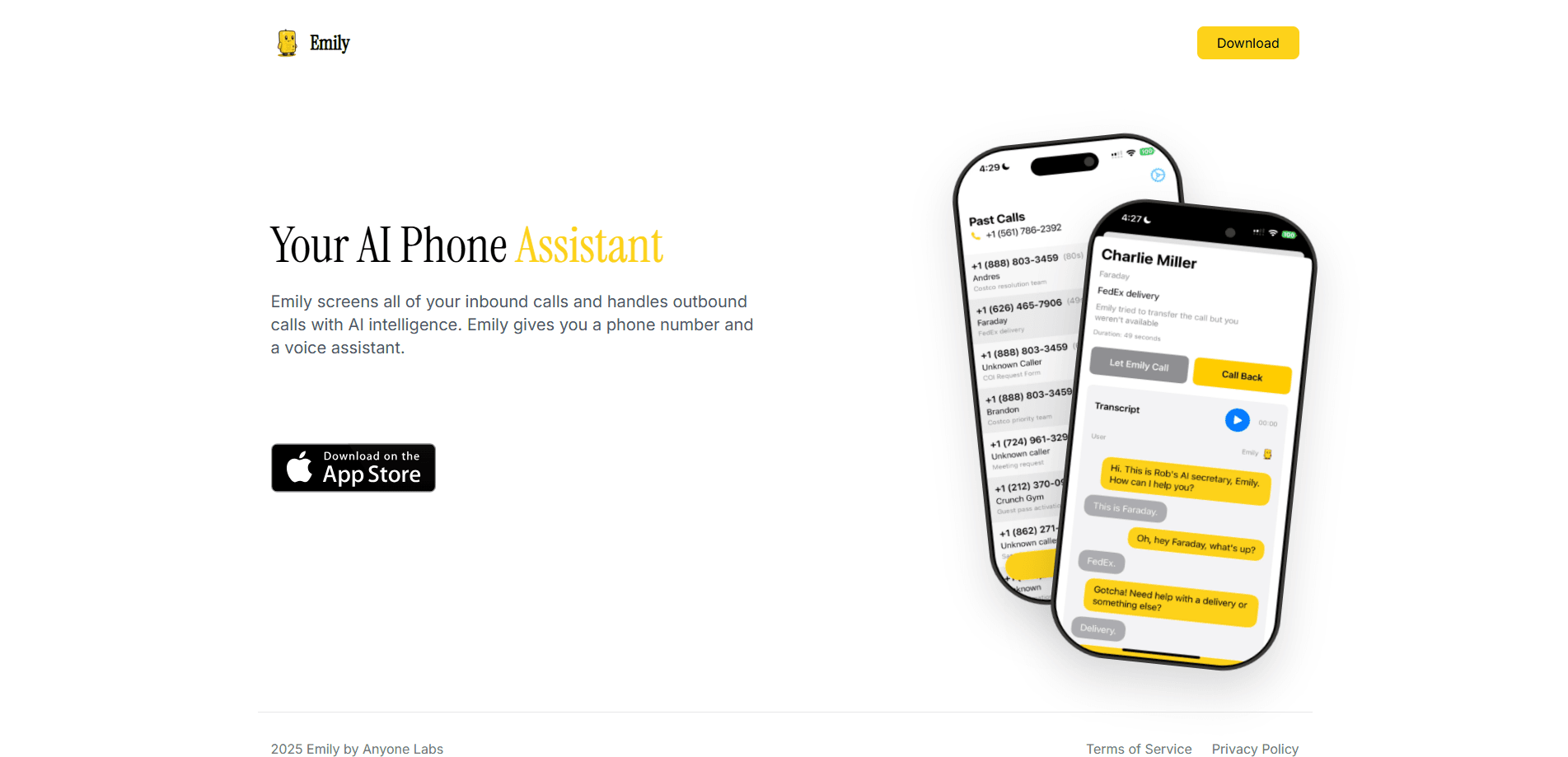
Emily is an AI phone assistant that screens unwanted calls and answers them for you. It runs on a dedicated number, greets callers with a voice, and books or blocks as needed.
About Emily
What Is Emily
Emily is an AI phone assistant built by Anyone Labs, the team behind dialemily.com. You get a dedicated phone number, and Emily answers calls there on your behalf while you keep your personal line private. Instead of ringing through, a call reaches the assistant first, which greets the caller, works out whether they are wanted, and decides what to do next. The product now runs under the name Envoy, its own agent for screening spam, scams and cold outreach.
This Emily review covers what the assistant actually does. Most people get a mix of real calls and junk: robocalls, sales pitches, and scam attempts that pretend to be a familiar company. Emily sits in front of that stream. It picks up, talks to whoever is on the line, and keeps a record of the conversation. You look at the transcript later rather than stopping to answer a call that turns out to be nothing.
One limit matters up front. Emily is an iOS app, so it runs on iPhone rather than Android or the web, and the dedicated number and call handling come from inside the app. The assistant records and processes call audio and messages to work, which the company states plainly in its privacy policy.
Getting Started
- Download the Emily app from the App Store and create an account
- Claim a dedicated phone number, either local or toll-free, from inside the app
- Set the greeting, voice and personality Emily uses when it answers a call
- Add business hours and call transfer rules, so real callers reach you and the rest get screened
- Review call transcripts and recordings in the app and mark the senders you want blocked
Product Information
A quick look at Emily's pricing, supported platforms, and performance.
Best for
The users, tasks, and scenarios where this tool fits best.
Users
- People who get a constant stream of spam and robocalls
- Small business owners and freelancers
- iPhone users who screen calls by hand
- Anyone who loses time to unknown callers
Tasks
- Call screening
- Spam and scam detection
- Message taking
- Call transfer
- Transcript review
Scenarios
- A number you do not recognize calls during work
- You run a side business on one iPhone
- Scam calls spike after a signup leaks
- You are away from the phone
- After-hours inquiries
Key features
AI Call Screening on a Dedicated Number
Emily answers calls on a number you claim, not your personal line. It greets each caller and works out whether the call is genuine before deciding what to do. Wanted callers can reach you; unknown or suspicious ones are handled by the assistant instead. That setup keeps your real number out of the calls you never wanted in the first place.
Spam and Scam Detection
The assistant is built to spot the calls people complain about most: robocalls, sales pitches, and scams that pose as a trusted brand. Suspicious callers are identified and kept away from your main line rather than forwarded through. The company states that detecting and preventing spam calls is one of the reasons it processes call data, and it uses interactions to get better at telling wanted calls from junk.
A Voice That Talks Back
Emily does not just screen and hang up. It holds a conversation with the caller, answering and asking questions in a voice, with a custom greeting and personality you set. Some callers never notice they are speaking to an assistant until it hands the call over or takes a message. That back-and-forth is what lets it sort real inquiries from an automated dialer in a single call.
Business Hours and Call Transfer Rules
You decide when Emily picks up and where a call goes from there. Business hours tell it when you are available, and transfer rules pass genuine callers to you while the rest stay with the assistant. Team members can set the same conditions, so a shared line follows the same logic as a personal one. This is the part that turns screening into a workable front desk.
Transcripts and Call Records
Every handled call leaves a record you can read later. Transcripts and call data are stored in the app, so you see who called and what they wanted without sitting through the audio first. You choose when to review the log, which is useful when the point of screening is to stop answering calls at all.
In-App Setup and Number Management
Everything runs inside the iOS app, from claiming a number to adjusting the voice and rules. You can add a local or toll-free line without extra hardware, and change settings as your needs shift. Keeping setup in one place makes the assistant quick to try, and quick to tune once you see what it screens.
Pros and cons
Pros
- Screens unwanted calls before they ring your personal line, so spam stops interrupting you
- Talks to callers in a voice with a custom greeting instead of only blocking them
- Records transcripts and call data you can review on your own schedule
- Runs on a dedicated number with local or toll-free options, keeping your real number private
- Sends real callers through with business hours and transfer rules
Cons
- Only available as an iOS app, so Android and desktop users cannot use it
- The assistant records and processes call audio and messages, which means callers speak to an AI that stores the conversation
- Spam detection depends on the model, so an unusual scam may still slip through as a wanted call
- Most features beyond basic screening sit behind a paid subscription
Frequently asked questions
Emily answers and screens phone calls so unwanted ones never reach you. It runs on a dedicated number, greets callers with an AI voice, works out whether a call is wanted, and can take a message or transfer the call on.
Related content
Explore related tools, skills, and articles for Emily.
Emily Alternatives

Foley
Hanamori Labs, LLC · Voice & Language · Productivity · AI AssistantFoley is a voice to-do list that turns a spoken sentence into a filed task, complete with project, date and time, then helps you plan the day around what is already there.

HireKey
HireKey · Voice & Language · Productivity · LeaningHireKey is an AI job search copilot built by a former tech recruiter. It checks role fit, tailors resumes, runs interview practice and tracks every application.

Fluence
Yay Software (Yannick Huchard) · Writing · Voice & Language · ProductivityFluence is an Android app that reads PDFs, EPUBs, Word files and web articles aloud, follows each sentence as it speaks, and answers questions about the text on the phone itself.