

Evlat
kalaomer · Coding · Productivity
Evlat is a free strip on the edge of your Mac screen that shows which AI coding agent is working, waiting on you, or finished, and jumps to that session's tab in one click.
About Evlat
What Is Evlat
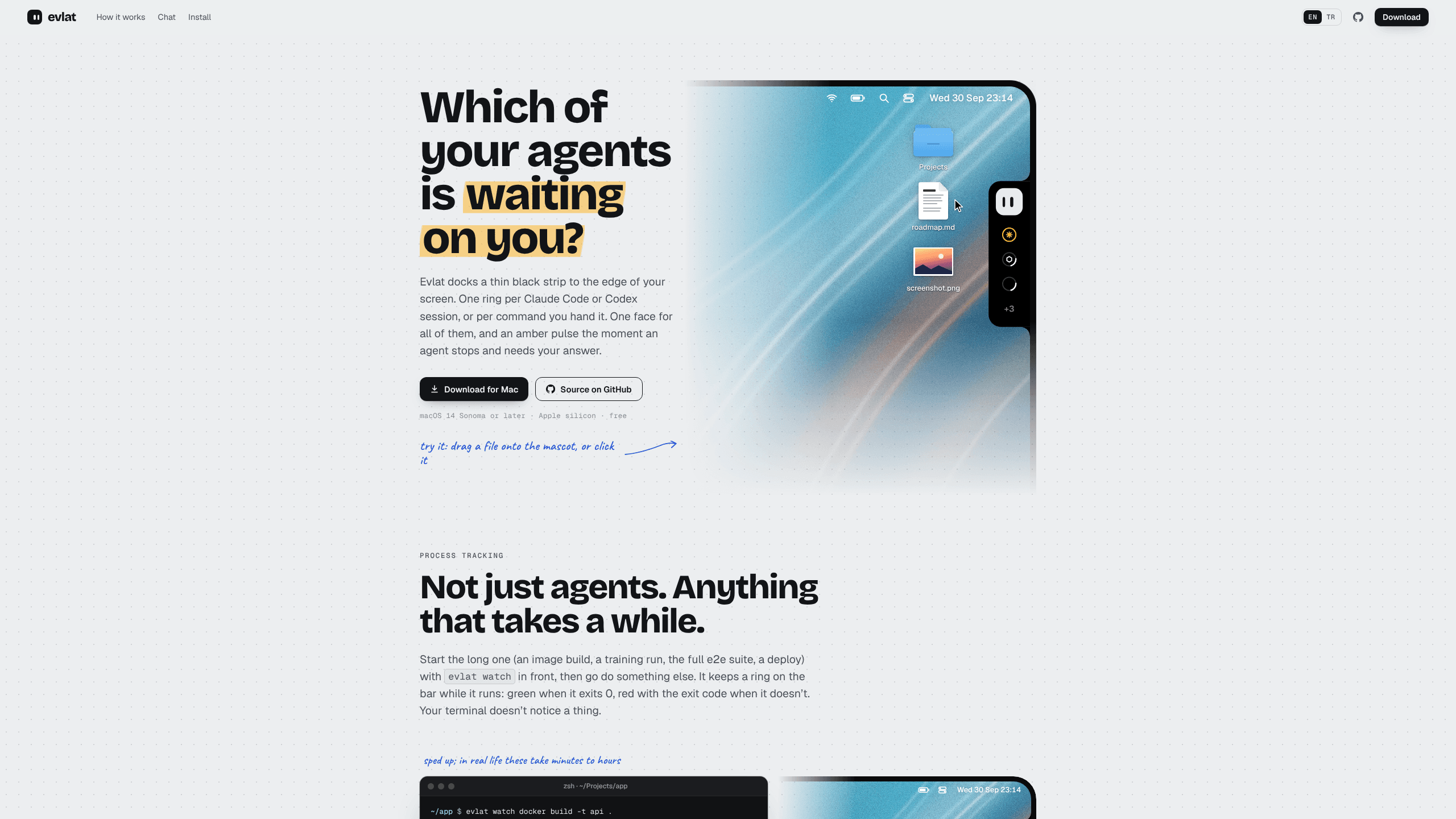
Evlat is an AI coding agent monitor, an agent status strip for macOS. It puts one ring per session on a narrow strip at the edge of the screen, so you can see at a glance whether Claude Code is still thinking, whether Codex is blocked on an approval, or whether Antigravity finished ten minutes ago while you were reading something else.
The app is a hook client, not a chat window. It writes its own entries into your agent config files and receives state over a local socket. When a session goes quiet because it needs a decision, the mascot and that ring turn amber and pulse. Click the card and Evlat brings the terminal or editor tab forward, whether the session runs in iTerm2, Warp, Ghostty, VS Code, Cursor, tmux or a plain Terminal window.
Two things shape what Evlat is not. It's Mac-only, Apple silicon only, macOS 14 or later, with no Intel build and no Windows or Linux app. And it tracks four agents by name: Claude Code, Codex, Antigravity and OpenCode. Everything else you run reaches the strip through the evlat watch command or the evlat signal API, which covers builds, test suites, deploys and your own scripts but can't answer a prompt for them.
The other limit is secrecy-friendly by design. There's no account, no telemetry, and no network port. Sessions and commands stay on your machine, and the only thing Evlat fetches from the internet is its own update from GitHub, checked hourly. Code that passes through your own Claude Code or Codex session still goes wherever that tool already sends it.
Getting Started
- Download Evlat.dmg from the project site, open it, and drag Evlat into Applications. The build is signed and notarised, so macOS opens it like any other app.
- Launch Evlat. A mascot appears at the edge of the screen, right side by default. It sits above the Dock on every Space.
- Right-click the mascot and install the hooks for Claude Code, Codex, Antigravity and OpenCode. Before writing, Evlat keeps a
.evlat.bakcopy of every config file it edits, and each hook sits next to the ones you already had. - Keep working in your terminal. Open sessions start reporting on their next message, and new ones appear as soon as they start.
- Optional: wrap long jobs with
evlat watch, or add a server under Settings → Servers by the name you already use with ssh.
Product Information
A quick look at Evlat's pricing, supported platforms, and performance.
Best for
The users, tasks, and scenarios where this tool fits best.
Users
- Developers running several agents at once
- Mac users who start long jobs and walk away
- Engineers splitting work between a laptop and a dev server
Tasks
- Answering permission prompts
- Watching builds, test suites and deploys
- Tracking usage windows
Scenarios
- Claude Code runs on a remote devbox while you read documentation locally
- An end-to-end suite takes 25 minutes
- A run finishes after you've stepped away
Key features
One Ring per Session
Every session gets its own ring on the strip, and the ring's motion carries the state before you read a word. A turning ring means the agent is working. An amber pulse means it needs you. Green means done, red means failed. Hovering opens a card with the session name, what it's waiting on, and a Go to session button.
Go to Session
The button lands on the tab that holds the session, not just the app. iTerm2, Warp, Ghostty, Cursor, VS Code, cmux, herdr, tmux and several smaller terminals are supported, with different depth per app: some open the exact pane, others bring the right window forward and leave the tab to you. Evlat asks for no Accessibility or screen recording permission to do it.
Answer Prompts from the Bar
For Claude Code and OpenCode, a permission prompt can be allowed or denied once directly on the card, on this Mac or on a server. Codex approval prompts work from the bar when the session runs on a server, where Codex waits two minutes at most. Your first answer counts, in the bar or in the terminal, so a duplicate click doesn't send a second approval.
evlat watch for Any Command
evlat watch npm run build runs the command exactly as it would run alone: same colours, same input handling, same Ctrl-C, same exit code. The command never knows Evlat exists, and if Evlat is closed it simply runs. That makes the strip useful for docker builds, training runs and deploys, not only for agents.
evlat signal for Your Own Scripts
Scripts that know their own progress can drive a row through the local API: --progress 0.4 fills the ring, --waiting turns it amber, --done and --failed set the end state, and --ttl decides how long a quiet row survives. Rows expire on their own after 900 seconds unless the script calls again.
Remote Machines over Your Own SSH
Remote AI agents follow the same rules as local ones: add a server by the name you give ssh and Evlat carries a socket back to your Mac through a reverse tunnel. No port is opened and no relay sits in between. When a server can't be reached, its rows dim and read "no connection" instead of freezing on a stale state.
Quiet Native App
Evlat is written in Swift with AppKit and SwiftUI, with no web view and no Electron runtime. A strip with nothing moving draws no frames. It has no Dock icon, takes no focus, and installs from the menu in a few clicks.
Pros and cons
Pros
- Free with no account, no telemetry and a published source under the FSL-1.1-ALv2 license, which turns into Apache 2.0 two years after each release.
- Jumping straight to the right tab is the part you feel every hour: the strip replaces the alt-tab shuffle that every multi-agent workflow turns into.
- `evlat watch` covers work that has nothing to do with AI agents, so the app earns its place on a normal build-and-deploy day, and the developer productivity gain shows up on days you never open a chat window.
- Remote rows arrive over the ssh connection you already have, with no daemon to install and no open port.
- Small footprint: native rendering, no background processes to speak of, and no macOS permission prompts on install.
Cons
- Apple silicon and macOS 14 or later only. Intel Macs, Windows and Linux users have no build to install.
- Antigravity sends no event when it asks for approval, so its row never turns amber for a pending prompt, and you still check that one by hand.
- Answering from the bar covers Claude Code, Codex on servers and OpenCode. A Claude Code session inside a Docker sandbox has to be answered in the sandbox terminal.
- No phone or watch notification. If you leave the desk, the amber pulse waits for you rather than reaching you.
Frequently asked questions
Evlat is a macOS app that shows the state of your AI coding sessions in a thin strip at the edge of the screen. Each session is a ring that turns while the agent works, pulses amber when it needs you, and goes green when it finishes.
Related content
Explore related tools, skills, and articles for Evlat.
Evlat Alternatives

Base Code
Base44 (Wix) · Coding · ProductivityBase Code is a shared cloud development environment from Base44. Teammates describe changes to an existing GitHub codebase in chat, preview them live and send them back as pull requests.

Google EmbeddingGemma 2
Google DeepMind · Writing · Image · CodingGoogle EmbeddingGemma 2 is a 740M-parameter open model that turns text, code, images, audio, and video frames into vectors in one 768-dimension space, running on phones and laptops.

GitGlow
GitGlow · Coding · ProductivityGitGlow is a local-first desktop Git client that lets independent developers review their own code and their AI agents' changes in one place before shipping.