

Extension Auditor Security Analyzer
Alpha CISO Pte. Ltd. · Other
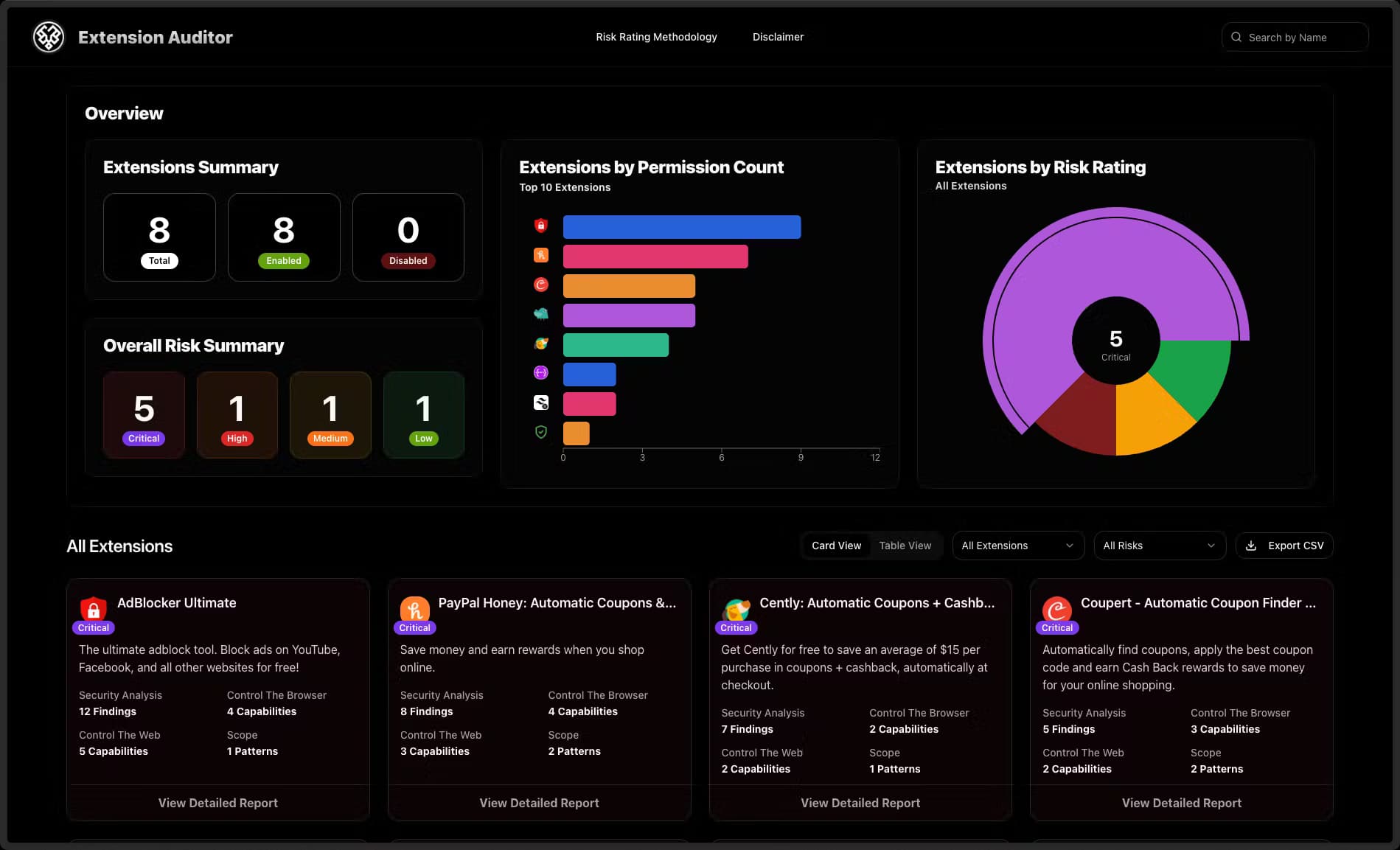
Extension Auditor Security Analyzer is a browser security platform that scans Chrome, Edge and Firefox extensions, scores their risk and alerts you when a permission or owner changes.
About Extension Auditor Security Analyzer
What Is Extension Auditor Security Analyzer
Extension Auditor Security Analyzer is a browser extension security tool from Alpha CISO Pte. Ltd. It looks at the add-ons you already have installed, reads what each one can access, and turns that into a plain risk score. The goal is simple: most people never check what a browser extension actually does, and a single bad update can quietly read every site you visit.
The tool watches a database of more than 1.9 million extensions rather than only the ones you ask about. Its scoring engine is built on published security research, so it grades permission requests the same way a reviewer would. Every score falls into one of four bands: Critical, High, Medium or Low.
The main limit is scope. This is a browser-focused tool with plans aimed at individuals, small teams and IT departments, not a full endpoint security suite. It checks extension behavior, not your whole device, and most team features assume you connect a work account such as Google Workspace or Microsoft 365.
Getting Started
- Create a free account on the Extension Auditor site, or start the 7-day trial from the pricing page.
- Add the browser extension to Chrome, Edge or Firefox, or paste a store URL to run an ad-hoc lookup with no install.
- Connect Google Workspace, Microsoft 365, Okta or Jamf if you want a fleet-wide inventory instead of a single browser.
- Review the risk scores, then set policies to allow, warn or block extensions across your team.
- Pick where alerts go, such as email, Slack, Teams or a webhook to your SIEM, and confirm the first notifications arrive.
Product Information
A quick look at Extension Auditor Security Analyzer's pricing, supported platforms, and performance.
Best for
The users, tasks, and scenarios where this tool fits best.
Users
- Everyday Chrome users
- IT and security admins
- Privacy-conscious individuals
Tasks
- Auditing installed add-ons
- Catching risky updates
- Screening before rollout
Scenarios
- Onboarding a new work laptop
- Responding to a supply chain scare
- Reviewing a browser for a family member
Key features
Extension lookup and risk scoring
Drop in any extension ID or store URL and the tool returns its permissions, publisher history and a risk score. The score is grouped into Critical, High, Medium and Low bands, each with a one-line note on what the level means. You get this without installing anything.
Malicious extension detection
The engine flags extensions that reviewers mark malicious or that carry critical findings, and it lists them alongside how many users each one has. The scan database covers the entire Chrome Web Store, so the intelligence isn't limited to what you search for. According to Alpha CISO, the engine was trained on 30 or more peer-reviewed security papers.
Continuous monitoring
Extension Auditor checks 11 event types every two hours, covering permission changes, version updates, ownership transfers, CSP changes and visibility shifts. When an approved extension starts behaving differently, you get an alert at that point rather than after the damage is done. A one-time scan can't do this.
Alerts and integrations
Notifications flow to in-app views, email, Slack, Teams or a webhook, so security teams can keep alerts inside tools they already watch. For automation, a webhook can push events to a SIEM. Google Workspace, Microsoft 365, Okta and Jamf connections pull your existing users and devices in without manual entry.
Fleet-wide inventory and policies
From one dashboard you see every extension across Chrome, Edge and Firefox, per user and per device. You can then set allow, warn or block policies so a risky add-on never reaches a managed browser. Deployment works either agent-based or agent-less. That matters when you can't install software everywhere.
Bulk scanning for rollout reviews
Upload a CSV or text file of extension IDs and store URLs and the tool returns one saved report instead of a stack of single lookups. That fits the moment a team wants to standardize its browser setup before a rollout. It saves the manual step of checking each add-on one by one.
REST API and access controls
A documented REST API with API key and OAuth2 authentication lets teams pull extension risk data as JSON into their own workflows. Paid plans carry monthly call allowances that scale from 1,000 to 50,000, with usage-based pricing for the API-only product. SAML SSO and audit logging ship on every plan, including the cheapest.
Pros and cons
Pros
- Risk scoring ties to published security research rather than guesswork, so the grades are defensible to a security reviewer.
- Coverage spans all three major browser stores, not just the extensions you name, which catches threats you didn't think to check.
- Continuous monitoring with Slack, Teams, email and webhook alerts keeps extension drift visible without manual re-scans.
- No feature paywalls: SAML SSO, audit logging and full API access are on every plan, so small teams aren't locked out of core controls.
Cons
- The cheapest plans cap how many extensions are analysed per browser, so heavy personal use can hit the limit fast.
- Team and Business plans carry 10-user and 100-user minimums, which is steep for a solo admin who just needs fleet policies.
- It covers extension security only, so shops that want endpoint or network protection still need another tool.
- Values like the risk bands depend on the vendor's own model, and there is no third-party audit of the scoring.
Frequently asked questions
It reads the permissions, code patterns and publisher details of installed extensions across Chrome, Edge and Firefox, then converts them into a Critical-to-Low risk score. It also tracks changes to those extensions over time.
Related content
Explore related tools, skills, and articles for Extension Auditor Security Analyzer.
Extension Auditor Security Analyzer Alternatives

Odyssey 3
Odyssey · OtherOdyssey-3 is Odyssey's foundation world model. It simulates physics in real time, turns a prompt into an interactive environment, and adapts to robots, cars and games.

JarvisCore
Prescott Data · Coding · Productivity · OtherJarvisCore is an open source Python runtime where AI agents work as equal peers on an agent mesh, claim tasks from a shared ledger, and reach external services through a zero-trust broker.
Clef
Cloudflare · Business · OtherClef is Cloudflare's open-source decision model for Workers AI. It returns calibrated probabilities for typed questions, not generated text, so agents can classify, route, and act fast.