
EyesOff
EyesOff Ltd · AI Detection
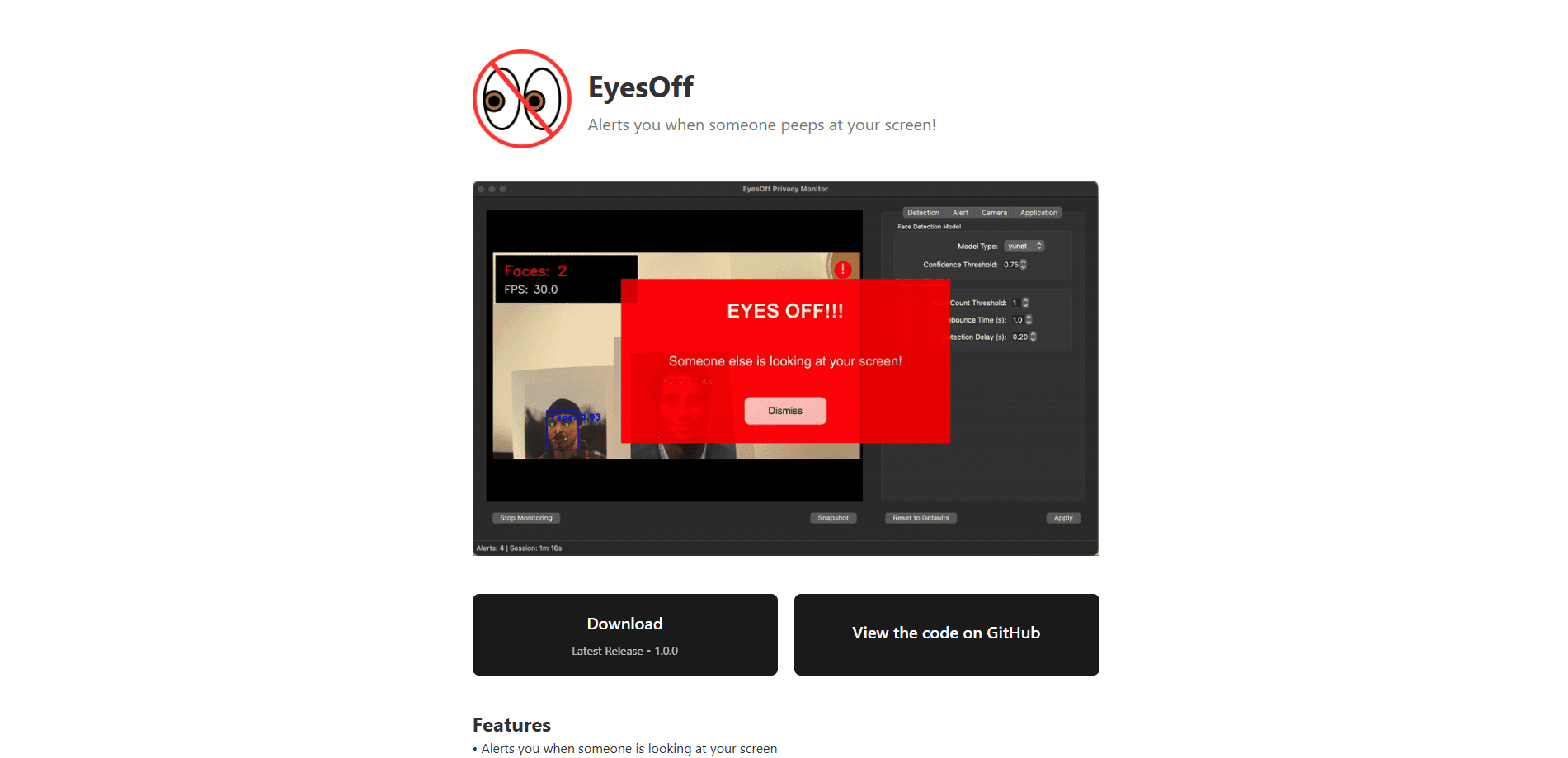
EyesOff is a webcam privacy tool for Mac and Windows that alerts you when another face looks at your screen, with all detection running on the device.
About EyesOff
What Is EyesOff
EyesOff is a screen privacy app for people who work on a laptop in places where a stranger can slide into the webcam's view. Cafés, trains, libraries, and open-plan offices all fit the bill. You leave it running in the background, and it warns you when someone appears to be looking at your screen.
The problem it targets has a name: shoulder surfing, also called visual hacking. You rarely notice it happening. A 2017 LMU Munich study of 174 people found that observers were spotted by the person they watched in only about 7% of cases, and a Ponemon Institute experiment found visual hacking succeeded in 91% of trials. That gap is what EyesOff tries to close, because you can't react to a threat you never saw.
The limits matter. EyesOff only covers angles inside your webcam's field of view, so someone behind your screen stays invisible to it. It's a privacy aid, not a guarantee, and the company says as much. Detection also needs the camera on, which draws power, and it works alongside habits like a privacy filter and smarter seating rather than replacing them.
Getting Started
- Download EyesOff from eyesoff.app. Grab the macOS 13.3 or later build, or the Windows 10 or later build. Both sit at version 1.4.2.
- Start the 14-day free trial, which needs no card, then enter a licence key or partner code when it ends.
- Grant camera access, plus Automation and Accessibility permissions on macOS so the app can switch or lock your screen when it flags a detection.
- Optional: enrol the authorised user on the device so Walk-Away can lock the screen when a second face appears after you leave.
- Pick how EyesOff reacts, from a quiet alert to an overlay, an app switch, or a full lock, and let it run in the background.
Product Information
A quick look at EyesOff's pricing, supported platforms, and performance.
Best for
The users, tasks, and scenarios where this tool fits best.
Users
- Remote and hybrid workers
- Students and library regulars
- Travellers and commuters
- Teams handling sensitive data
Tasks
- Spotting a shoulder surfer
- Locking up when you walk away
- Logging intrusions
- Blurring or hiding content fast
Scenarios
- Working from a café or train
- Open-plan and hot-desk offices
- Co-working and study rooms
Key features
On-device shoulder-surfing detection
The core of EyesOff is its ShoulderGuard pipeline, which samples frames from your webcam, finds faces, and decides whether a face is looking at your screen. A small YuNet model handles face detection at around 75,000 parameters, and a custom classifier trained on a roughly 80,000-image dataset judges the gaze. This on-device detection keeps everything on your machine, so live camera frames never travel to a server.
Flexible responses to a detection
You choose what happens when someone's gaze is flagged. Options run from a quiet alert to a screen overlay, an automatic application switch, or a full lock. It's the difference between being told to look up and having the content hidden before the onlooker reads anything.
Walk-Away locking
Enrol the authorised user on the device once, and EyesOff can lock the screen when a different face shows up after you step away. This covers the coffee-run scenario, where the risk isn't peeking but someone using the moment you're gone.
Snapshots and the Intrusions Log
Opt in and EyesOff saves a local image each time it detects an intrusion. You review and delete them yourself in the Intrusions Log, and nothing leaves the device. It's evidence you can check rather than a black box.
Privacy-first local processing
Camera frames and gaze detections are processed on the device and aren't uploaded. The detection pipeline keeps running even with no network connection. A connection is only needed for licence validation, and a few optional features like partner-code redemption, the anonymous feedback form, and update checks.
Battery-conscious background running
EyesOff is built to sit in the background without wrecking your battery. It samples frames rather than processing every one, drops the capture rate where the webcam allows it, and runs the light face model far more often than the heavier gaze model. On an M2 MacBook Air, one test measured about 2.9% battery use per hour.
Pros and cons
Pros
- Runs entirely on-device, so your webcam feed isn't sent anywhere.
- Clear about its limits, and it flags the coverage gap of webcam-only detection instead of overselling it.
- Battery use is a stated design goal, with published numbers and a documented optimisation path.
- Several response types let you match the app to your tolerance, from a nudge to a hard lock.
- The 14-day trial needs no card, so you can test it on your own laptop first.
Cons
- Only sees what your webcam sees, so anyone outside its field of view, and often anyone directly behind you, goes undetected.
- No free tier. After 14 days you pay £19.99 a year or stop using it.
- Detection needs the camera switched on, which some people and some workplaces won't allow.
- It's a single-purpose tool. It won't replace a privacy filter or a password manager, and the company says it isn't a compliance guarantee.
Frequently asked questions
EyesOff is a Mac and Windows app that monitors your webcam and warns you when another face appears to be looking at your screen. It's aimed at people working in cafés, on trains, or in shared offices, where shoulder surfing, also called visual hacking, is a real risk.
Related content
Explore related tools, skills, and articles for EyesOff.
EyesOff Alternatives
Isgen AI
Isgen · AI DetectionIsgen AI is a web-based AI detector that scores text for machine authorship and shows you which sentences and phrases push the number up. It's built for teachers, editors, students, and writers. Their question is simple: did this draft come from ChatGPT, GPT-5, Claude, Gemini, DeepSeek, or another model? You paste or upload content, run a scan, and get a Human, AI, and Mixed breakdown in seconds. There's also a companion editor that scores text while you write it.
Humanizeai Tools
Humanizeai Tools · Writing · AI DetectionHumanizeai Tools is a web-based AI humanizer that rewrites machine-generated text so it sounds like a person wrote it, which is the whole point of the category it belongs to. Paste a draft from ChatGPT, Claude, or Gemini, run it through the tool, and it swaps out the phrases and sentence patterns that AI detectors flag. If your goal is to make AI text sound human before you publish it, this is the kind of tool built for exactly that. It suits students, bloggers, and marketers who need copy that reads naturally and clears tools like GPTZero, Copyleaks, and Winston AI after a single pass.

Hidemyai
Hidemyai · Writing · AI DetectionHidemyai is an AI content humanizer. It rewrites text from ChatGPT, Jasper, and similar tools so the result reads like a person wrote it. You paste your draft, pick a document type and tone, and the service returns a version meant to bypass AI detectors such as Originality.ai, Turnitin, and ZeroGPT. It targets writers, marketers, and students who lean on AI drafts but can't ship copy that sounds robotic. The promise is simple: make AI content undetectable.