
Facialprint
Facialprint Inc. · Writing · Other
Facialprint is a digital guestbook for events that uses AI facial recognition to find each guest in your photo gallery, then sends every person a private gallery of their own pictures.
About Facialprint
What Is Facialprint
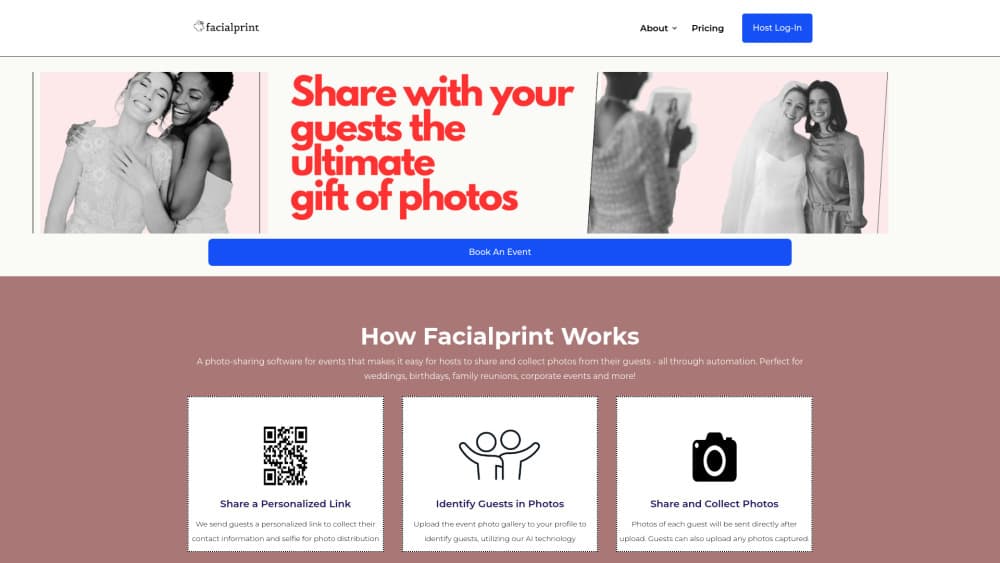
Facialprint is a web app that turns one event photo gallery into personal albums for the people who attended. The host sends out a sign-up link, guests add contact details and a selfie, and the software scans the uploaded gallery to match faces against those selfies. Each guest gets a private gallery by email or text, and the host ends up with a guest book of notes and photos.
The problem it addresses is familiar to anyone who has planned a party. The photographer delivers 800 shots, someone posts a shared drive link, and six weeks later most guests have looked at three photos. Facialprint pushes pictures to people instead of asking them to dig. Weddings are the main use case, and the same flow covers birthdays, baby showers, family reunions and corporate events.
Three limits matter before you book. There's no free plan or trial, so you pay per event to find out whether it fits. Guests only receive photos if they sign up with a selfie, which means older relatives and reluctant colleagues may need a nudge. Matching quality also depends on the source photos: dark ballrooms, heavy backlighting and crowded group shots will produce misses that a person would catch.
Getting Started
- Create a host account at facialprint.co and choose the Essential or Standard plan for the event.
- Send the guest link by text, email or a printed QR code. Guests add their name, a phone number or email address, and a selfie, then set a PIN for their gallery.
- Upload the event gallery to your dashboard once the photographer hands it over. The AI matches faces in those photos against the guest selfies.
- Let the automated messages go out, then read the notes and photo collection guests leave in your guest book.
Product Information
A quick look at Facialprint's pricing, supported platforms, and performance.
Best for
The users, tasks, and scenarios where this tool fits best.
Users
- Couples planning a wedding
- Event planners and venue coordinators
- HR and internal comms teams
Tasks
- Getting a wedding gallery to 200 guests without a group chat
- Collecting contact details and notes in one place
- Distributing conference or offsite photos to attendees
- Rescuing a gallery that would otherwise sit untouched
Scenarios
- The week after a multi-day wedding weekend
- A company anniversary party with 300 employees
- A family reunion spread across several states
Key features
Guest Sign-Up Through One Link
One personalized event link is all a guest needs. It travels by text message, email or a printed QR code, and the form captures a name, a phone number or email address, a selfie and a private PIN. No app install and no guest account, which is the difference between a sign-up rate that holds up and one that stalls after the first twenty people.
AI Facial Recognition Across the Whole Gallery
Upload the gallery once and the sorting happens on the server. Facialprint maps the faces in the host's photos, matches them against the selfies guests submitted, and groups the results by person. Hosts upload the originals at full resolution, so nothing depends on guests tagging themselves in advance or on anyone sorting files into folders.
Private Gallery Delivered to Each Guest
Every guest receives a personal link that holds only the photos they appear in. Delivery runs automatically after the upload finishes, and the gallery is private rather than a public album the whole guest list can browse. Guests can send notes and their own pictures back through the same link.
Email, SMS and WhatsApp Invitations With Reminders
The Standard plan handles invitations and reminder messages over email, SMS and WhatsApp. That matters more than it sounds: a wedding list usually needs three or four contact rounds before the last guests sign up, and reminders carry most of that work. Essential keeps the custom link and QR code sign-up flow but leaves the messaging to you.
Guest Notes Collected Alongside the Photos
The guest book holds more than images. Guests leave written notes with their photos, and the host receives the collection once the event is over. For a wedding or a retirement party, that's the part people keep, and it arrives as one archive instead of being scattered across text threads.
Host Dashboard With Storage Built Into the Plan
The dashboard keeps the event gallery and the guest list in one place. Storage comes with the plan instead of being sold separately: 50 GB for three months on Essential, unlimited for a year on Standard. Both plans cap guest counts, at 100 and 500, so the decision usually comes down to headcount and how long you want the archive to stay live.
Pros and cons
Pros
- Guests get their own photos without installing an app or hunting through a shared folder.
- One gallery upload covers the whole event, with no manual tagging or sorting work.
- Reminders over email, SMS and WhatsApp lift sign-up rates on large guest lists.
- The guest book pulls notes and pictures into one archive at a fixed price per event.
- Per-event pricing means a one-off wedding doesn't turn into another subscription.
Cons
- No free plan or trial. You commit $59 to $150 before you know how matching performs on your own photos.
- Guests who skip the selfie step get nothing, so the host still ends up chasing the quiet half of the list.
- Low light, motion blur and crowded group shots cause misses, and the site doesn't document a manual correction step.
- Web only, with no public API and no integration with the delivery tools photographers already use, so the upload stays manual.
Frequently asked questions
Facialprint distributes event photos to the people in them. The host collects guest selfies, uploads the event gallery, and the software sends each guest a private set of the photos they appear in, along with a guest book of notes.
Related content
Explore related tools, skills, and articles for Facialprint.
Facialprint Alternatives

Google EmbeddingGemma 2
Google DeepMind · Writing · Image · CodingGoogle EmbeddingGemma 2 is a 740M-parameter open model that turns text, code, images, audio, and video frames into vectors in one 768-dimension space, running on phones and laptops.

MePersona
MePersona, Inc. · Writing · Productivity · MarketingMePersona is an AI unified inbox for creators. It learns your voice, drafts replies to fan messages from 12 platforms, and sends only what you approve.

Fluence
Yay Software (Yannick Huchard) · Writing · Voice & Language · ProductivityFluence is an Android app that reads PDFs, EPUBs, Word files and web articles aloud, follows each sentence as it speaks, and answers questions about the text on the phone itself.