

Findtool
Rayid · Other
Findtool is a free AI tool recommendation platform that turns a plain description of your problem into a short list of matching tools. Type what you need and it names four options, each with a link.
About Findtool
What Is Findtool
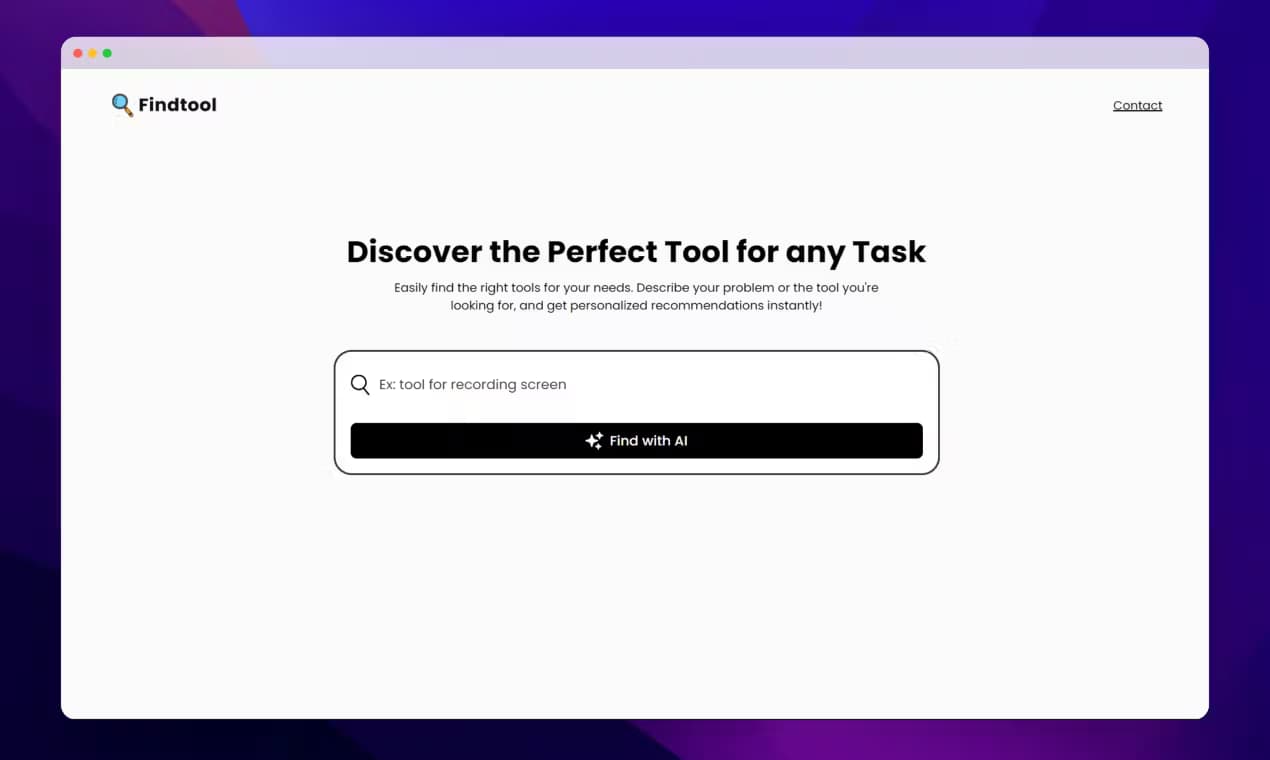
Findtool is a small web app for discovering tools when you already know the task but not the product name. You describe the problem in everyday words, something like "app for recording my screen" or "tool to organize research notes", and it answers with a few suggestions instead of a giant directory you have to dig through.
Under the hood, it sends your description to an AI language model and asks for four tools that fit, each with a name, a website domain, and a one-line description. That's the whole idea behind the AI-powered tool finder: skip the browsing and let it find tools with AI, based on the outcome you describe. The personalized tool suggestions stay short and tied to your wording rather than a generic best-of list. You don't need an account, and there's nothing to install.
The main limit is scope. Suggestions come from what the model already knows, so very new or niche products may not surface, and the notes are brief. Treat it as a discovery shortcut, not a review site, and check a tool's own page before you commit.
Getting Started
- Open findtool.vercel.app in any modern browser. There's no sign up or download step.
- Type your task or problem into the search box, for example "tool for editing podcast audio".
- Press Find with AI and wait a few seconds while it works.
- Read the four suggestions, each with a name, a domain link, and a short description.
- Open the ones that look useful, or rephrase your query and search again to see different results.
Product Information
A quick look at Findtool's pricing, supported platforms, and performance.
Best for
The users, tasks, and scenarios where this tool fits best.
Users
- Writers and content creators
- Students and researchers
- General users curious about AI
Tasks
- Recording or editing screen video
- Writing and proofreading
- Image and design work
- Finding a starting point for an unfamiliar job
Scenarios
- You know the task but not the product name
- Quick project planning
- Exploring alternatives
Key features
Natural Language Tool Search
You describe your problem in everyday words and Findtool turns it into a short list of matches. There's no need to know the right category or keyword, which helps when you can name the job but not the product. The AI-powered tool finder builds its answer around the exact wording you used, so small changes in phrasing can surface different ideas.
Four Focused Recommendations
Each search returns four tools rather than a long page of results. Every suggestion comes with a name, a website domain, and a brief description, so you can scan the list in seconds and decide what's worth opening. If you're hunting for the best tool for a task, a short list beats an endless scroll.
Direct Links to Each Tool
Results include the tool's domain, so you can jump to the product and check it for yourself. Findtool points you to options but leaves the final call to you.
No Account or Install Required
The whole thing runs in the browser with no sign up, no download, and no settings to configure. You open the page, type, and get an answer, which keeps the barrier to trying it very low.
Free to Use
There's no paid tier and no paywall on searches, so it doubles as a free AI tool finder for anyone on a budget. You can run as many queries as you like, which suits quick one-off questions or comparing several ideas in a row.
Simple, Distraction-Free Interface
The page is a single search box and a button, with results appearing below. There are no ads, pop-ups, or account prompts competing for attention, so the focus stays on your query.
Pros and cons
Pros
- Turns a plain task description into tool suggestions without keyword research
- Returns only four results, so the list stays short and easy to scan
- Needs no account, download, or setup, so you can try it in seconds
- Includes a domain link for each tool so you can verify it yourself
- Free with no visible search limits
Cons
- Suggestions come from a language model, so newer or niche products may be missing
- Descriptions are very short, which means less detail for comparing similar tools
- Output quality varies with how you phrase the query, so vague input gives vague results
Frequently asked questions
Findtool is an AI tool finder that helps you discover apps and tools by describing your problem in plain language. It returns four suggestions with links, so it works best as a starting point when you know the task but not the product name.
Related content
Explore related tools, skills, and articles for Findtool.
Findtool Alternatives

Odyssey 3
Odyssey · OtherOdyssey-3 is Odyssey's foundation world model. It simulates physics in real time, turns a prompt into an interactive environment, and adapts to robots, cars and games.

JarvisCore
Prescott Data · Coding · Productivity · OtherJarvisCore is an open source Python runtime where AI agents work as equal peers on an agent mesh, claim tasks from a shared ledger, and reach external services through a zero-trust broker.
Clef
Cloudflare · Business · OtherClef is Cloudflare's open-source decision model for Workers AI. It returns calibrated probabilities for typed questions, not generated text, so agents can classify, route, and act fast.