

FindUpApp
FindUpApp · Coding · Other
FindUpApp is an app discovery platform built for people who are tired of scrolling the same top charts. It works as a curated app directory, organizing iOS and Android apps into granular categories that store rankings ignore, then points you straight to the App Store or Google Play page so you can install without detours. Developers can list their own apps for free, which means the catalog keeps growing well past the titles everyone already knows about.
About FindUpApp
What Is FindUpApp
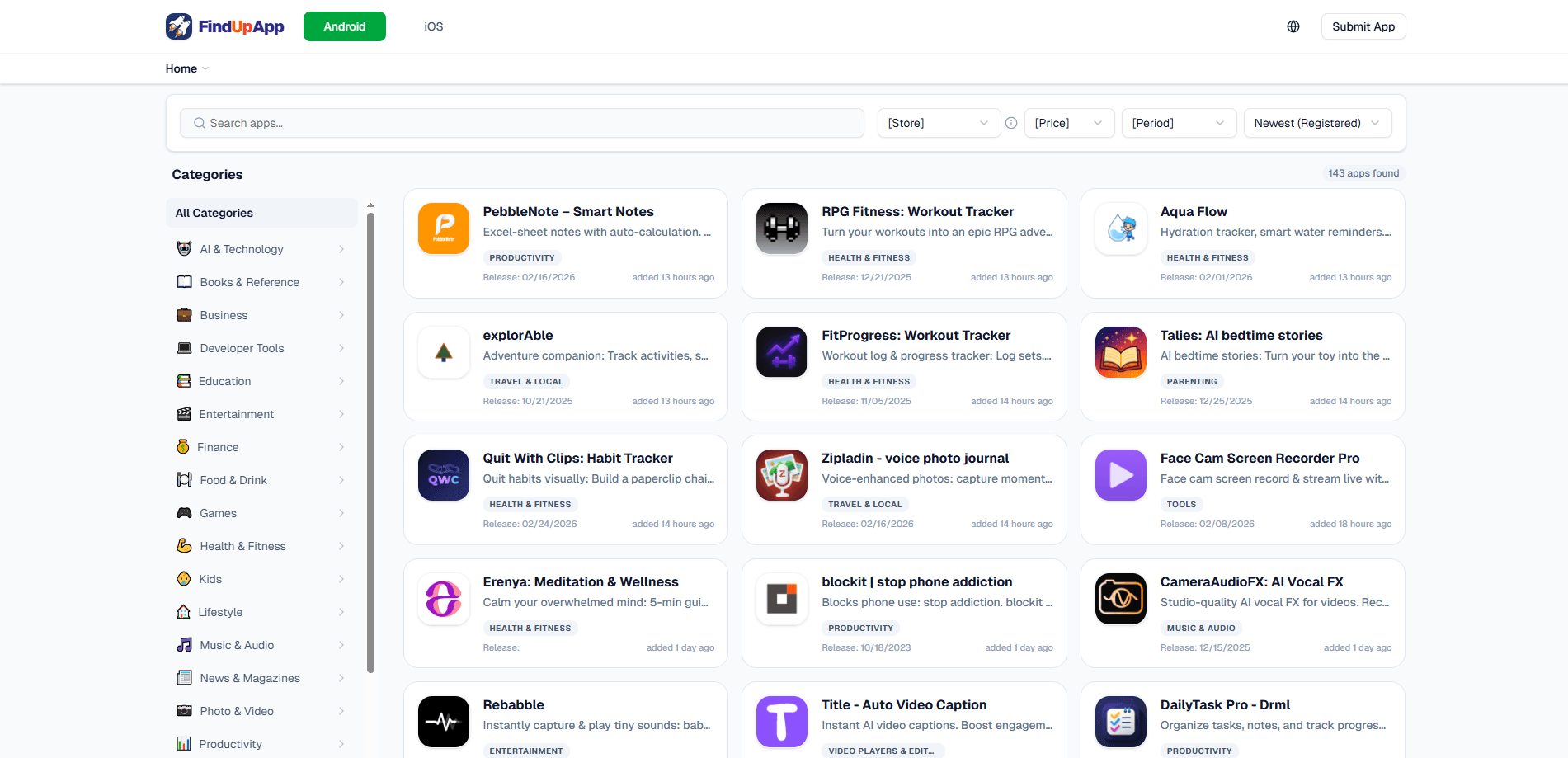
FindUpApp is a niche app discovery site that helps you discover new apps you'd never stumble onto in a normal store search. Instead of ranking by download volume, it groups apps by narrow, specific categories, so a ramen journaling app or a breathing-based focus blocker can sit next to the big names and still get seen.
The platform runs as a web directory rather than an installed app. You browse it in a browser on any device, and every listing links out to the official App Store or Google Play page for the download itself. That keeps FindUpApp out of the middle of the install. Good. That means no extra launcher or store client on your phone.
There's a two-sided side to it too. Developers register their apps directly and list them for free to reach more users, while regular visitors can flag the hidden gems they've found. Buying or trading anything isn't required to use the catalog, and the site also tests a third-party creator market on an independent chain, which is separate from the core browsing experience.
It doesn't host downloads, and it doesn't install anything for you. So what happens when a listing points to an app that's region-locked or pulled from the store? Nothing, really. The link is all the site can offer.
Getting Started
- Open findupapp.com in any browser. No account is needed to browse.
- Pick a category or scan the latest additions to narrow the field to something specific.
- Open a listing and read the description, category tags and platform details.
- Tap the direct App Store or Google Play link to install the app on your device.
- If you make apps, register your own listing from the developer side to reach new users.
Product Information
A quick look at FindUpApp's pricing, supported platforms, and performance.
Best for
The users, tasks, and scenarios where this tool fits best.
Users
- App hoarders who want fresh finds
- Indie developers
- Casual browsers on iOS
Tasks
- Discovering niche apps by specific interest
- Checking what's new without a store feed
- Finding indie alternatives
Scenarios
- Weekend boredom browsing
- Researching a category before you commit
- Tracking a specific niche over time
Key features
Granular Category Discovery
FindUpApp splits apps into narrow categories you won't find in standard store rankings. That's the core idea. Instead of ten broad buckets, you get specific groupings that make a small app easier to find. If you know the exact kind of tool you want, this cuts out a lot of scrolling.
Direct Store Links
It provides links straight to the App Store and Google Play, and the install happens there. No extra download step, no wrapper installer, no confusing redirect chain. You read about an app, tap through and install it the normal way.
Free Developer Listings
Developers can register their own apps and publish a listing at no cost. The point is reach: a free listing puts your app in front of people actively browsing for something new, not just searching for your name. Low effort, real eyeballs. It's an easy way to get attention outside the major stores, where a new title usually vanishes without a trace.
Community Submissions
Visitors can share hidden gems they've found, which keeps the directory from turning into a wall of sponsored placements. The catalog grows from both developer submissions and user picks. That spread matters. Coverage ends up across niches rather than concentrating on a few popular genres.
Latest Additions Feed
The homepage leads with recently added apps and timestamps, so you can see what landed in the last few hours or days. Simple. It's a quick way to check in periodically without digging through every category on the site.
Platform and Release Details
Listings include release information plus the platform an app targets, so you can tell at a glance whether something is iOS-only before you click. That detail matters when you're on Android. Half the catalog points to the App Store, and there's no point tapping a link you can't use.
Creator Market Experiment
FindUpApp is testing a third-party creator market on Orynth, an independent chain, where it may collect creator fees on trades. This isn't part of browsing or installing apps. Prices and returns aren't guaranteed. Treat it as a side experiment, not a reason to use the platform.
Pros and cons
Pros
- Category structure surfaces apps that store charts bury, useful when you want something genuinely new.
- Direct App Store and Google Play links keep the install process clean, with no extra client or launcher.
- Free developer listings make it worth a look if you're trying to get an indie app noticed.
- Browsing needs no account, so you can sample the catalog in a couple of minutes.
- The latest additions feed gives a clear, current picture of what's new.
Cons
- It doesn't host downloads, so a broken or region-locked store link leaves you with nothing to install.
- Coverage is uneven: iOS listings are far more common than Android ones, which limits it for Android-only users.
- The creator market experiment adds a crypto angle that has nothing to do with app discovery and can confuse first-time visitors.
- No API is documented, so you can't build a tool or feed on top of the catalog.
Frequently asked questions
It's a web-based app discovery platform that catalogs mobile apps by narrow categories and links out to the official store listing for each one. You use it to find apps, not to download them.
Related content
Explore related tools, skills, and articles for FindUpApp.
FindUpApp Alternatives
Forefront
Forefront · CodingForefront is a web platform for building with open-source AI. It lets you fine-tune leading open-source language models on your own data, evaluate how they perform, and run them through an API or export them to host yourself. Developers who want the convenience of a closed-source platform but insist on owning their models and data are the target audience here.

Startkit
StartKit.AI · CodingStartkit is a boilerplate for building AI SaaS and AI wrapper products. Think of it as an AI startup boilerplate with the boring parts already wired up: authentication, Stripe and Lemon Squeezy payments, usage limits, transactional email, and an AI API starter that talks to OpenAI, Anthropic, Groq, or Llama. You clone the repo, set your price, and start on the part of your product that people actually pay for. It's Next.js under React and Tailwind, so most of the boilerplate code already feels familiar.
Testim
Tricentis · CodingTestim is an AI-powered test automation platform for building and running end-to-end tests across web, mobile, and Salesforce applications. It leans on machine learning to keep tests stable when an interface changes, so teams spend less time fixing broken selectors. Not bad for an automated testing tool you can start using today. You create tests by recording actions in a browser, then optionally add JavaScript when you need more control. It's a solid pick for busy QA teams.