
Firetower
Westlabs LLC · Coding · Productivity
Firetower is a self-hosted coding agent control plane that lets you run coding agents on your own servers and drive them from a desktop or phone client.
About Firetower
What Is Firetower
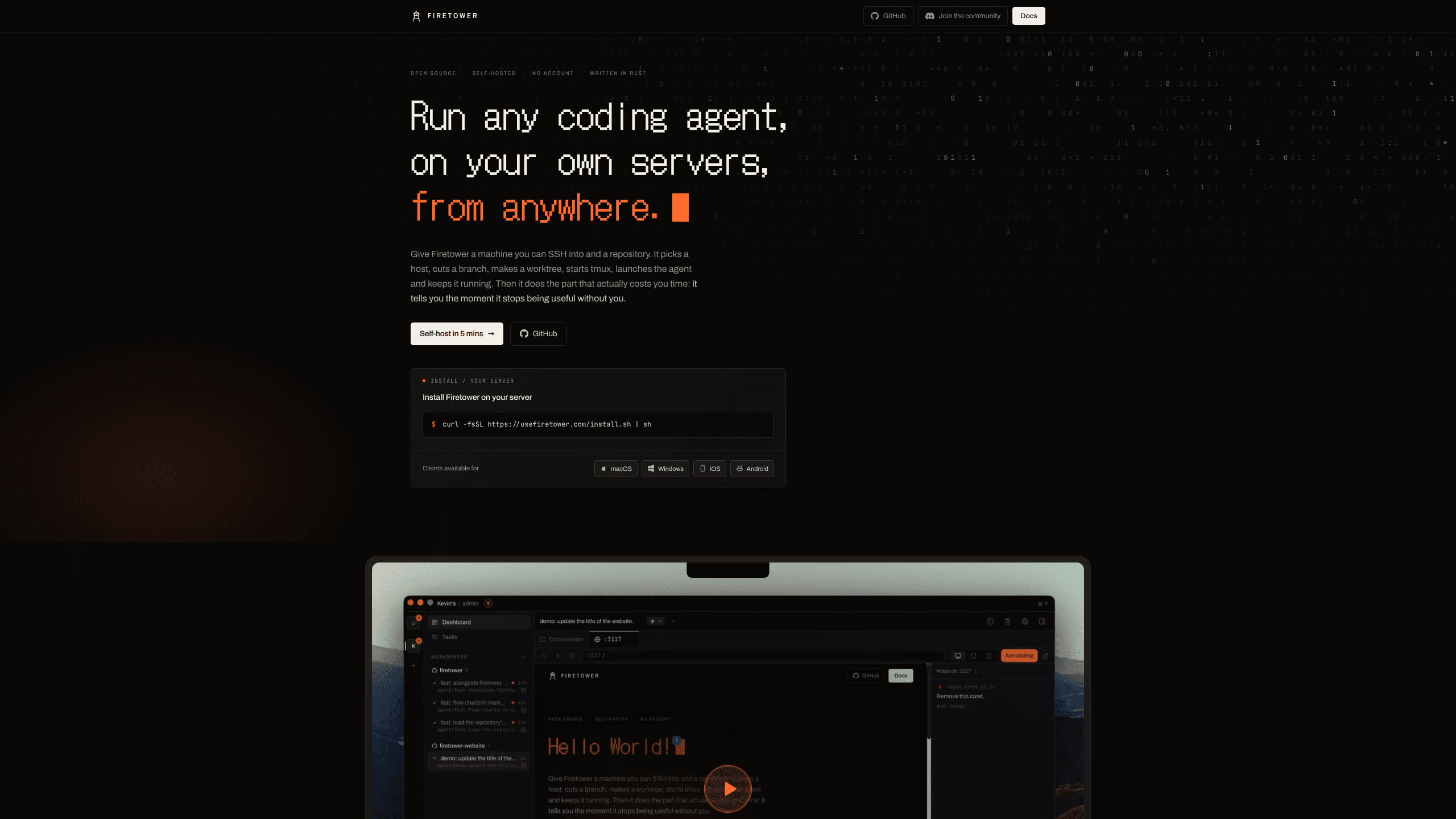
Firetower is a coding agent control plane that lives on a server you own. You install it on a Linux box, add machines you can already SSH into, and it puts a worker on each one. Describe a task and it picks a host, cuts a branch, makes a worktree, starts tmux, launches the agent, and stays with the run until something needs a person. That is agent orchestration without a cloud account in the middle.
The part that matters is where the agent runs. It sits on the server, not on the laptop you started from, so closing the lid or switching to a phone doesn't end the session. You reach the control plane over HTTPS on your Tailscale network, and workers talk back over SSH, which means nothing has to be exposed to the public internet.
You bring the rest. The server, the SSH access, and the agent subscriptions are yours. Firetower ships as AGPL-3.0 source under Westlabs LLC, with desktop apps for macOS and Windows and mobile apps for iOS and Android. There is no hosted tier and no account to create, so a team that wants managed infrastructure has to look elsewhere.
Getting Started
- Run the install command on a Linux server. The control plane takes about 200 MB of memory and creates no account.
- Add a machine you can SSH into, such as a VPS, a Mac mini, or a box at home. Firetower starts a worker there and never opens a port.
- Connect a git host and pick a repository, or start a workspace with no repository checked out and download the files at the end.
- Start from a GitHub issue or a Linear ticket. The agent gets its own branch and worktree, and you follow the run from the desktop or mobile app.
Product Information
A quick look at Firetower's pricing, supported platforms, and performance.
Best for
The users, tasks, and scenarios where this tool fits best.
Users
- Solo developers who own more than one machine
- Small teams with a shared Linux server
- Developers who review away from the desk
Tasks
- Long refactors that outlive a laptop session
- Fixing several issues in parallel across repositories
- Sharing house rules for agent work
Scenarios
- The end of a workday arrives before the task does
- Code and credentials have to stay on infrastructure you control
- A review starts on the desktop and finishes on the phone
Key features
A Control Plane on a Server You Own
The core of Firetower is a small service you install with one command on any Linux box. It holds the repository list, secrets, user accounts, and the queue of runs. Clients connect to it rather than to the agents, so the laptop becomes one screen among several. A team can run it on a spare server, and a solo developer can run it on the same VPS that hosts their projects.
Branch and Worktree Isolation
Every run gets a fresh branch and a git worktree, so parallel agents never share a checkout. One agent can rewrite a module while another fixes a bug in the same repository, and neither sees the other's half-finished files. When a run ends, the diff is ready for review on its own branch, which keeps agent work out of your working tree until you decide to merge it.
Agents Keep Running After You Leave
Because the process lives on the worker, remote coding agents keep running after you close the desktop app. The conversation, the diff and the branch stay attached to the run, and any client can pick them up. Firetower also tracks which runs are blocked on a question, so the inbox shows the two or three that need you instead of the twenty that don't.
Clients for Desktop and Phone
Native apps cover macOS, Windows, iOS and Android. The desktop client is the main place to add workers, connect repositories and manage secrets. The mobile apps handle a diff, a quick answer, or a run started away from the desk. Both connect over HTTPS on your Tailscale network, so the control plane stays off the public internet.
A Shared Skills Library
Upload a skill once and manage it from the tower. Share it with the teammates who need it, and every agent they run picks it up without a copy in each repository. Teams that keep review rules, release steps or house style in prompts get one place to update them, and a skill can carry a version number so people know what they're running.
Token Watch Across Providers
Claude Code, Codex, Kimi, Grok and the rest each report usage in their own way, and none of them see the others. Firetower watches all of them together and keeps a running total, broken down by project, issue and teammate. That makes it possible to answer a plain question, which project burned the tokens this week, without reconciling several dashboards by hand.
A Small Rust Core
The control plane and worker are written in Rust, with a small core and no pile of terminal daemons left running. The desktop app reports about 50 MB of memory, against roughly 1.5 GB idle for a competing app plus daemon in a user report the project cites. On a VPS that also runs other services, that difference decides whether you need a bigger box.
Pros and cons
Pros
- Agents run on a machine that stays awake, so a long task survives a closed laptop, a dead battery, or a train tunnel.
- Every run gets its own branch and worktree, which removes the collisions that show up when two agents share a checkout.
- It works with the Claude Code and Codex subscriptions you already pay for, so there is no new per-seat bill on top.
- The control plane never opens a port to the public internet, and workers only accept SSH from it.
- The source is AGPL-3.0, so you can read it, fork it, and change how runs are scheduled.
Cons
- You need a Linux server and comfort with SSH and Tailscale, and there is no hosted option, so signing up takes longer than creating an account somewhere else.
- The desktop and mobile apps are the only clients, which leaves out anyone who wants to check a run from a browser on a locked-down machine.
- OpenCode, Grok and Hermes are listed as looking for contributions, so agent choice is narrower than the marketing implies.
- The project is young and its own README warns about occasional bugs, while updates, backups and uptime are your responsibility.
Frequently asked questions
Firetower is a self-hosted control plane for coding agents. You install it on a server, add machines over SSH, and it starts agents in isolated worktrees, supervises them, and shows every run in a desktop or mobile client. It supports Claude Code, Codex, Cursor Agent and Kimi, among others.
Related content
Explore related tools, skills, and articles for Firetower.
Firetower Alternatives

Base Code
Base44 (Wix) · Coding · ProductivityBase Code is a shared cloud development environment from Base44. Teammates describe changes to an existing GitHub codebase in chat, preview them live and send them back as pull requests.

Google EmbeddingGemma 2
Google DeepMind · Writing · Image · CodingGoogle EmbeddingGemma 2 is a 740M-parameter open model that turns text, code, images, audio, and video frames into vectors in one 768-dimension space, running on phones and laptops.

GitGlow
GitGlow · Coding · ProductivityGitGlow is a local-first desktop Git client that lets independent developers review their own code and their AI agents' changes in one place before shipping.