
Flashcard Generator
TEMURIYDEVS LTD · Writing · Leaning
Flashcard Generator turns PDFs, notes, images, audio, and YouTube links into editable Q&A flashcards in seconds using Google Gemini. The web tool starts free and needs no signup.
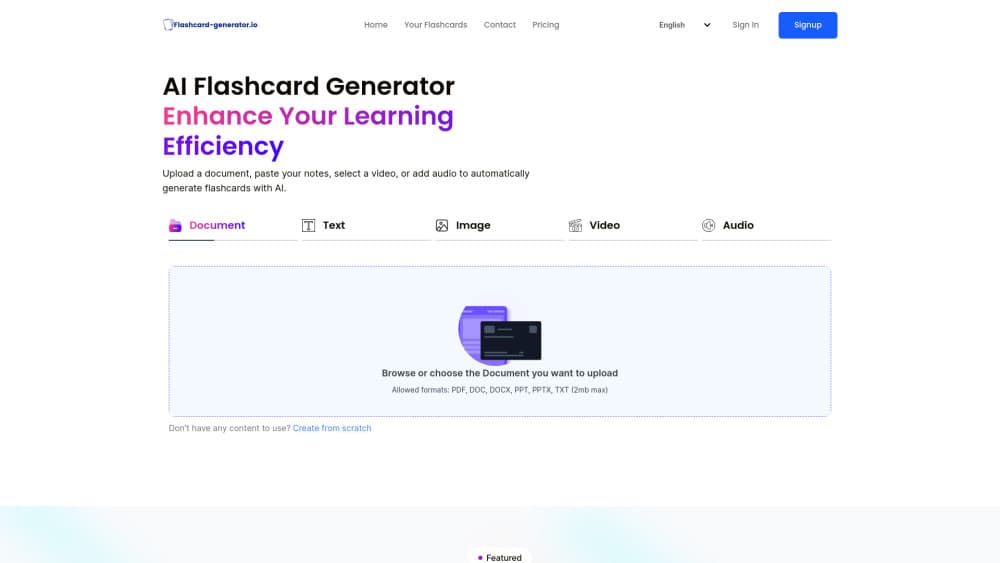
About Flashcard Generator
What Is Flashcard Generator
Flashcard Generator is a browser based AI study tool that reads your course material and writes question and answer pairs from it. You bring a PDF, a slide deck, a photo of handwritten notes, an audio file, or a YouTube link. The service returns a deck of digital flashcards you can edit and share. It's built and run by TEMURIYDEVS LTD.
The pitch is simple: making cards by hand takes longer than reviewing them. A 30 page reading can eat an evening of typing, and most students quit before the deck is finished. This tool trades that typing time for a 10 second upload, which is why it fits cramming and last minute review better than a carefully curated long term deck.
There are limits worth knowing up front. The free plan caps uploads at 2 MB and gives you 10 generations per day. Messy scans and image heavy slides produce weaker cards, so clean text in means clean cards out. The site also stops short of spaced repetition scheduling, so it won't decide what you review tomorrow the way Anki does.
Getting Started
- Open the site and pick an input type: document, text, image, video, or audio.
- Upload a file within the size limit, paste your notes, or drop in a YouTube link.
- Wait while the AI reads the material and drafts question and answer cards.
- Edit any card: reword a question, delete a weak one, or add your own.
- Sign up if you want to keep the deck, revisit it later, or share a link with classmates.
Product Information
A quick look at Flashcard Generator's pricing, supported platforms, and performance.
Best for
The users, tasks, and scenarios where this tool fits best.
Users
- Students with dense reading lists
- Language learners
- Teachers and tutors
Tasks
- Turning lecture PDFs into review cards
- Digitizing handwritten notes
- Building decks from video or audio
Scenarios
- The night before an exam
- Study breaks on a phone
- Group revision sessions
Key features
Any Document to Flashcards
PDF, DOC, DOCX, PPT, PPTX, and TXT files all go in, and Q&A pairs come out. The AI flashcard maker strips the formatting, finds the facts worth testing, and writes one question per idea. A 30 page PDF typically finishes in under 10 seconds according to the company.
Photo and Handwriting Input
You can photograph a page of handwritten notes and upload the image instead of retyping it. Recognition is the weak link here: neat print and even lighting work well, while cramped cursive and shadowed phone shots produce cards you'll need to fix by hand.
Video and Audio Conversion
Paste a YouTube URL and the AI works from the transcript to build a deck. Audio uploads cover recorded lectures and podcast episodes, but that path sits behind the paid plans, so free users can't convert an MP3.
Card Editing After Generation
Every card is editable once the deck lands. You can reword a vague question, cut a card that tests trivia rather than understanding, or add one the AI missed. This matters because generated cards tend to be literal, and literal cards are easy to answer without knowing the material.
Deck Sharing by Link
A share link hands the same deck to a study group, which is the practical way to split review work across a class. Sharing needs an account, and the link points at the site rather than an exportable file.
Free Tier Without Signup
The free plan runs 10 generations a day at no cost, with no credit card and no account needed to try it. Uploads are capped at 2 MB, which fits most single chapters and short slide decks but rules out full textbooks.
Pros and cons
Pros
- No signup and no card details to test the core workflow, so you can judge output quality on your own material before paying.
- Handles six input types in one place: documents, plain text, photos, YouTube links, audio, and video.
- Generated cards are editable, which turns a rough first pass into a usable deck in a few minutes.
- Paid tiers are cheap by study app standards at $3.99 per month on the yearly plan.
- Interface ships in eight languages, including Spanish, German, French, Portuguese, Russian, Dutch, and Arabic.
Cons
- The free plan allows 10 generations per day, so a heavy review week runs out before the weekend.
- Uploads on the free plan stop at 2 MB, which blocks most full textbooks and long scanned PDFs.
- Audio to flashcard conversion is paid only, leaving free users with documents, text, images, and video.
- There's no dedicated app, and decks live on the site, so offline review on a plane isn't an option.
Frequently asked questions
Yes, there's a free plan with 10 generations per day, no credit card, and no account required to start. Paid plans remove the daily cap and add audio uploads.
Related content
Explore related tools, skills, and articles for Flashcard Generator.
Flashcard Generator Alternatives

Google EmbeddingGemma 2
Google DeepMind · Writing · Image · CodingGoogle EmbeddingGemma 2 is a 740M-parameter open model that turns text, code, images, audio, and video frames into vectors in one 768-dimension space, running on phones and laptops.

MePersona
MePersona, Inc. · Writing · Productivity · MarketingMePersona is an AI unified inbox for creators. It learns your voice, drafts replies to fan messages from 12 platforms, and sends only what you approve.

Fluence
Yay Software (Yannick Huchard) · Writing · Voice & Language · ProductivityFluence is an Android app that reads PDFs, EPUBs, Word files and web articles aloud, follows each sentence as it speaks, and answers questions about the text on the phone itself.