

FlashcardX
Talbert Herndon · Leaning
FlashcardX is a web app that turns pasted article or textbook text into flashcard decks with AI. It fits students who want a fast vocabulary pass before a test.
About FlashcardX
What Is FlashcardX
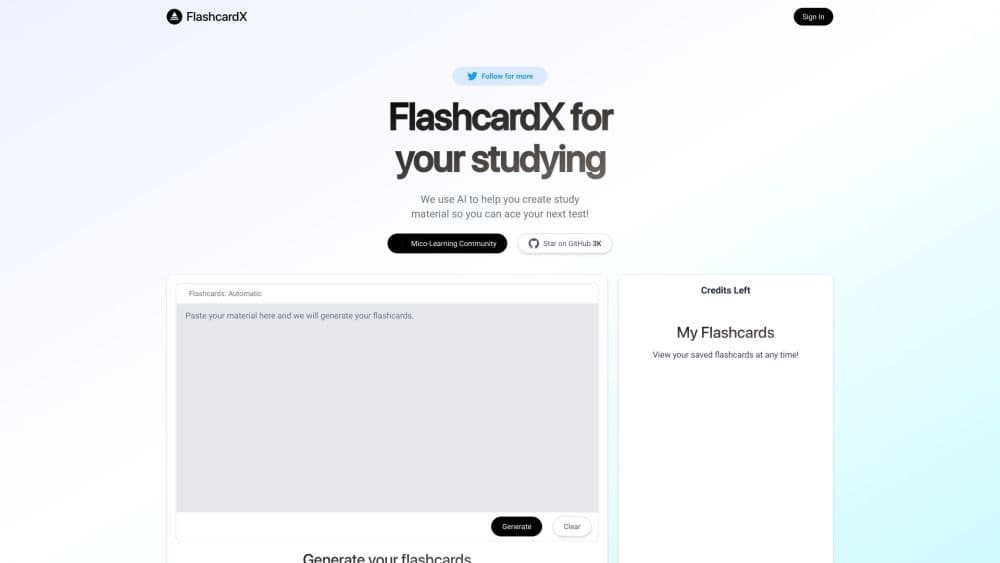
FlashcardX is a browser-based study tool built by independent developer Talbert Herndon. You paste a chunk of text, give it a short prompt, and the app returns a set of term and definition cards you can review or keep in your library. The pitch is simple: skip the card-making grind and get to the memorizing part.
The tool is narrow on purpose. It generates vocabulary pairs, so it works best on language learning, definitions, and named concepts in a chapter. If you need diagrams, multi-step math, or image occlusion, this isn't the app for that.
Two limits matter before you sign up. Links aren't accepted, so you can't drop a URL and let the app read the page. Generation also runs on a credit balance shown in the interface, which means long study sessions can hit a wall.
Getting Started
- Open flashcardx.com in a browser and sign in with the button in the top right.
- Paste the source text into the prompt box. Articles, textbook paragraphs, and lecture notes all work. Links don't.
- Add a short instruction so the model knows what to pull out, for example the key terms from a biology chapter.
- Review the generated term and definition cards, then save the set to My Flashcards.
- Come back to the library whenever you want to run through a deck again.
Product Information
A quick look at FlashcardX's pricing, supported platforms, and performance.
Best for
The users, tasks, and scenarios where this tool fits best.
Users
- Students prepping for vocabulary-heavy exams
- Language learners
- Teachers building quick review sets
Tasks
- Turning a textbook section into review cards
- Building a first deck for a new subject
- Drilling definitions the night before a quiz
- Converting lecture notes into study material
Scenarios
- A short cram session between classes
- Pre-reading a chapter
- Group study prep
Key features
Prompt to Deck Generation
Paste a passage, add a one-line instruction, and FlashcardX calls an AI model to pull out terms and definitions. The output arrives as a two-column card list you can read immediately. There's no template setup and no manual card typing.
Term and Definition Card Format
Every card holds a single term paired with its definition. That format keeps study flashcards fast to review, since you're testing recall of one idea at a time. It also means the tool stays focused on vocabulary rather than open-ended questions.
Saved Flashcard Library
The My Flashcards view keeps your generated sets available after you close the tab. You can reopen a deck instead of regenerating it, which matters when credits are limited. Sets are tied to your signed-in account.
Credit-Based Usage
The interface shows a credits counter next to the generator. Each run spends credits, so the cost of a session depends on how many decks you build. Watching that number is the practical way to manage usage while pricing stays unpublished.
Browser-Only Access
FlashcardX runs in any modern browser on desktop or mobile, so there's no install step and no app store account. Your decks follow you as long as you can sign in. Offline review isn't supported.
Open Source Codebase
The project ships under GPL-3.0 on GitHub, which means you can read the code or run your own copy with your own model key. For schools with strict data rules, self-hosting is the escape hatch.
Pros and cons
Pros
- Generating a deck takes one paste and one click, which beats typing cards by hand.
- The term and definition format is easy to review on a phone during a commute.
- Saved decks persist in the library, so repeat sessions don't burn credits.
- The open source license lets technically minded users self-host the same flashcard maker.
- No install needed, and free credits are enough to test the workflow.
Cons
- Links aren't supported, so you can't point the AI study tool at a web page or a PDF upload.
- Cards stick to vocabulary pairs, which leaves out formulas, timelines, and image-based recall.
- Pricing for extra credits isn't published, so you can't budget before you start.
- The codebase hasn't seen a public update since 2023, which raises questions about long-term support.
Frequently asked questions
Yes. You can sign in and generate cards without paying, and the interface tracks a credit balance. Extra credits and pricing for them aren't listed on the site.
Related content
Explore related tools, skills, and articles for FlashcardX.
FlashcardX Alternatives

Kaggle AI
Google · Coding · LeaningKaggle AI is a community platform where people build, test, and compare machine learning models against shared data. It combines data science competitions, tens of thousands of public datasets, and free cloud notebooks with GPU and TPU access, so anyone with a browser can train a model without buying hardware. Google owns the platform, and joining costs nothing.

Bunch
Bunch AI · Leaning · BusinessBunch is an AI leadership coaching app that turns a few spare minutes a day into real management practice. It hands you one short, personalized tip each day, tracks how you respond, and lets you compare notes with peers inside private groups. The pitch is simple: you lead better by practicing a little, often, instead of sitting through a weekend seminar. Think of it as a leadership training app you actually open.

AI Mock Interview
SQLPad · Coding · LeaningAI Mock Interview is a practice tool built into SQLPad that simulates real job interviews and gives you instant feedback on both what you say and how you say it. You pick a role template or upload a job description, answer questions out loud in real time, and then review a transcript with notes on structure, clarity, and grammar. It's aimed at data professionals prepping for SQL, Python, data engineering, machine learning, and system design roles, and it works entirely in the browser. No install needed.