

Flexi: Vocabulary Flashcards
Tomer Beilinson · Other
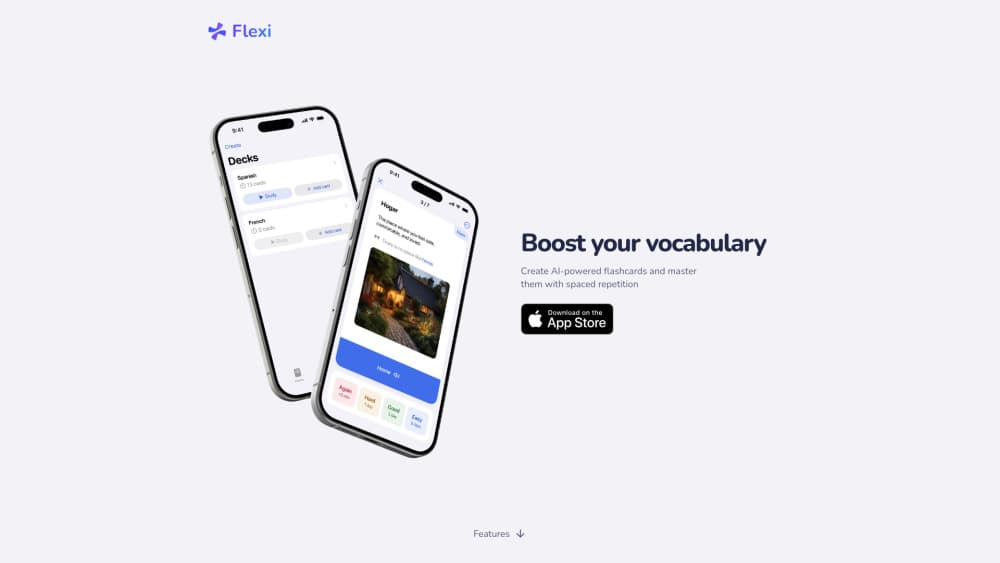
Flexi is an AI vocabulary flashcards app that turns a word into ready-to-study cards with translations, examples and audio, then schedules reviews with FSRS spaced repetition.
About Flexi: Vocabulary Flashcards
What Is Flexi
Flexi is a mobile study app built around one narrow job: getting new words into your long-term memory without the busywork of card making. You type a word or a short phrase. The app returns up to five card options with a translation, a contextual example, a definition, the part of speech and a pronunciation guide. Pick what you want, keep it, and the card joins your deck.
Most language learning apps hand you a fixed deck and a schedule you can't touch. Flexi works the other way around. That card-building loop is what separates it from older flashcard tools, and it's the most credible Anki alternative for anyone who would rather spend ten minutes on review than on formatting. It also imports existing decks, so switching doesn't mean starting from zero.
The limits are mostly practical. Everything runs on iOS and Android, so there's no browser or desktop version for building a large deck at a keyboard. The iOS app asks for iOS 18 or later, and the deeper features sit behind a Premium plan. For a student juggling three languages, the trade is easy to defend.
Getting Started
- Download Flexi from the App Store or Google Play and create an account.
- Set your deck language pair and the languages you want translations and audio in.
- Add a word or paste a word list, then choose which of the generated cards to keep.
- Review the day's queue, or import an existing deck from Anki, Quizlet or a CSV file.
- Enable reminders and a home screen widget if you want the habit to hold.
Product Information
A quick look at Flexi: Vocabulary Flashcards's pricing, supported platforms, and performance.
Best for
The users, tasks, and scenarios where this tool fits best.
Users
- Language learners with a personal word list
- Students facing reading-heavy exams
- Former Anki users who stopped reviewing
- Polyglot learners working across scripts
Tasks
- Turning a reading list into cards
- Fixing pronunciation
- Checking a word in context
- Migrating a deck
Scenarios
- A commute review session
- Building vocabulary for a trip
- Keeping a heritage language alive
Key features
AI Card Generation
Type a word, get up to five editable card options. Each one can carry a translation, definition, example sentence, part of speech and pronunciation guide, so you choose the wording that fits your level instead of accepting a single canned card. The AI flashcard generator is the reason most people install it, and it's what makes Flexi feel less like a database and more like a study partner.
FSRS Spaced Repetition
Reviews run on FSRS spaced repetition, the modern scheduler that Anki users know by name. Flexi places each card just before you would forget it, which keeps daily queues short and pushes mature cards further out. You still control how much you review, and the algorithm adapts to the ratings you give.
Pronunciation Beyond Latin Scripts
Audio is available in more than 20 languages, and written guides cover IPA for English, Spanish, German, Dutch, Czech, Finnish and Romanian, kana for Japanese, Pinyin or Zhuyin for Mandarin, and Jyutping for Cantonese. For learners of Japanese or Chinese, that's the difference between guessing a tone and hearing it.
Deck Import From Anki, Quizlet and CSV
Bring the decks you already built. Basic Anki import is free, and Premium adds study progress and one image per card. It's the least dramatic feature on the list and probably the one that decides whether you switch, because nobody wants to rebuild three years of cards.
AI Tutor Inside Every Card
Each card has a chat entry point, so you can ask why a word takes that preposition, or request a simpler example. It works as a supplement to review, not a replacement, and the answers are grounded in the card you're looking at.
Capture and Widgets
Jot down a phrase the moment you hear it and turn it into cards later. Reminders and home screen widgets nudge the daily session, which matters more than it sounds, since most flashcard apps die from skipped days rather than bad algorithms.
Pros and cons
Pros
- Card creation takes seconds. A word in, several usable cards out, with the fields already filled.
- FSRS scheduling is a real upgrade over the simplified algorithms in most consumer flashcard apps.
- Imports cover Anki, Quizlet and CSV, including progress and images on the paid plan.
- Pronunciation support handles kana, Pinyin, Zhuyin and Jyutping, which Latin-only apps can't touch.
Cons
- No browser or desktop app. Building a 500-card deck means working on a phone, or preparing a CSV elsewhere and importing it.
- iOS 18 or later is required on Apple devices, so an older iPhone is out of luck.
- The public review base is small, with 138 App Store ratings and 1K+ Android downloads, and $99.99 for lifetime access is a lot next to free Anki.
Frequently asked questions
It generates vocabulary flashcards from a word or phrase, then schedules your reviews. You get translations, examples, definitions, parts of speech and pronunciation guides without typing them yourself.
Related content
Explore related tools, skills, and articles for Flexi: Vocabulary Flashcards.
Flexi: Vocabulary Flashcards Alternatives

Odyssey 3
Odyssey · OtherOdyssey-3 is Odyssey's foundation world model. It simulates physics in real time, turns a prompt into an interactive environment, and adapts to robots, cars and games.

JarvisCore
Prescott Data · Coding · Productivity · OtherJarvisCore is an open source Python runtime where AI agents work as equal peers on an agent mesh, claim tasks from a shared ledger, and reach external services through a zero-trust broker.
Clef
Cloudflare · Business · OtherClef is Cloudflare's open-source decision model for Workers AI. It returns calibrated probabilities for typed questions, not generated text, so agents can classify, route, and act fast.