

Flodesk Studio
Flodesk · Writing
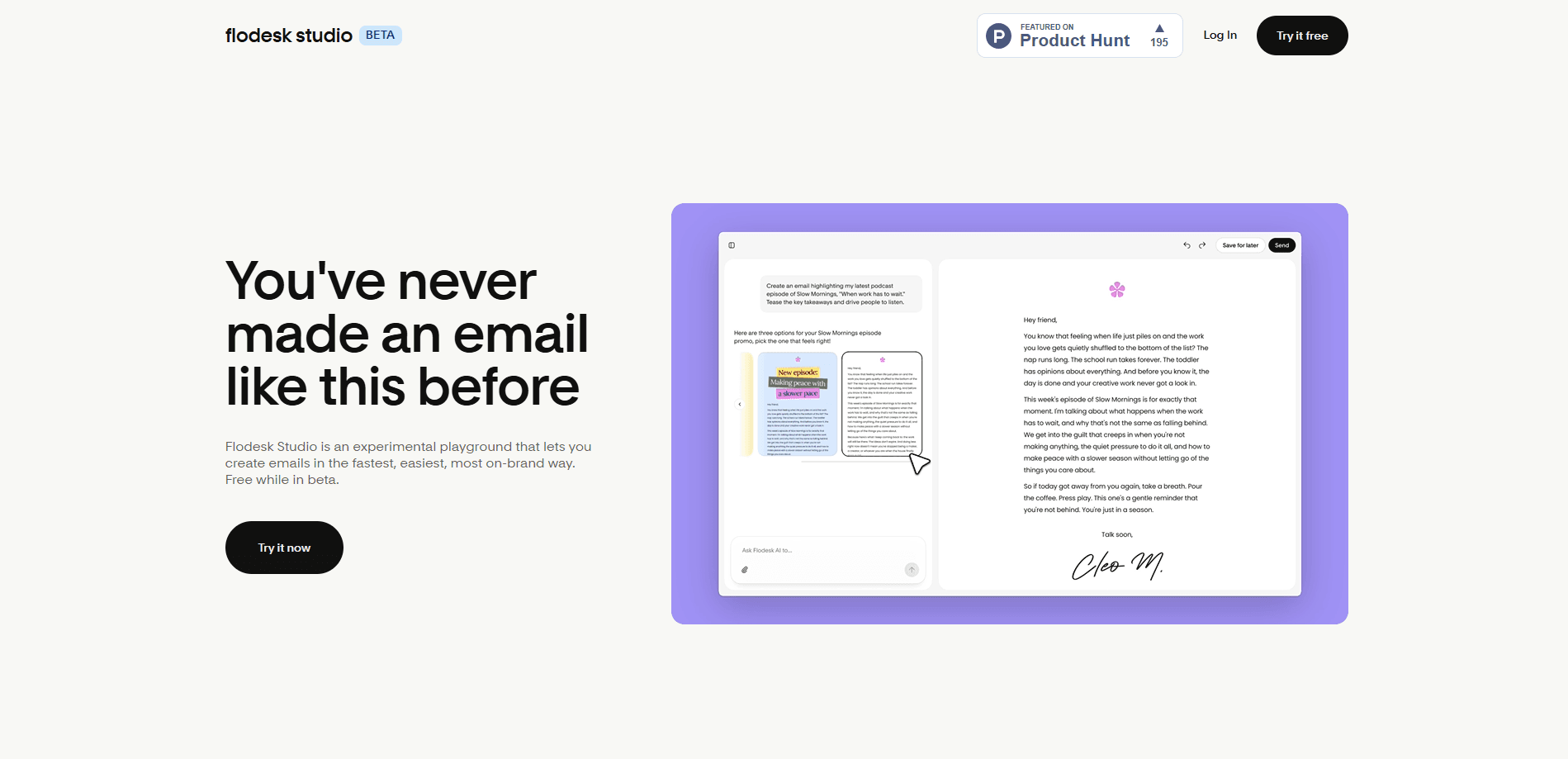
Flodesk Studio is an AI email design app that turns a single prompt into a polished, on-brand email in seconds. You add your brand assets, write a prompt, and pick one of three design directions, then refine the result by chatting with it or editing by hand. When the email looks right, you export it as HTML and send it through whatever email provider you already use. It's a standalone product. It's separate from the classic Flodesk email builder, and it runs free while in beta.
About Flodesk Studio
What Is Flodesk Studio
Flodesk Studio is an AI email generator built for people who want beautiful emails without fighting a design tool for an afternoon. You upload your fonts, colors, images, and brand context once, then describe the email you want in plain words. Studio returns three design directions, you pick your favorite, and you keep editing however you think best: by typing instructions into a chat or by dragging blocks around by hand.
The big idea is speed without losing control. According to Flodesk, Studio gets you roughly 80% of the way to a finished email in a single prompt, and every layout it draws from was hand-crafted by human designers rather than assembled from generic AI output. That matters if you've ever watched an AI tool produce something that looked fine at a glance and wrong the moment you added your logo. It happens more than you'd think.
There are real limits to know about before you commit. Studio is in beta, so bugs and missing pieces are expected, and the company says plainly it won't be perfect yet. It's also a design and export tool, not a full email service: it doesn't send campaigns for you. You design the email and export the HTML. From there it goes into your existing provider. That's the whole loop.
Getting Started
- Sign in to Flodesk Studio at app.studio.flodesk.com and start a new email project.
- Add your brand: upload fonts, colors, images, and any tone or business details you want the design to reflect.
- Write a prompt describing the email, then pick your favorite of the three design directions Studio generates.
- Refine the email by chatting with the tool or editing blocks, spacing, and copy by hand until it looks right.
- Export the finished email as HTML and drop it into your email provider to send.
Product Information
A quick look at Flodesk Studio's pricing, supported platforms, and performance.
Best for
The users, tasks, and scenarios where this tool fits best.
Users
- Small business owners
- Solopreneurs and creators
- Email marketers
- Freelancers who build emails for clients
Tasks
- Turning a rough idea into a full email layout
- Keeping every send on-brand
- Speeding up recurring newsletters
- Exporting emails to another provider
Scenarios
- A weekly newsletter that needs a fresh look but the same brand voice
- A promo email that has to go out today
- Testing a few layout ideas before committing
- Handing a draft to a designer or client
Key features
Prompt to Email in One Step
You describe the email you want in plain language, and Studio returns three design directions built from your brand inputs. No template hunting required. It means you spend your time choosing and refining rather than assembling a layout from nothing.
Brand Setup That Carries Across Emails
You upload your fonts, colors, images, and tone once, and Studio applies them to new designs automatically. That's the feature that keeps a prompt-based tool from producing generic-looking emails, since the output reflects your brand instead of a default style.
Three Directions Per Prompt
Every prompt gives you three distinct layouts to compare, which is genuinely useful when you're not sure what structure an email needs. You see options side by side. No committing to the first thing the tool draws.
Edit by Chat or by Hand
Refinement works two ways. You can type instructions into a chat and let Studio make the change, or drop into manual editing and drag blocks, adjust spacing, and rewrite copy yourself. The manual side includes a large set of layouts. You're not locked into chat-only edits.
HTML Export to Any Email Provider
When the design is done, you export it as HTML and import it into your own email provider. That makes Studio a design layer you add to your current stack, not a replacement for your sending platform, which is a big deal if you've already committed to a provider.
Human-Designed Layouts Behind the AI
Studio's layouts were hand-crafted by a design team rather than generated on the fly. The AI adapts them to your brand. Big difference. It's the gap between an AI that invents a layout and one that draws from work a designer already checked, and it's why the output rarely looks like default AI output.
Pros and cons
Pros
- Goes from a short prompt to a usable, on-brand email layout in seconds, which removes most of the blank-page friction.
- Brand assets you upload carry across new designs, so repeat emails stay consistent without redoing setup.
- Two edit paths, chat and manual, suit both people who want speed and people who want pixel-level control.
- HTML export means it slots into the email provider you already use instead of forcing a switch.
- Free during beta, so you can test whether the workflow fits before paying anything.
Cons
- It's in beta, so expect bugs and missing features, and review output before you send anything to real subscribers.
- It doesn't send emails for you, so anyone without a separate email provider has to set one up first.
- No confirmed public API, which limits automated or programmatic workflows.
- Pricing after beta isn't published, so you can't plan long-term costs yet from the official site alone.
Frequently asked questions
It's an AI email design app for creating branded marketing emails. You write a prompt, Studio generates three design directions, and you refine and export the result as HTML for your email provider.
Related content
Explore related tools, skills, and articles for Flodesk Studio.
Flodesk Studio Alternatives

Google EmbeddingGemma 2
Google DeepMind · Writing · Image · CodingGoogle EmbeddingGemma 2 is a 740M-parameter open model that turns text, code, images, audio, and video frames into vectors in one 768-dimension space, running on phones and laptops.

MePersona
MePersona, Inc. · Writing · Productivity · MarketingMePersona is an AI unified inbox for creators. It learns your voice, drafts replies to fan messages from 12 platforms, and sends only what you approve.

Fluence
Yay Software (Yannick Huchard) · Writing · Voice & Language · ProductivityFluence is an Android app that reads PDFs, EPUBs, Word files and web articles aloud, follows each sentence as it speaks, and answers questions about the text on the phone itself.