

FLORA
FLORA · Writing · Image
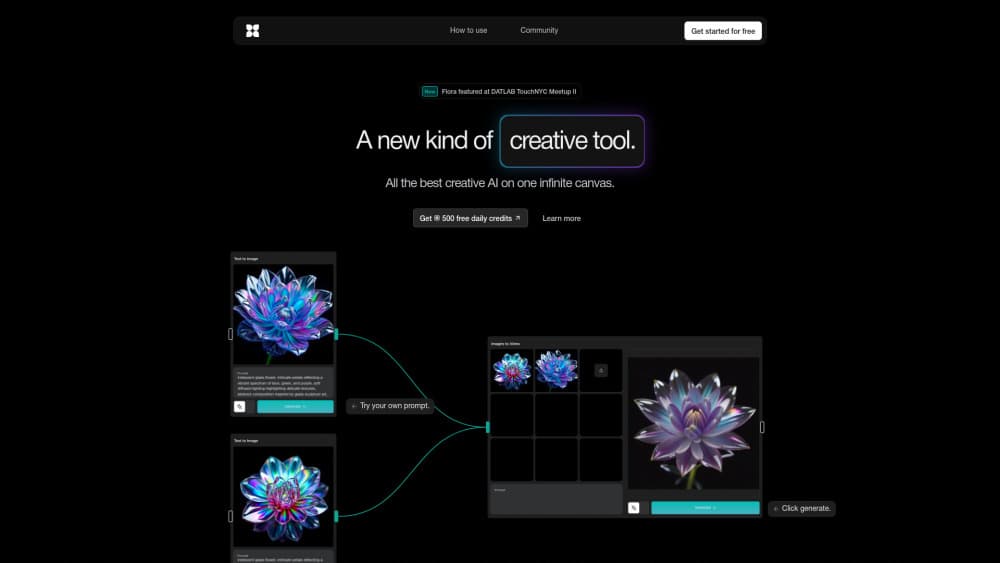
FLORA is a generative AI canvas that brings 50+ text, image, and video models into one workspace, so creative teams can ideate, iterate, and scale assets in a single place.
About FLORA
What Is FLORA
FLORA is a generative AI canvas built for creative professionals, not casual tinkerers. It gathers text, image, and video models from many providers onto one infinite board, and you move between them without opening a dozen tabs. Type a prompt, drop a reference image, branch a result into variations, and keep the whole thread in front of you.
The idea behind it is control. Most AI tools make generating easy but leave you guessing why an output came out the way it did. Tools built for traditional design give you control but take years to learn. FLORA tries to sit between the two. Its founder, Weber Wong, came out of NYU's ITP program and frames the company as an applied HCI shop: the goal is to speak an idea and shape it, rather than roll the dice and hope.
Under the hood, FLORA leans on a long list of third-party models. You get image models such as Nano Banana, FLUX, Gemini, and Seedream, video models like Veo, Kling, Ray, and Seedance, plus text models for planning and scripting. A single subscription covers the whole set, so you skip buying each model on its own. The platform also ships Techniques, reusable workflows built by FLORA and outside creators, and a recent Fashion Studio for lookbooks and campaign work.
Teams from Pentagram to Lionsgate use it, and the company raised $42 million to chase what it calls "the next Adobe." If you want to know where FLORA pricing lands before committing, the site prices per seat with usage pooled across the team.
Getting Started
- Go to flora.ai and click Get started for free, or sign up for the Starter plan if you want video models and collaboration.
- Open the canvas and pick a model from the sidebar, or start from a Technique built for your task.
- Type a prompt, or attach a reference image to lock a subject or style.
- Branch the result into variations and edit any node directly on the board.
- Run a video model, or generate a batch, once the direction holds up.
- Export the finished asset, or share the canvas with your team for review.
Product Information
A quick look at FLORA's pricing, supported platforms, and performance.
Best for
The users, tasks, and scenarios where this tool fits best.
Users
- Creative teams at studios and agencies
- Brand and marketing designers
- Filmmakers and motion artists
Tasks
- Concepting and moodboards
- Image generation and editing
- Video production
Scenarios
- Building a launch campaign
- Designing a product line
- Producing video storyboards
Key features
One canvas for text, image, and video
The core of FLORA is the canvas itself. Every model sits on the same infinite board, so you can draft a concept with a text model, render it with an image model, and animate it with a video model without breaking your flow. Branching lets you try several paths from one node and keep them side by side rather than overwriting your last attempt. For teams that jump between tools all day, the payoff is fewer tabs and a clearer trail of how an idea evolved.
50+ models under one subscription
FLORA packs more than 50 models into a single plan, which is the part that saves the most money and hassle. Image work spans models like Nano Banana, FLUX, Gemini, and Seedream. Video spans Veo 3.1, Kling, Ray 2, and Seedance. Text models handle planning and copy. You watch the dollar cost of each generation at published model rates, so a team can bill clients from real usage history instead of guessing.
Techniques and runnable workflows
Techniques are reusable workflows built by FLORA and invited creators. Each one packages a proven process, such as Character Lock, Logo to Brand Identity, or a font builder, and you run it on your own assets or open it on the canvas to tweak. For anyone new to the tool, a Technique is the fastest route from a blank board to a finished result, and you can learn the pattern to build your own.
Fashion Studio
Fashion Studio is a purpose-built set of tools for apparel work, from sketch to campaign, wired into the canvas. It covers the steps a fashion team runs in a season, and it draws from your plan's shared usage at the same published model rates. It shipped in August 2026 and sits alongside the general canvas rather than replacing it.
Real-time collaboration and shared assets
The Starter plan and up add real-time cursors, commenting, and project sharing, with view-only and editable roles. Team assets and shared elements live in a common library, so a studio keeps one source of truth for logos, subjects, and brand looks. Per-member usage caps and analytics let an admin see where the budget goes.
MCP and API access
From the Starter plan, FLORA exposes MCP and API access. That means you can wire the models and your saved workflows into other tools, or trigger generations from outside the canvas. For teams already building around agents and automation, this is the piece that keeps FLORA inside their pipeline rather than next to it.
Pros and cons
Pros
- A single subscription covers 50+ text, image, and video models, so you stop paying separately for each one.
- The canvas keeps concepting, editing, and animation in one place, which cuts tab-switching.
- Techniques and Fashion Studio give newcomers a proven starting point instead of a blank board.
- Real-time collaboration, shared assets, and usage analytics fit how studios actually work.
- MCP and API access open the door to automation and outside tools.
Cons
- Seat pricing starts around $18 and climbs to $200, and heavy video work eats the included usage fast.
- The entry plan leans on text and image models, so video and collaboration need the paid tiers.
- A canvas with dozens of models can overwhelm someone who just wants a quick one-off image.
- Much of the creative strength rests on third-party models, so output quality shifts with each provider's updates.
Frequently asked questions
FLORA is a generative AI canvas for creative teams. It places 50+ text, image, and video models on one workspace so you can concept, edit, and animate without switching between apps.
Related content
Explore related tools, skills, and articles for FLORA.
FLORA Alternatives

Google EmbeddingGemma 2
Google DeepMind · Writing · Image · CodingGoogle EmbeddingGemma 2 is a 740M-parameter open model that turns text, code, images, audio, and video frames into vectors in one 768-dimension space, running on phones and laptops.

MePersona
MePersona, Inc. · Writing · Productivity · MarketingMePersona is an AI unified inbox for creators. It learns your voice, drafts replies to fan messages from 12 platforms, and sends only what you approve.

Fluence
Yay Software (Yannick Huchard) · Writing · Voice & Language · ProductivityFluence is an Android app that reads PDFs, EPUBs, Word files and web articles aloud, follows each sentence as it speaks, and answers questions about the text on the phone itself.