

Flowdy
GO FORWARD Inc. · AI Detection · Business
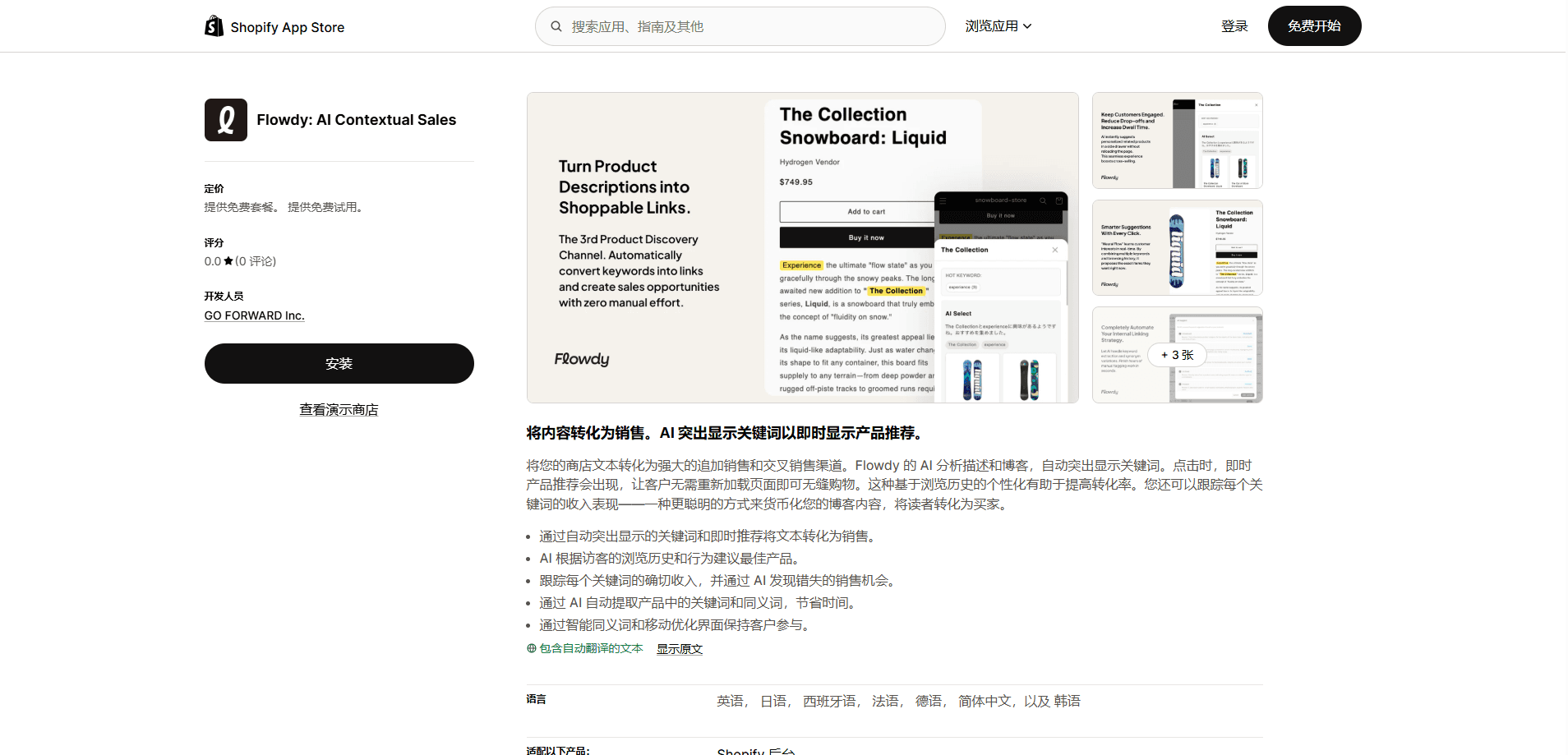
Flowdy is an AI app for Shopify that writes AI blog posts from your real product data, then turns them into shoppable content. You pick a collection, answer a few questions in a chat, and get a ready-to-edit post built from product titles, descriptions, prices, variants, and tags. After publishing, it highlights keywords, links them to matching products, and shows those products in a drawer when shoppers click. The point is simple: get readers from an article to a product page without a separate manual step.
About Flowdy
What Is Flowdy
Flowdy is a Shopify app that connects the writing side of content marketing with the buying side of a store. Instead of writing a blog post and then going back to insert product links by hand, you generate the article from the products you already sell, and the app handles the linking. It's built for merchants who want blog traffic but don't have a content team.
The problem it solves is the gap between reading and buying. A reader finishes your post, feels interested, then has to hunt for the product you mentioned. Flowdy closes that gap: keywords in the text become entry points to a product drawer that opens without a page reload, so the reader never leaves the article. So what's the actual pitch? Shoppable product discovery, nothing more.
The biggest limitation is scope. Flowdy only works inside Shopify. That rules it out if you run on WooCommerce, BigCommerce, or a custom stack. Article generation is also capped by plan, from 2 posts a month on the free tier up to 30 on the top tier. And since the writing pulls from your product data, thin or messy product descriptions tend to produce thin articles too.
Getting Started
- Install Flowdy from the Shopify App Store and approve the permissions it requests for products, blogs, and orders.
- Pick a collection to write about, so the app knows which products feed the article.
- Answer a short set of questions in the AI chat about the angle, tone, and audience you want.
- Review and edit the generated draft, then publish it to your Shopify blog.
- Let Flowdy highlight keywords and link products, then check the analytics to see clicks, product views, and purchases.
Product Information
A quick look at Flowdy's pricing, supported platforms, and performance.
Best for
The users, tasks, and scenarios where this tool fits best.
Users
- Shopify merchants with a decent product catalog
- Small stores without a content writer
- Store owners who already blog but link products manually
Tasks
- Turning a product collection into a blog article
- Linking keywords in existing content to products
- Measuring which articles drive sales
Scenarios
- Seasonal gift guides built from a collection
- Multi-language stores
- Content-led product discovery on mobile
Key features
Blog generation from real product data
Flowdy writes articles using your actual product titles, descriptions, prices, variants, and tags, not generic filler. You choose a collection and answer a few questions in the AI chat, and it produces a draft ready for editing. Because the source is your own catalog, the post mentions products you can actually ship. That matters.
Keyword highlighting that links to products
Once an article is published, Flowdy pulls out relevant keywords and highlights them inline. Each highlighted term connects to matching products, so the text itself becomes a navigation layer. Think of it as a keyword highlighting app layered over your blog. Shoppers who spot a term they care about can jump straight to the item without scrolling back to a link, which keeps them reading instead of bouncing to search.
Shopify product recommendations in a smart drawer
Clicking a highlighted keyword opens a drawer that shows related products. It loads in place. No page reload, no lost reading position. These Shopify product recommendations adapt per visitor, so the products shown can shift based on what the shopper has viewed before.
Revenue tracking by keyword
The analytics dashboard tracks clicks, product views, and purchases, then ties them back to the keywords that triggered them, which is the only way to know whether an article earned anything. That tells you which terms in an article earn money and which ones just get attention. On the top tier, you also get page-level keyword performance. Not every highlighted word pays off.
Multi-language blog generation
Flowdy generates content in seven languages: English, Japanese, Spanish, French, German, Chinese (Simplified), and Korean. That matters for stores selling across regions, where a single English blog leaves non-English shoppers out. The same product data feeds each language version, which means you don't rewrite the whole thing for every market.
Opportunity Radar (top tier)
The Serious plan adds Opportunity Radar, which surfaces content and keyword opportunities based on how the store is performing. It's less about writing the post and more about telling you what's worth writing next, and for stores that publish often, that kind of guidance can save more time than the drafting itself. Buyers on lower tiers don't get it.
Pros and cons
Pros
- Writes from your real product data, so posts naturally point to items you sell.
- Auto-linking turns article keywords into product entry points without manual work.
- The keyword-level revenue tracking shows which content actually drives sales, not just traffic.
- Free tier lets a small store test the whole flow before paying.
- Seven output languages cover most cross-border selling situations.
Cons
- Shopify only, so it's a non-starter for WooCommerce, BigCommerce, or custom stores.
- Monthly post limits (2, 10, or 30) can feel tight for a store blogging daily.
- Output quality depends on your product data, and weak descriptions produce weak articles.
Frequently asked questions
It writes blog articles from your Shopify product data, then makes those articles shoppable by highlighting keywords and linking them to products. It also tracks which keywords and posts lead to purchases.
Related content
Explore related tools, skills, and articles for Flowdy.
Flowdy Alternatives
Isgen AI
Isgen · AI DetectionIsgen AI is a web-based AI detector that scores text for machine authorship and shows you which sentences and phrases push the number up. It's built for teachers, editors, students, and writers. Their question is simple: did this draft come from ChatGPT, GPT-5, Claude, Gemini, DeepSeek, or another model? You paste or upload content, run a scan, and get a Human, AI, and Mixed breakdown in seconds. There's also a companion editor that scores text while you write it.
Humanizeai Tools
Humanizeai Tools · Writing · AI DetectionHumanizeai Tools is a web-based AI humanizer that rewrites machine-generated text so it sounds like a person wrote it, which is the whole point of the category it belongs to. Paste a draft from ChatGPT, Claude, or Gemini, run it through the tool, and it swaps out the phrases and sentence patterns that AI detectors flag. If your goal is to make AI text sound human before you publish it, this is the kind of tool built for exactly that. It suits students, bloggers, and marketers who need copy that reads naturally and clears tools like GPTZero, Copyleaks, and Winston AI after a single pass.

Hidemyai
Hidemyai · Writing · AI DetectionHidemyai is an AI content humanizer. It rewrites text from ChatGPT, Jasper, and similar tools so the result reads like a person wrote it. You paste your draft, pick a document type and tone, and the service returns a version meant to bypass AI detectors such as Originality.ai, Turnitin, and ZeroGPT. It targets writers, marketers, and students who lean on AI drafts but can't ship copy that sounds robotic. The promise is simple: make AI content undetectable.