
FlowHunt
QualityUnit (AiMingle s.r.o.) · Coding · Other · Chatbot
FlowHunt is a no-code AI agent builder aimed at marketing, SEO and support teams. You assemble agents from prebuilt blocks, connect your own tools, and run them from one dashboard.
About FlowHunt
What Is FlowHunt
FlowHunt is an AI agent platform from QualityUnit, the company behind LiveAgent and PostAffiliatePro. The pitch is narrow on purpose: marketers and support leads build working AI tools without touching code, then leave them running on a schedule.
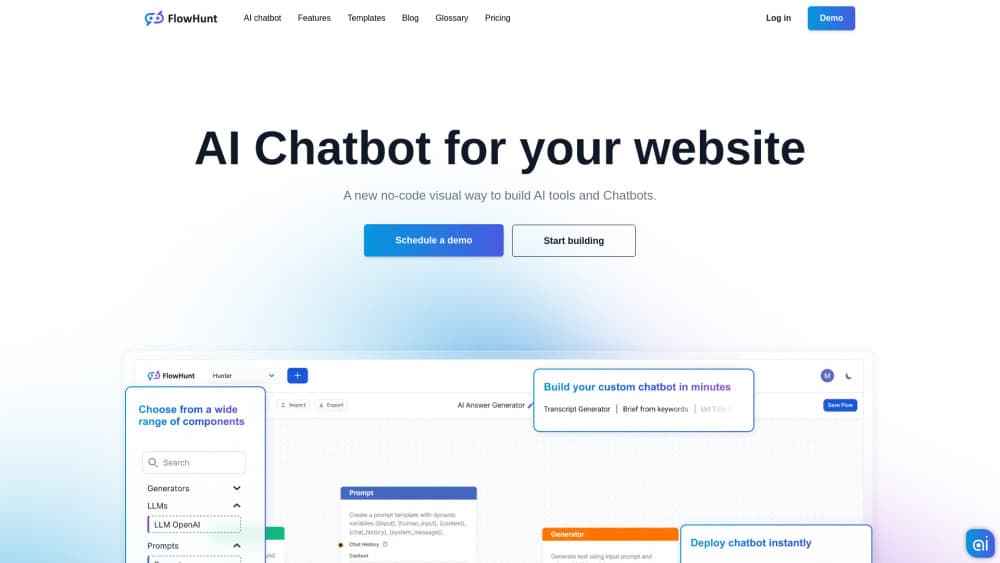
The builder works like a visual flow chart, which is how the AI automation platform side shows up. Each block adds one capability, such as a web search, a language model call, a database lookup or an action inside a connected app. Chain enough blocks and you get a tool that researches a topic, writes a draft and pushes it to your CMS.
The limits are real. FlowHunt charges by credits, so a heavy month costs more than the sticker price suggests. Agent output also needs a human check before it goes public. Treat it as a fast way to ship internal and semi-public automation, not as a full replacement for a content or support team.
Getting Started
- Create an account at app.flowhunt.io. You get 5 trial credits and no card is required.
- Pick a template or open a blank flow, then drag blocks onto the canvas.
- Connect your accounts, such as Zendesk, HubSpot, Notion or your CMS, and attach a knowledge source.
- Choose a model for each step. FlowHunt ships with access to the latest frontier models.
- Test the flow in the built-in chat, then publish it as a chatbot or run it on a schedule.
Product Information
A quick look at FlowHunt's pricing, supported platforms, and performance.
Best for
The users, tasks, and scenarios where this tool fits best.
Users
- Marketing teams at small companies
- SEO and content leads
- Support teams with ticket volume
Tasks
- Scheduled blog production
- Ticket triage and reply drafting
- Prospect research and outreach
- Internal knowledge assistant
Scenarios
- A three-person team that ships content weekly and can't hire a writer
- Support volume doubling after a launch
- Testing an AI workflow before buying an enterprise stack
Key features
Visual Flow Builder
Every agent is a canvas of connected blocks. You drag a block for search, scraping, model calls, memory or app actions, then wire them in order. No code, no deployment step, and the same flow works as a chatbot or a scheduled job.
Multi-Agent Projects
AI Projects adds a supervisor that builds a team of specialized agents around one goal. They claim tasks from a shared board, run them and report back, while you approve the decisions that matter. It's the closest thing here to managing staff.
Prebuilt Templates and Use Cases
FlowHunt ships templates for SEO articles, support replies, lead enrichment and document Q&A. Each one is a starting point you can clone and edit, which beats building the whole flow from an empty canvas.
Connected Knowledge and Integrations
Agents pull live data from Zendesk, HubSpot, Salesforce, LiveAgent, Odoo and Notion, plus your own uploaded documents. That grounding is what keeps a support answer accurate instead of generic.
Model Choice Including Bring Your Own
Each step can call a different model, and the plan includes access to current frontier models from several providers. Teams with their own API keys can plug those in, so you aren't locked to one vendor.
Chatbot Publishing and Embeds
Any finished flow can become a chatbot with a share link or an embed code for your site. That makes FlowHunt a workable AI chatbot builder for public-facing support and lead capture, not just internal tooling.
Pros and cons
Pros
- The visual builder is genuinely no-code, so a marketer can ship a working agent in an afternoon.
- Templates cover the common jobs first, which shortens the blank-page stage.
- Model access is broad and includes bring your own keys, so quality and cost can be tuned per step.
- Chatbot embeds and scheduling mean one build serves both public and internal use.
- On-premise deployment exists for teams that can't send data to a third-party cloud.
Cons
- Credits are the billing unit and a busy flow burns them fast, so monthly cost is hard to predict before you measure real usage.
- There's no free tier, only 5 trial credits, which is thin for testing a multi-step pipeline.
- Agents still produce drafts that need review, so the tool reduces work rather than removing it.
- The block library is deep enough to overwhelm a first-time user who just wants a simple bot.
Frequently asked questions
FlowHunt builds AI agents and chatbots that run marketing, SEO and support work. Typical uses are scheduled article production, ticket triage, lead research and internal document assistants.
Related content
Explore related tools, skills, and articles for FlowHunt.
FlowHunt Alternatives

Base Code
Base44 (Wix) · Coding · ProductivityBase Code is a shared cloud development environment from Base44. Teammates describe changes to an existing GitHub codebase in chat, preview them live and send them back as pull requests.

Google EmbeddingGemma 2
Google DeepMind · Writing · Image · CodingGoogle EmbeddingGemma 2 is a 740M-parameter open model that turns text, code, images, audio, and video frames into vectors in one 768-dimension space, running on phones and laptops.

GitGlow
GitGlow · Coding · ProductivityGitGlow is a local-first desktop Git client that lets independent developers review their own code and their AI agents' changes in one place before shipping.