

Flowtrail AI
Data Nexus Labs · Coding · Marketing
Flowtrail AI is a conversational AI data analyst that lets teams ask questions about their databases and files in plain language, then get charts, reports, and dashboards back.
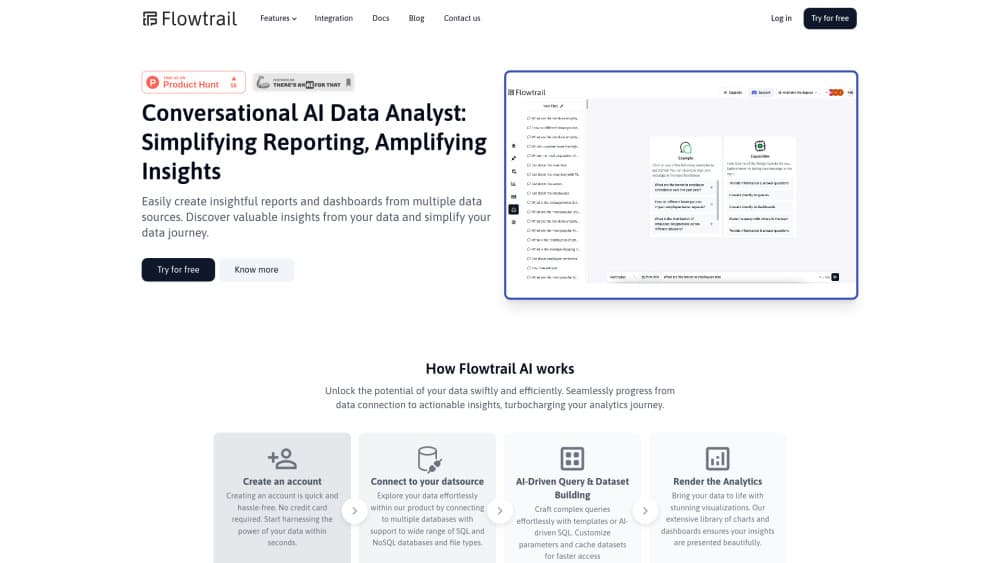
About Flowtrail AI
What Is Flowtrail AI
Flowtrail AI is a web platform for asking business questions without writing SQL. You connect a database, a cloud bucket, or a spreadsheet, give the system context about your company, and then type questions the way you would ask a colleague. The answer comes back as a table, a chart, or a report you can keep.
The product sits in the same lane as a BI tool, but the interface is a chat window rather than a drag-and-drop canvas. That changes who can use it. A sales lead can check last month's numbers without filing a ticket with the data team. An analyst can skip the first round of ad hoc requests and spend the time on modeling instead.
There's a catch worth knowing before you sign up. The official site now redirects to Data Nexus Labs, the development studio behind the product, and the pricing and documentation pages no longer load. Directory listings still describe a working platform, including a limited free tier and a Pro plan around $20 per month. Treat those numbers as a starting point for a sales conversation, not a published rate card.
Accuracy also depends on setup. A conversational data agent is only as good as the schema, metric definitions, and guardrails you feed it. If your tables use cryptic column names or your team argues about what counts as revenue, the chat answers will reflect that mess.
Getting Started
- Create an account on the Flowtrail AI site and open a workspace for your team.
- Connect a data source. The platform accepts common databases such as MySQL, PostgreSQL, and MongoDB, plus file uploads like CSV exports and cloud storage buckets.
- Teach the agent your business context. Add descriptions for tables, define key metrics, and set guardrails so answers follow your definitions rather than generic guesses.
- Ask a question in the chat box, then refine it. Follow-up prompts narrow the date range, change the grouping, or switch the chart type.
- Save the result as a dashboard or a scheduled report, and share it with teammates who need the same view.
Product Information
A quick look at Flowtrail AI's pricing, supported platforms, and performance.
Best for
The users, tasks, and scenarios where this tool fits best.
Users
- Business analysts
- Product and operations managers
- Small teams without a dedicated data engineer
Tasks
- Building a weekly sales dashboard
- Exploring customer support logs
- Checking campaign performance
- Answering one-off executive questions
Scenarios
- A Monday morning metrics review
- A new market launch
- Handing reporting to a non-technical owner
Key features
Conversational Query Interface
The core of the product is a chat box built around one idea: talk to your data instead of learning a query language. You type something like "which products grew fastest last quarter" and the system translates it into a query against your connected sources, then explains the result in a short summary with a chart. Multi-turn prompts let you narrow the answer without starting over. For routine reporting, that removes the step where someone has to write SQL, paste it into a tool, and format the output by hand.
Multi-Source Data Connections
Flowtrail AI connects to relational databases, document stores, cloud storage, and uploaded files. A CSV export can sit next to a live PostgreSQL table in the same workspace, which matters when finance keeps its numbers in spreadsheets while product data lives in a database. The platform builds a unified view across those sources, so a single question can pull from more than one place. Setup quality decides how well that works.
Custom Dashboards and Reports
Answers can be pinned to dashboards, and dashboards can be shared with the rest of the team. You choose the chart type, arrange the layout, and set a refresh cadence. The output is meant for people who check the same numbers every week, not just for one-off exploration. Compared with a traditional BI suite, the build step is conversational, which shortens the path from question to a view others can use.
Trainable Agent With Business Context
Instead of a generic chatbot, Flowtrail AI lets you train an agent on your own context. You supply table descriptions, metric definitions, and rules about what the agent should and should not answer. The idea is to keep the language model anchored to your business vocabulary, so "active customer" means the same thing in a chat answer as it does in a board deck. This is the feature that separates a useful data agent from a demo.
Text to SQL With Guardrails
Under the chat layer, the system generates SQL from natural language and runs it against your sources. Guardrails limit which tables and columns the agent can touch, which helps with both accuracy and access control. Teams in regulated industries should still review the permission model before connecting sensitive data. A text to SQL layer is convenient, but it does not replace database-level access rules.
Workflow Automation Agents
Beyond answering questions, the platform can run recurring analysis and reporting tasks through AI agents. You define the job, such as a Monday revenue summary or a weekly churn check, and the agent produces the output on schedule. That turns the tool from a query interface into part of the reporting workflow. The value shows up when the same request arrives every week and nobody wants to run it manually again.
Pros and cons
Pros
- Natural language data analysis lowers the barrier for teammates who never learned SQL, so routine questions stop piling up in the data team's inbox.
- One workspace can mix databases, cloud storage, and CSV uploads, which fits companies whose data never made it into a single warehouse.
- Dashboards and scheduled reports turn a one-off chat answer into something the whole team can reuse.
- The trainable agent and metric guardrails give you a way to keep definitions consistent, provided you invest the setup time.
Cons
- The official site now redirects to the developer's studio page, and the pricing and help pages are offline, so you can't confirm current plans or limits without contacting the vendor.
- Accuracy depends on clean schemas and well-defined metrics. Poorly labeled tables produce confident but wrong answers, and someone has to catch them.
- There's no public API documentation, which rules it out for teams that need to embed queries in their own product.
Frequently asked questions
Flowtrail AI answers business questions about your data in plain language. You connect databases or files, ask a question in the chat, and get a table, chart, or dashboard back. It's built for reporting and exploration rather than for data engineering.
Related content
Explore related tools, skills, and articles for Flowtrail AI.
Flowtrail AI Alternatives

Base Code
Base44 (Wix) · Coding · ProductivityBase Code is a shared cloud development environment from Base44. Teammates describe changes to an existing GitHub codebase in chat, preview them live and send them back as pull requests.

Google EmbeddingGemma 2
Google DeepMind · Writing · Image · CodingGoogle EmbeddingGemma 2 is a 740M-parameter open model that turns text, code, images, audio, and video frames into vectors in one 768-dimension space, running on phones and laptops.

GitGlow
GitGlow · Coding · ProductivityGitGlow is a local-first desktop Git client that lets independent developers review their own code and their AI agents' changes in one place before shipping.