

FluxTranslate — LLM Inline Translator
Kane · Coding · Other
FluxTranslate is a Chrome extension that translates a web page in place, swapping the original text for the translated version rather than opening a separate tab or popup. It runs on large language models, and you power it two ways: by signing in with an existing Claude or ChatGPT subscription, or by plugging in your own OpenAI, Anthropic, Gemini, or Groq API key. There's no developer-run server in the middle, so your page text only goes to the model provider you pick.
About FluxTranslate — LLM Inline Translator
What Is FluxTranslate
Most browser translation tools send your page to a company server, translate it their way, and hand back the result. FluxTranslate takes a different route. It's an open-source AI translation extension (MIT licensed) that borrows the reading model you might already pay for. Think of it as an LLM inline translator that borrows your own account. If you have a Claude Pro or Max plan, or ChatGPT Plus or Pro, you can log in and translate without buying anything else. If you'd rather use raw API access, you add a key from OpenAI, Anthropic, Google Gemini, or Groq and pay those providers directly by usage.
The core idea is that translation quality depends on which model does the work, and you should be the one choosing it. A Gemini model might handle one language pair better than GPT, and you can switch with a couple of clicks. That flexibility is the whole point, and it's what separates this from the browser's built-in translator.
The tradeoff is setup. This isn't a click-and-forget tool for someone who just wants Spanish news in English. You need either a paid AI subscription or an API key, and you need to walk through a short configuration before the first page translates. If you don't already have one of those accounts, the extension has nothing to run on. That's the catch. No account, no translation.
Getting Started
- Install FluxTranslate from the Chrome Web Store and pin it to your toolbar.
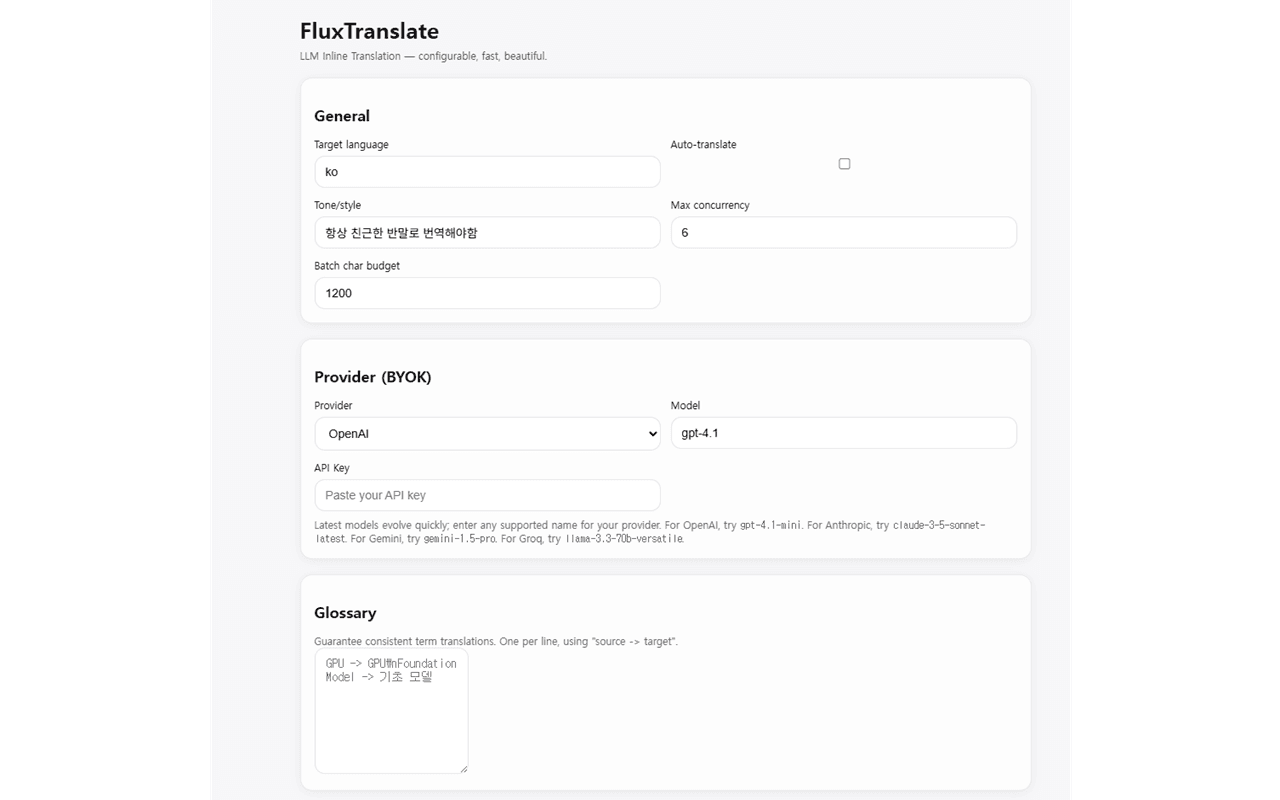
- Open the extension's options page and connect a provider. Sign in with Claude or ChatGPT, or paste an API key from OpenAI, Anthropic, Gemini, or Groq.
- Pick the model you want to use from the dropdown, which lists only the models your account can actually reach.
- Set your preferences: target language, tone or style, and any site rules such as "always translate" or "never translate."
- Open any page and press Alt+Shift+Y, click the toolbar icon, or type "xl8" in the address bar to start the translation.
Product Information
A quick look at FluxTranslate — LLM Inline Translator's pricing, supported platforms, and performance.
Best for
The users, tasks, and scenarios where this tool fits best.
Users
- People who already pay for Claude Pro or ChatGPT Plus and want to get more out of that subscription instead of buying a separate translation service.
- Readers who work across several language pairs and care which model handles each one, rather than accepting whatever a default engine produces.
- Privacy-minded users who don't want their page text routed through an unfamiliar translation company's servers.
Tasks
- Reading foreign-language news, documentation, and forum threads without leaving the page you're on.
- Translating a single paragraph or a highlighted passage on the spot with Alt+click or a selection bubble.
- Keeping terminology consistent across a long project by loading a personal glossary into the extension.
Scenarios
- Researching a topic where the best sources are published in a language you don't read fluently.
- Looking for a way to translate a webpage with ChatGPT or Claude you already pay for, instead of signing up for yet another service.
- Checking a machine-translated draft against the original by toggling a page back to its source text.
Key features
Inline translation that replaces text in place
FluxTranslate doesn't open a sidebar or a new tab. It rewrites the page you're reading, block by block, so the layout stays intact and your place in the article doesn't move. While each block is being translated, a shimmering placeholder marks the spot, which makes long pages feel less like a black box. Nothing jumps. You keep reading.
Two ways to power it, subscription or key
You can sign in with a Claude Pro or Max account, or a ChatGPT Plus or Pro account, and translate using the plan you already have. That means no metered billing and no new API key to manage. If you'd rather control costs per request, you switch to BYOK translation mode and add a key for OpenAI, Anthropic, Gemini, or Groq. Same extension, two very different billing models.
Paragraph and selection translation
Sometimes you don't want the whole page. Alt+click any paragraph to translate just that block, or highlight a sentence and a small bubble offers a quick translation. Which one do you need? Usually just the one paragraph that matters. It's handy for reading one paragraph of a foreign email or checking a single quoted line in a larger article.
Custom tone, style, and glossary
You can steer the output with a tone or style preference, and load a personal glossary so recurring terms stay consistent. For anyone translating technical material or brand copy, that glossary is the difference between a readable result and one that keeps renaming the same thing.
Model picker tied to your account
The model dropdown only shows the models your connected account can actually use, so you won't pick something that fails on your first request. Swapping models is a two-click job, which makes it easy to compare how GPT, Claude, and Gemini each handle a tricky passage.
Per-site rules and shortcuts
You can set a site to always translate, never translate, or translate automatically on load. Beyond the toolbar button, there's a right-click context menu, a keyboard shortcut (Alt+Shift+Y to translate, Alt+Shift+U to restore), and an omnibox keyword, "xl8," so you can start a translation straight from the address bar.
Local cache to avoid double billing
Repeated text is cached locally, so the same block isn't sent to the model, and paid for, twice. On pages you revisit often, that adds up. It also means translation feels faster the second time you load a page. Paid twice for the same sentence? Not here.
Pros and cons
Pros
- Uses a subscription you may already pay for, so there's no separate translation bill for Claude or ChatGPT users.
- Model choice is genuinely open: OpenAI, Anthropic, Gemini, and Groq all work, and you can switch per task.
- Everything runs client-side, with no developer server collecting your page text, which is a real difference from hosted translation services.
- Open source under the MIT license, so the code can be inspected or self-built.
- Handy controls like Alt+click paragraph translation, a glossary, per-site rules, and keyboard shortcuts.
Cons
- There's no free tier. Without a paid AI subscription or an API key, the extension has nothing to run on.
- Cost and speed depend entirely on the provider you connect, so your mileage varies by account and model.
- First-time setup involves signing in or pasting a key and choosing a model, which is more work than a one-click browser translator.
- As a young extension at version 0.2.0 with few reviews so far, it hasn't built a long track record yet.
Frequently asked questions
The extension itself is free to download and it's open source, but it needs a paid model behind it. You either sign in with a Claude or ChatGPT subscription you already have, or supply your own API key for OpenAI, Anthropic, Gemini, or Groq, where you pay that provider for usage.
Related content
Explore related tools, skills, and articles for FluxTranslate — LLM Inline Translator.
FluxTranslate — LLM Inline Translator Alternatives
Forefront
Forefront · CodingForefront is a web platform for building with open-source AI. It lets you fine-tune leading open-source language models on your own data, evaluate how they perform, and run them through an API or export them to host yourself. Developers who want the convenience of a closed-source platform but insist on owning their models and data are the target audience here.

Startkit
StartKit.AI · CodingStartkit is a boilerplate for building AI SaaS and AI wrapper products. Think of it as an AI startup boilerplate with the boring parts already wired up: authentication, Stripe and Lemon Squeezy payments, usage limits, transactional email, and an AI API starter that talks to OpenAI, Anthropic, Groq, or Llama. You clone the repo, set your price, and start on the part of your product that people actually pay for. It's Next.js under React and Tailwind, so most of the boilerplate code already feels familiar.
Testim
Tricentis · CodingTestim is an AI-powered test automation platform for building and running end-to-end tests across web, mobile, and Salesforce applications. It leans on machine learning to keep tests stable when an interface changes, so teams spend less time fixing broken selectors. Not bad for an automated testing tool you can start using today. You create tests by recording actions in a browser, then optionally add JavaScript when you need more control. It's a solid pick for busy QA teams.